In the second time setting mode, keep pressing B for 2s,the Minute flashes, entering setting mode
Press button B to select the following items for setting sequentially:
➢ Press D to increase the value, press and hold D to advance quickly.
➢ Press C to decrease the value, press and hold C to decrease quickly
➢ Keep pressing B for 2s to exit.
➢ It will exit setting mode when no any key pressing for 1 minute.
9、Altitude measurement mode
➢ In the timekeeping mode, press button C to enter altitude measurement mode
➢ Press D to shift the top row display content: temperature→altitude trend
➢ When it displays the trend, you can review the former hourly curve by quick pressing
➢ Keep pressing D for 2s to shift the unit of temperature and altitude
℃/ft→℃/m→℉/m→℉/ft
➢ It will return to timekeeping mode after 24h without any pressing, when the top row display curve, the
first line flashes(current altitude)
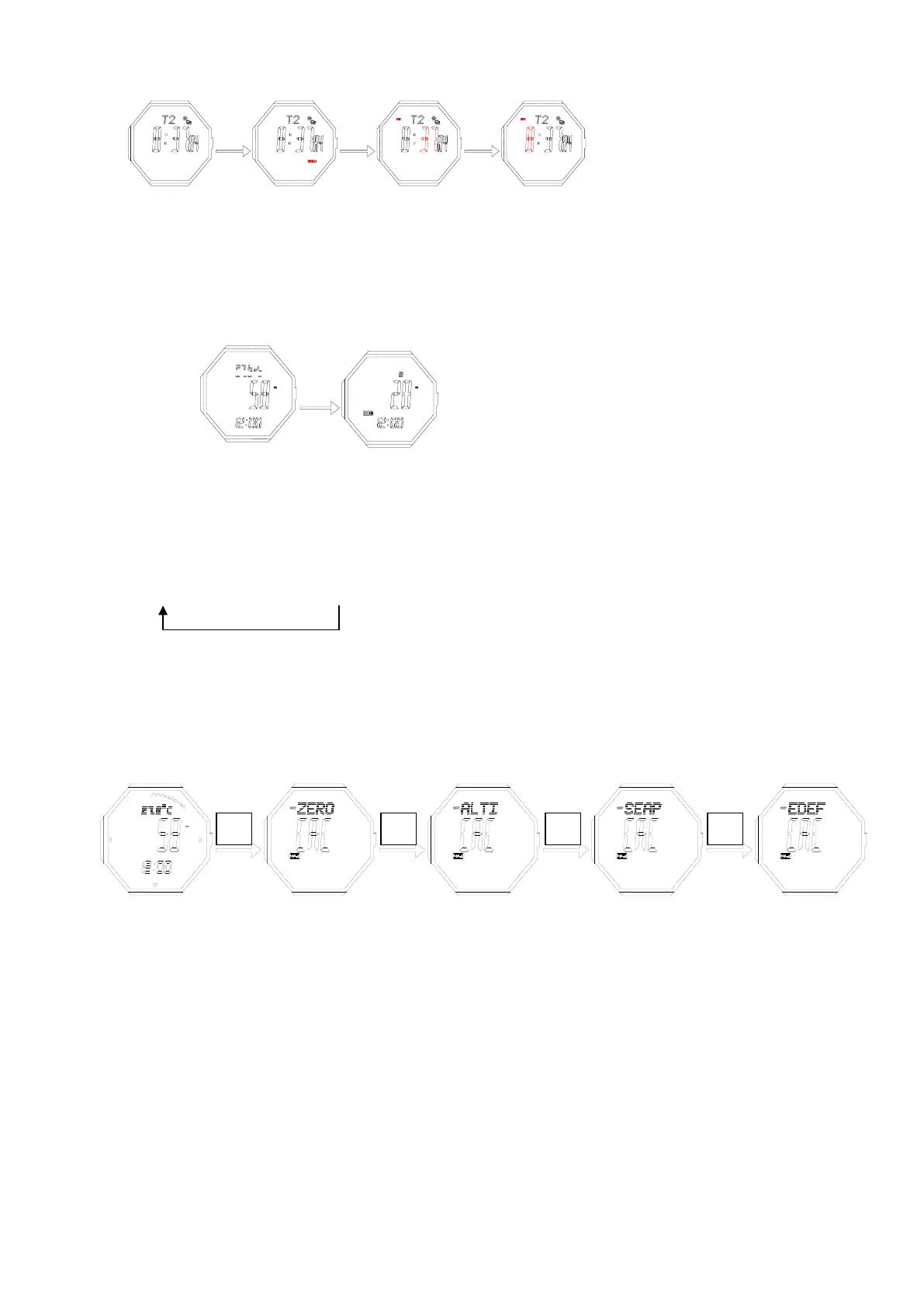
Altitude setting
Press button B for 2s to enter altitude setting mode,press B to move and set the following items
temperature On top Set the height to 0 Correct relative height Set sea level pressure Restore initial value
Relative altitude setting(ZERO)
➢ Press D/C to shift“YES”/“NO”,when it is YES, that means the relative altitude is 0, when NO, that means
use the default value(work out according to default sea level atmosphere1013.25mb). If choose “Yes”,
the measurement result is relatively, and the (r) will occur on screen.
Input your current altitude
➢ Input your current altitude(ALTI)
➢ Press D to increase the value, press and hold D to advance quickly.
➢ Press C to decrease the value, press and hold C to decrease quickly
➢ Press button B for 2s to confirm, return to altitude measurement mode
Input sea level atmosphere value(SEAP)
➢ Press D to increase the value, press and hold D to advance quickly.
➢ Press C to decrease the value, press and hold C to decrease quickly
➢ Press button B for 2s to confirm, return to altitude measurement mode
Factory default sea level atmospheric pressure value(FDEF)


 To Next Page
 Loading...