
 Need help?
Do you have a question about the CAKCITY Apache and is the answer not in the manual?
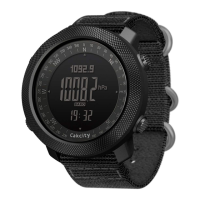
Displays time, day, week, month, year, and supports 12/24 hour format.
Tracks steps taken, distance, and calories burned.
Includes air pressure, altitude, and temperature measurement capabilities.
Provides compass navigation and dual alarm functionality with hourly chime.
Features chronograph and countdown timer with extensive ranges.
Includes Pacer, second time display, low battery indicator, and EL backlight.
Switch between Timekeeping, Pedometer, Record, Alarm, Chronograph, Countdown, Pressure, Altitude, Compass, and Second Time modes.
Shift display between week, temperature, altitude, and sea level curves using button D.
Adjust seconds, minutes, and hours using buttons D (increase) and C (decrease).
Configure year, date format (M/D), and month with navigation buttons.
Configure LCD resolution and 12/24 hour format.
Use button B to move between settings; press B for 2s to exit.
Defines ranges for steps (0-999999), calories (0.0-99999.9 Kcal), mileage, and exercise time.
Set units (metric/imperial), step distance, and user weight.
Access history for the latest 7 days and shift daily data for pedometer, mileage, calories, and timer.
Shift between alarm items (AL1, AL2, Chime) and set alarm time.
Turn alarms on/off and understand alarm sound and visual cues.
Start, stop, reset, and record split times (LAP) in the chronograph function.
Set and run the countdown timer; it sounds an alarm upon reaching zero.
Configure hours, minutes, and seconds for the countdown timer.
Control metronome on/off, reset, and set the pace (30-180 bpm).
Set the time for a second time zone, including hours and minutes.
Enter altitude mode, shift display between temperature and altitude trend.
Switch temperature and altitude units between Celsius/Fahrenheit and meters/feet.
Set altitude to zero, correct relative height, input current altitude, and sea level pressure.
Enter pressure mode, shift display between temperature, SEAP, and trend.
Change units for pressure and temperature (hPa/mb, inHg, °C/°F).
Input current pressure, temperature, and set factory default values.
Adjust compass, measure after adjusting, and stop after 1 minute.
Toggle reverse direction display and understand directional acronyms.
Perform automatic or digital adjustment (CAL/DEC) for accurate readings.
Displays error codes (ERR1, ERR2, ERR3) for sensor communication issues.
Details how often altitude and pressure measurements are taken.
Estimates weather based on atmospheric pressure changes over 4 hours.
Provides guidance for accurate personal temperature readings.

 To Next Page
 General