RCD PRECAUTIONS
Points to observe for safe usage
• Read this manual carefully before using this disc and the system components. They contain in-
structions on how to use this product in a safe and effective manner. Alpine cannot be responsible
for problems resulting from failure to observe the instructions in this manual.
WARNING
This symbol means important instructions. Fail-
ure to heed them can result in injury or material
property damage.
Do not operate any function that takes your attention away from safely driving your vehicle.
Any function that requires your prolonged attention should only be performed after coming to a
complete stop. Always stop the vehicle in a safe location before performing these functions. Failure
to do so may result in an accident.
Keep the volume at a level where you can still hear outside noises while driving.
Excessive volume levels that obscure sounds such as emergency vehicle sirens or road warning
signals(traincrossings,etc.)canbedangerousandmayresultinanaccident.LISTENINGAT
LOUDVOLUMELEVELSINACARMAYALSOCAUSEHEARINGDAMAGE.
Do not disassemble or alter.
Doingsomayresultinanaccident,reorelectricshock.
Use only in cars with a 12V volt negative ground.
(Checkwithyourdealerifyouarenotsure.)Failuretodosomayresultinre,etc.
Keep small objects such as screws out of the reach of children.
Swallowing them may result in serious injury. If swallowed, consult a physician immediately.
Use the correct ampere rating when replacing fuses.
Failuretodosomayresultinreorelectricshock.
Do not block vents or radiator panels.
Doingsomaycauseheattobuildupinsideandmayresultinre.
Use this product for mobile 12V applications.
Useforotherthanitsdesignedapplicationmayresultinre,electricshockorotherinjury.
Do not place hands, ngers or foreign objects in insertion slots or gaps.
Doing so may result in personal injury or damage to the product.
Halt use immediately if a problem appears.
Failure to do so may cause personal injury or damage to the product. Return it to your authorized
Alpine dealer or the nearest Alpine Service Centre for repairing.
Product cleaning.
Useasoftdryclothforperiodiccleaningoftheproduct.Formoreseverestains,pleasedampenthe
cloth with water only. Anything else has the chance of dissolving the paint or damaging the plastic.
Temperature.
Be sure the temperature inside the vehicle is between +45°C (+113°F) and 0°C (+32°F) before turn-
ing your unit on.
Moisture condensation.
You may notice the disc playback sound wavering due to condensation. If this happens, remove
the disc from the player and wait about an hour for the moisture to evaporate.
Damaged disc.
Do not attempt to play cracked, warped, or damaged discs. Playing a bad disc could severely dam-
age the playback mechanism.
Maintenance.
If you have problems, do not attempt to repair the unit yourself. Return it to your Alpine dealer or
the nearest Alpine Service Station for servicing.
Never attempt the following.
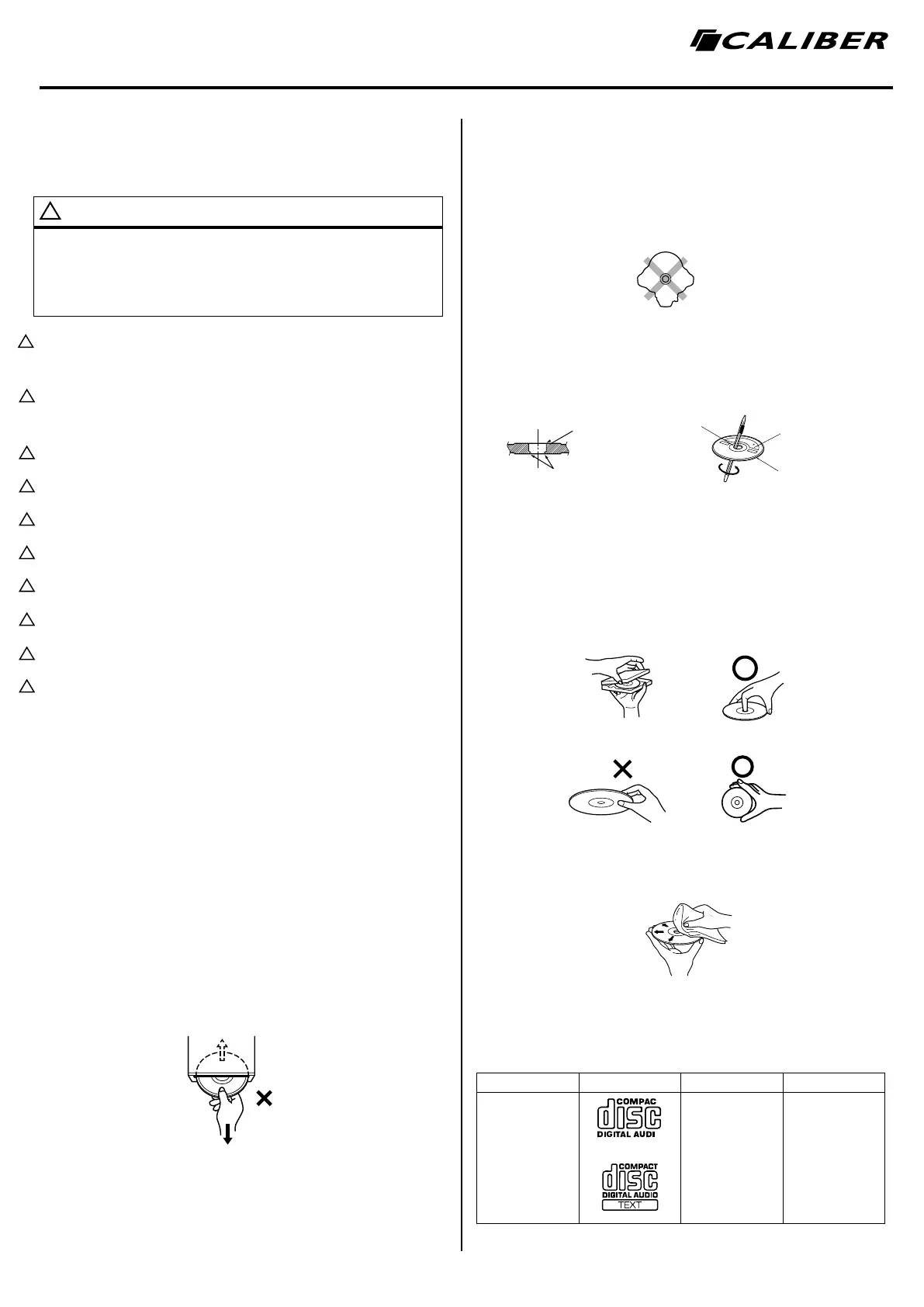
Do not grip or pull out the disc while it is being pulled back into the player by the automatic reload-
ing mechanism. Do not attempt to insert a disc into the unit when the unit power is off.
Inserting discs.
Your player accepts only one disc at a time for playback. Do not attempt to load more than one disc.
Make sure the label side is facing up when you insert the disc. “Disc error” will be displayed on your
player if you insert a disc incorrectly. If “Disc error” continues to be displayed even though the disc
has been inserted correctly, push the RESET switch with a pointed object such as a ballpoint pen.
Playing a disc while driving on a very bumpy road may result in skips, but this will not scratch the disc
or damage the player.
Irregular shaped discs.
Besuretouseroundshapeddiscsonlyforthisunitandneveruseanyspecialshapeddiscs.Useof
special shaped discs may cause damage to the mechanism.
new discs.
To prevent the disc from jamming, “Disc error” is displayed if discs with irregular surfaces are inserted
or if discs are inserted incorrectly. When a new disc is ejected immediately after initial loading, use
yourngertofeelaroundtheinsideofthecentreholeandoutsideedgeofthedisc.Ifyoufeelany
small bumps or irregularities, this could inhibit proper loading of the disc. To remove the bumps, rub
the inside edge of the hole and outside edge of the disc with a ballpoint pen or other such instrument,
then insert the disc again.
Installation location.
Make sure that the system will not be installed in a location subjected to:
• Direct sun and heat
• High humidity and water
• Excessive dust
• Excessive vibrations
Correct handling.
Donotdropthediscwhilehandling.Holdthediscsoyouwillnotleavengerprintsonthesurface.Do
notafxtape,paper,orgummedlabelstothedisc.Donotwriteonthedisc.
Disc cleaning.
Fingerprints, dust, or soil on the surface of the disc could cause the DVD player to skip. For routine
cleaning, wipe the playing surface with a clean, soft cloth from the centre of the disc to the outer
edge. If the surface is heavily soiled, dampen a clean, soft cloth in a solution of mild neutral detergent
before cleaning the disc.
Disc-accessoires
There are various accessories available on the market for protecting the disc surface and improving
soundquality.However,mostofthemwillinuencethethicknessand/ordiametreofthedisc.Using
such accessories can cause operational problems.
Playable discs
Mark Recorded content Disc-size
Music - CD
Audio 12 cm
WARNING
!
Opening in
het midden
Opening in
het midden
Nieuwe
Disc
Oneffenheden
Buitenkant
(oneffenheden)
Niet correct
Correct
Correct
!
!
!
!
!
!
!
!
!
!


 To Next Page
 Loading...