— 3 —
Wall Mounting
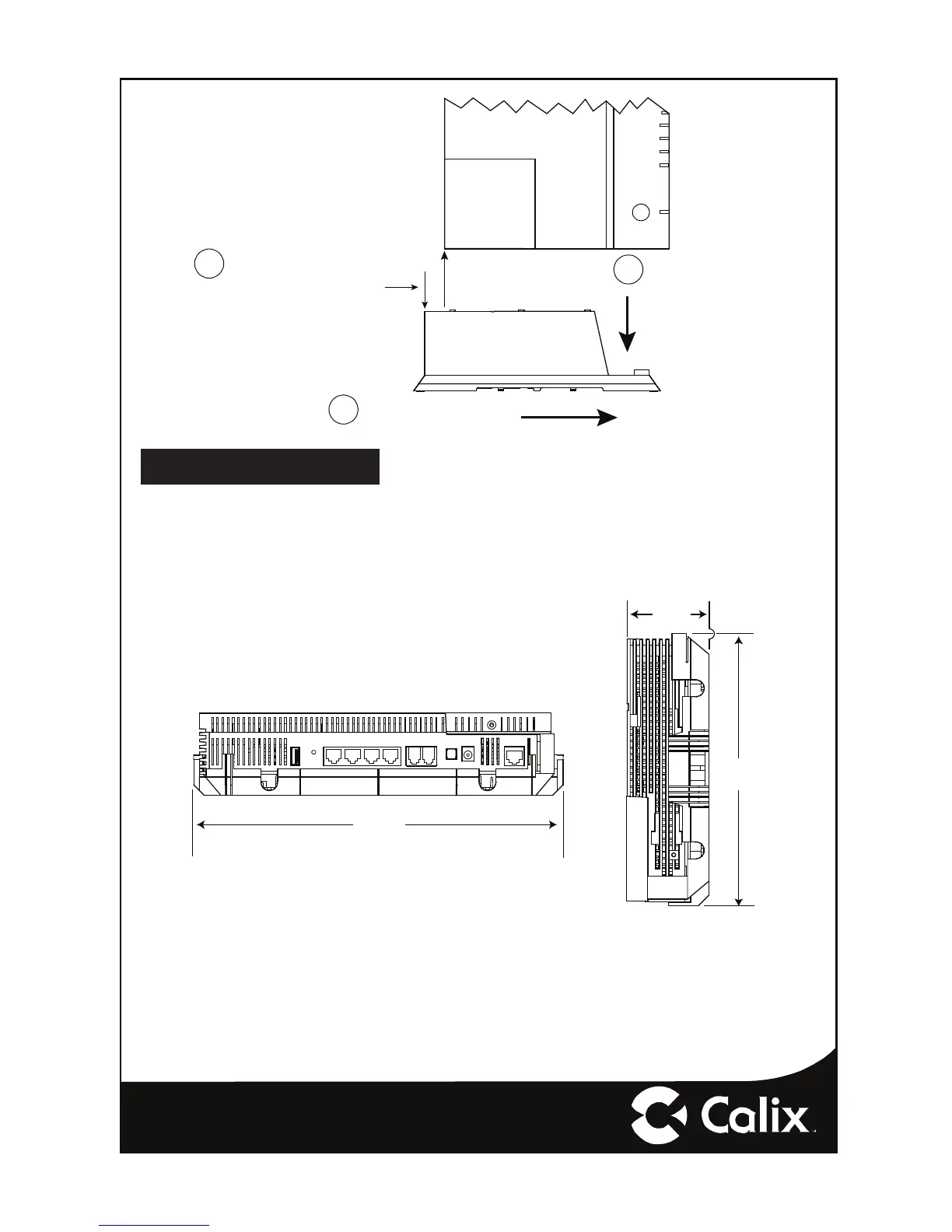
In order to facilitate wall mounting of the GigaCenter, a Wall Mount Bracket is required
(included with the GigaCenter).
Line-up GigaCenter and
Tabletop Stand as shown.
Allow a 9/16” offset between
the bottom corner of the GigaCenter
and the top edge of the Tabletop Stand
1
Slide GigaCenter down
onto Tabletop Stand until
flush
2
7211
Push stand to the right while
pulling the GigaCenter to the
left until locked into place
3
ETHERNET 2
ETHERNET 1
PHONE 1
PHONE 2
USB
WPS
11.0625”
28.1 cm
8.25”
20.95 cm
2.5”
6.4 cm
Dimensions with Wall Mount Tray Attached
7016


 To Next Page