— 5 —
Connecting the Equipment
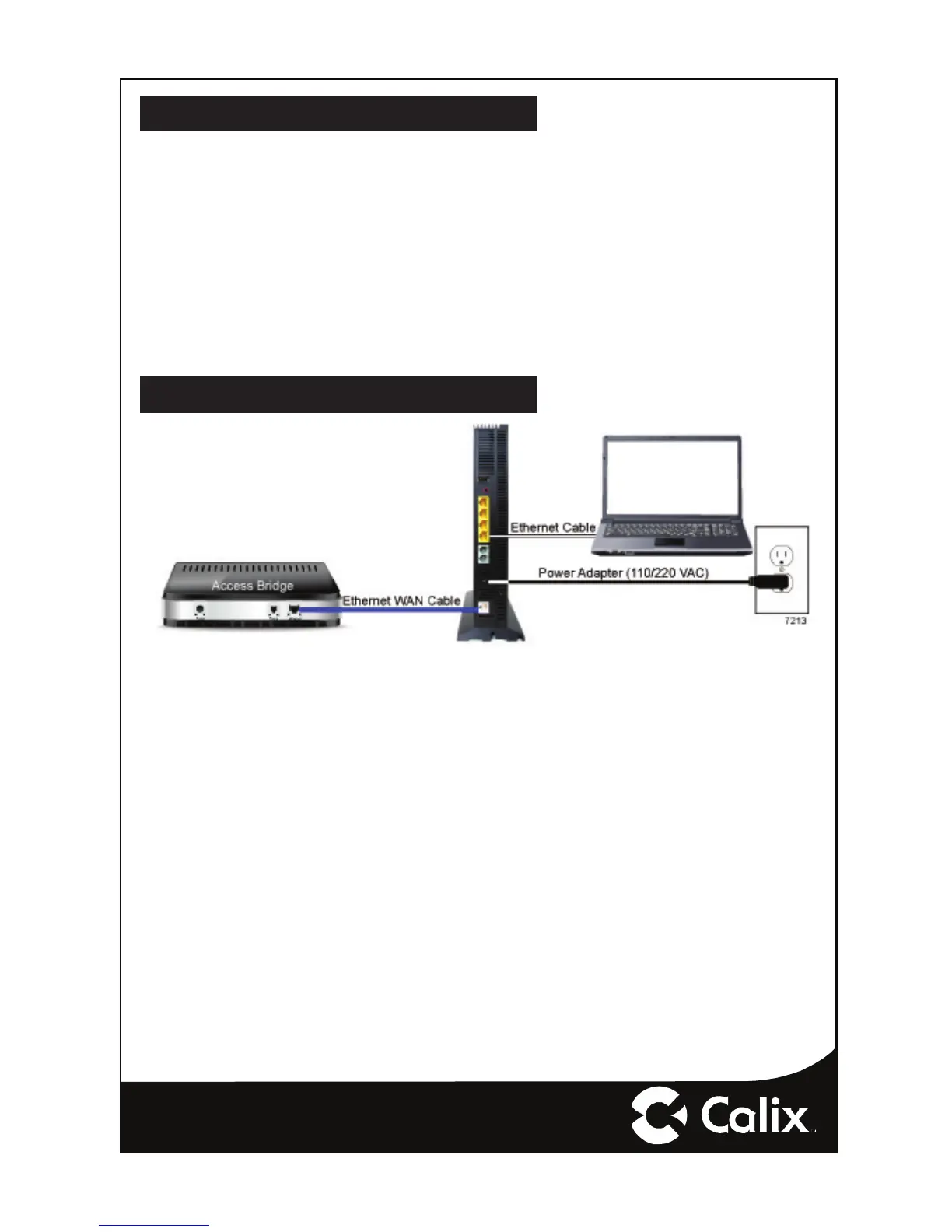
1. Remove the GigaCenter from its packaging and inventory all parts.
2. Connect a CAT5 or CAT6 Ethernet cable from an Ethernet LAN port on the data/
video source device to the white Ethernet WAN (Eth-WAN) interface on the back
of the GigaCenter 844E.
3. Plug in the power adapter shipped with the GigaCenter to an available wall sock-
et and attach the other end to the GigaCenter’s power port.
4. Push the ON/OFF switch to ON and allow the GigaCenter to boot-up (about four
minutes).
Connecting Outside Services
Subscriber voice, IP video and data services are attached to the rear of the GigaCen-
ter.
1. Locate the telephone, video, and data cables coming from the home.
2. Connect the incoming telephone lines to the RJ-11 connectors on the rear of the
GigaCenter.
3. Connect CAT5 or better cabling to the LAN Ethernet (RJ-45) ports for direct-at-
tached devices.
4. Secure all subscriber service wiring as appropriate.


 To Next Page