— 4 —
Default Device Settings
Inserted inside the shipping carton of each GigaCenter, the inventory label (x2) pro-
vides necessary product information. This information may be attached to a work order
or applied to the exterior of the device for future reference.
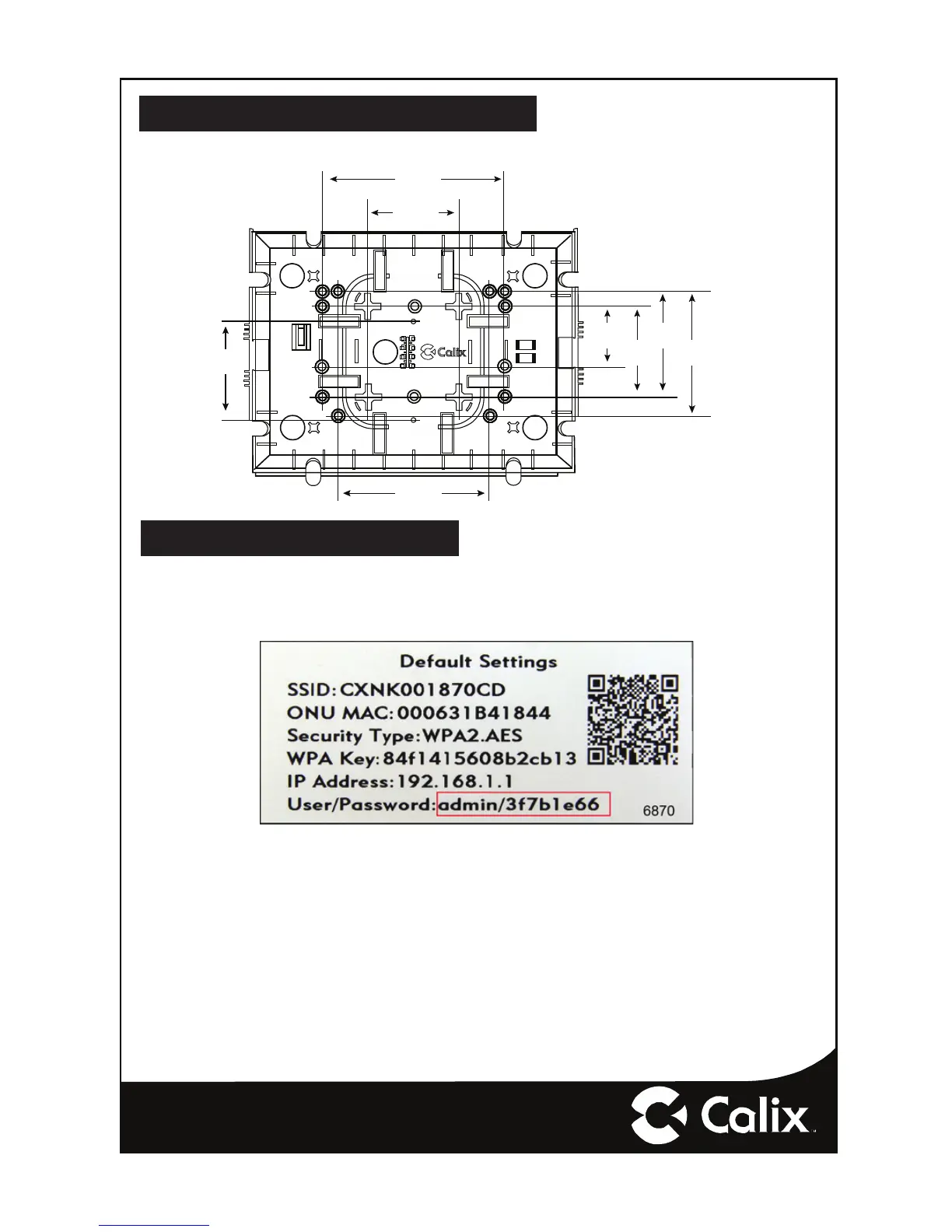
Wall Mounting Dimensions
The GigaCenter can be mounted to a wall or a Structured Wiring Enclosure.
6781
6.0”
(15.2 cm)
2.0”
(5.1 cm)
3.0”
(7.6 cm)
3.0”
(7.6 cm)
3.5”
(8.9 cm)
4.125”
(10.5 cm)
5.0”
(12.7 cm)
3.25”
(8.3 cm)
†
† = Standard Electrical
Outlet Spacing
Note: Mounting holes with double right indicate
standard Structured Wiring Enclosure Spacing (Levithon)
• Serial Number of the 844E GigaCenter
• ONU MAC address
• Default Wi-Fi security type
• Wi-Fi security key (WPA Key)
• Default IP address of the home gateway router (needed at initial turn-up)
• Default login credentials (User Name/Password)


 To Next Page