Need help?
Do you have a question about the Callaway 300 PRO and is the answer not in the manual?
Details the technical specifications of the Callaway 300 PRO Laser Rangefinder, including dimensions, weight, and performance.
Lists the items included with the Callaway 300 PRO Laser Rangefinder, such as battery, carry case, and cleaning cloth.
Step-by-step instructions for installing the battery in the laser rangefinder, including opening and closing the compartment.
Identifies the external components of the Callaway 300 PRO Laser Rangefinder, such as the eyepiece and buttons.
Explains the various icons and readouts displayed on the rangefinder's LCD screen, including distance and mode indicators.
Guides the user on how to power on the rangefinder and take distance measurements using the power button.
Describes Standard Mode for general use and P.A.T. Mode for flagstick acquisition with pulse feedback.
Explains how to use scanning mode for multiple targets and how to switch between Yards and Meters.
Details how the slope function works, including display of incline/decline and slope-adjusted distance.
Explains the meaning of the RED (off) and GREEN (on) positions of the slope switch and their tournament legality.
Provides important notes on maximum range, auto shutoff, and the impact of weather conditions.
Offers advice on how to store the laser rangefinder properly and how to clean its components without damage.
Covers essential maintenance for the rangefinder, including cleaning, avoiding submersion, and storage temperature.
Troubleshooting steps for inaccurate measurements, including checking units, battery, and obstructions.
Solutions for a blurry view, such as using the diopter adjustment and cleaning the lens.
Guidance on identifying when the battery needs replacement and what type of battery is used.
Clarifies the best situations for using P.A.T. Mode, such as for small targets or when there are background obstructions.
Details the warranty period, coverage, and procedures for product returns and repairs.
Highlights essential safety precautions, including avoiding direct sun exposure, aiming at people, and improper storage.
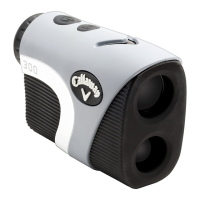
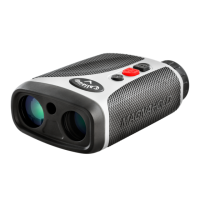
The Callaway 300 PRO Laser Rangefinder is a sophisticated device designed to provide precise distance measurements for golfers. Its sleek and compact design makes it easy to handle and carry on the course. The rangefinder incorporates advanced technologies to enhance accuracy and user experience, making it a valuable tool for improving one's golf game.
The primary function of the Callaway 300 PRO Laser Rangefinder is to measure distances to various objects on a golf course, such as flagsticks, hazards, and other landmarks. It utilizes a laser to determine the exact distance, which is then displayed on an internal LCD screen. This allows golfers to make more informed club selections and improve their shot accuracy.
A key feature of this rangefinder is its P.A.T. (Pin Acquisition Technology) with Pulse Technology. This technology is specifically designed to help golfers lock onto the flagstick, even when there are trees or other objects in the background. When the laser successfully locks onto the pin, the device provides a short vibration, offering tactile confirmation to the user. This ensures that the measurement is taken to the intended target, rather than a background object.
The rangefinder also includes a Slope Function, which measures the angle of incline or decline to the target. Based on this angle, it calculates and displays a slope-adjusted distance. This feature is particularly useful on courses with varying terrain, as it helps golfers understand the "plays like" distance, which can be significantly different from the straight-line distance on sloped shots. The slope function can be easily toggled on or off via a physical switch on the side of the device. When the slope function is off, the rangefinder is tournament legal, adhering to golf regulations that prohibit distance-measuring devices from providing slope-adjusted distances during competitive play.
The device offers multiple measurement modes to suit different situations on the course. The Standard Mode is recommended for measuring distances to larger objects, providing a straightforward distance reading. The P.A.T. Mode, as mentioned, is ideal for smaller targets like flagsticks, leveraging the Pulse Technology for confirmation. Additionally, the rangefinder features a Scanning mode, which allows users to continuously measure distances to multiple targets by holding down the power button. As the user scans the landscape, the measurements update in real-time, making it easy to gauge distances to various points of interest. In P.A.T. Scanning mode, the measurement will only update when a shorter distance is detected, which is helpful for isolating the flagstick from background elements.
The Callaway 300 PRO also allows users to switch between units of measure, offering readings in either yards or meters. This flexibility caters to individual preferences and regional standards.
Operating the Callaway 300 PRO Laser Rangefinder is designed to be intuitive and user-friendly.
To power on the device, the user simply looks through the eyepiece and presses and releases the Power Button. Once powered on, the LCD display will become active, showing the aiming circle and other indicators.
Focusing the display for optimal clarity is achieved through the Diopter Adjustment, located on the eyepiece. By turning the eyepiece, users can adjust the focus to match their vision, ensuring a sharp and clear view of the target and the displayed information.
To take a measurement, the user aims the Zero-In Aiming Circle at the desired target and presses the Power Button. The laser will fire, and a Laser Indicator Box will appear around the aiming circle, confirming that the laser is active. The measured distance will then be displayed prominently at the top of the LCD screen.
The Mode Button is used to toggle between different measurement modes, such as Standard and P.A.T. Mode. A quick press of the Mode Button will switch between these modes. To activate or deactivate the Pulse Technology within P.A.T. Mode, the Mode Button is pressed twice quickly. To change the unit of measure from yards to meters (or vice versa), the device must be powered off, and then the Mode Button held down for three seconds.
The LCD display provides a wealth of information to the user, including the Zero-In Aiming Circle for targeting, a Laser Indicator Box to show laser activity, a P.A.T. Mode Indicator (flagstick icon), a Pulse Indicator (wavy lines), the measured Distance, the Unit of Measure (Y/M), the Angle of Incline/Decline, the Slope Adjusted Distance, and a Battery Indicator. These indicators keep the user informed about the device's status and measurement details.
For battery installation, the device uses a CR2 3-Volt Lithium Battery. The process involves lifting a hatch tab, turning counterclockwise to open, removing a protective plastic cover, and then replacing the battery cap by turning clockwise. The Battery Indicator on the LCD display provides an estimate of remaining battery life, flashing when the battery needs replacement. Approximately 200 ranges are left when the icon is empty before the battery is completely drained.
The rangefinder also features an Auto Shutoff function to conserve battery life. If the device remains idle for more than 10 seconds, it will automatically power off.
Proper maintenance of the Callaway 300 PRO Laser Rangefinder ensures its longevity and continued accuracy.
For cleaning, it is recommended to use only a soft, clean cloth to prevent scratches on the lenses and housing. Harsh cleaning products or abrasive materials should be avoided. The device should never be submerged in liquid, as it is only weather resistant (IPX3), meaning it is protected against light rain but not immersion.
Storage conditions are also important. The rangefinder should not be stored in extremely hot or cold temperatures (outside the range of <50°F to >110°F), as extreme temperatures can damage internal components. When not in use, it is best to store the device in its provided carrying case to protect it from dust, impacts, and environmental elements.
A crucial maintenance tip for storing the laser is to avoid leaving the eyepiece in direct sunlight. The condenser effect of the lens can concentrate sunlight and potentially damage the internal display surface, leading to malfunctions or display issues.
Troubleshooting guidance is provided for common issues. If measurements are inaccurate, users should check the unit of measure, ensure the battery isn't weak (indicated by a flashing battery icon), and verify that there are no obstructions in the view. If the view through the eyepiece is blurry, adjusting the diopter is the solution. If the battery indicator is flashing, or the LCD display is not present when pressing the power button, it's time to replace the battery. The device uses a CR2 3-Volt Lithium Battery, and having a spare is always a good idea.
 General
| Type | Laser Rangefinder |
|---|---|
| Magnification | 6x |
| Range | 5-1000 yards |
| Accuracy | +/- 1 yard |
| Slope Technology | Yes |
| Pin Acquisition Technology | Yes |
| Waterproof | Yes |
| Dimensions | 4.25 x 3 x 1.75 inches |
| Battery | CR2 3V |


 To Next Page