7
SPEED CONTROL KNOB
• The silver knob located by the power button & timer button is the Speed control adjustment.
• This knob controls how fast the cart runs without the remote.
• The remote can only be used to stop the cart: pressing the middle “circle” button once.
• This knob is used for walking behind the cart without using the remote. The cart will only move
forward when using the speed control knob.
• To increase speed, turn the knob clockwise; to decrease speed, turn the knob counterclockwise.
To stop the cart, turn the knob counter clockwise until the knob does not rotate any further.
Also, pressing the power button once on the cart handle will stop the cart.
Do not touch the knob if you are not ready for the cart to move. The Cart will continue to
move until the knob is turned to the o position. Also, pressing the power button once or
pressing the middle button on the remote will stop the cart.
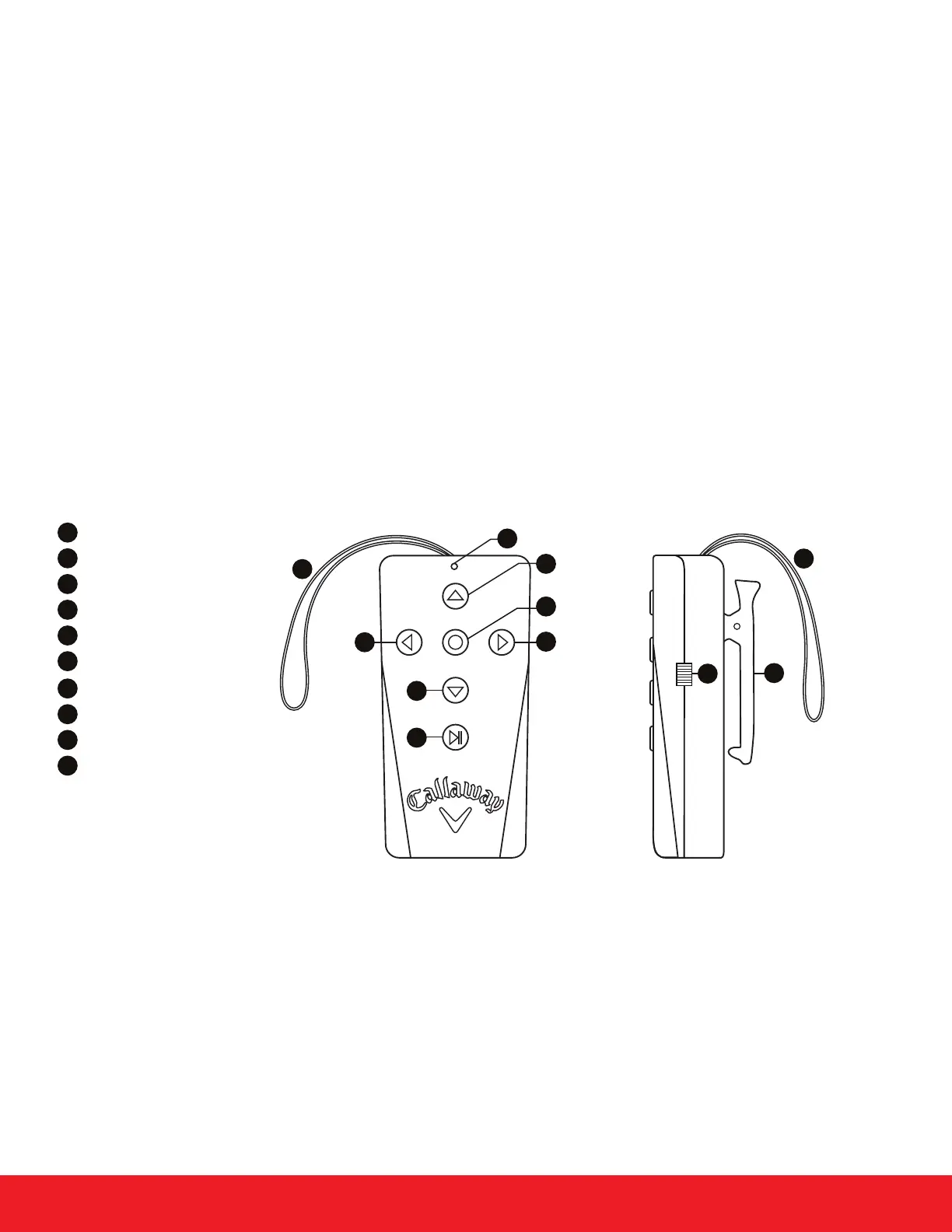
REMOTE CONTROL LAYOUT
• To turn the remote on, slide the switch on the side of the remote towards the antenna. Make sure
to turn the remote control o when it is not in use. The remote will not shut o automatically.
The remote requires 2 AAA batteries.
• When using the remote, make sure your hand is not covering the antenna. The antenna needs
to move freely for optimal range.
Forward
Reverse
Left
Right
Stop
Play/Pause
On/O Switch
Clip/Mount
Antenna
LED Indicator
1
2
3
4
5
6
7
8
9
10
1
4
3
5
2
6
10
9
7
8
9


 To Next Page