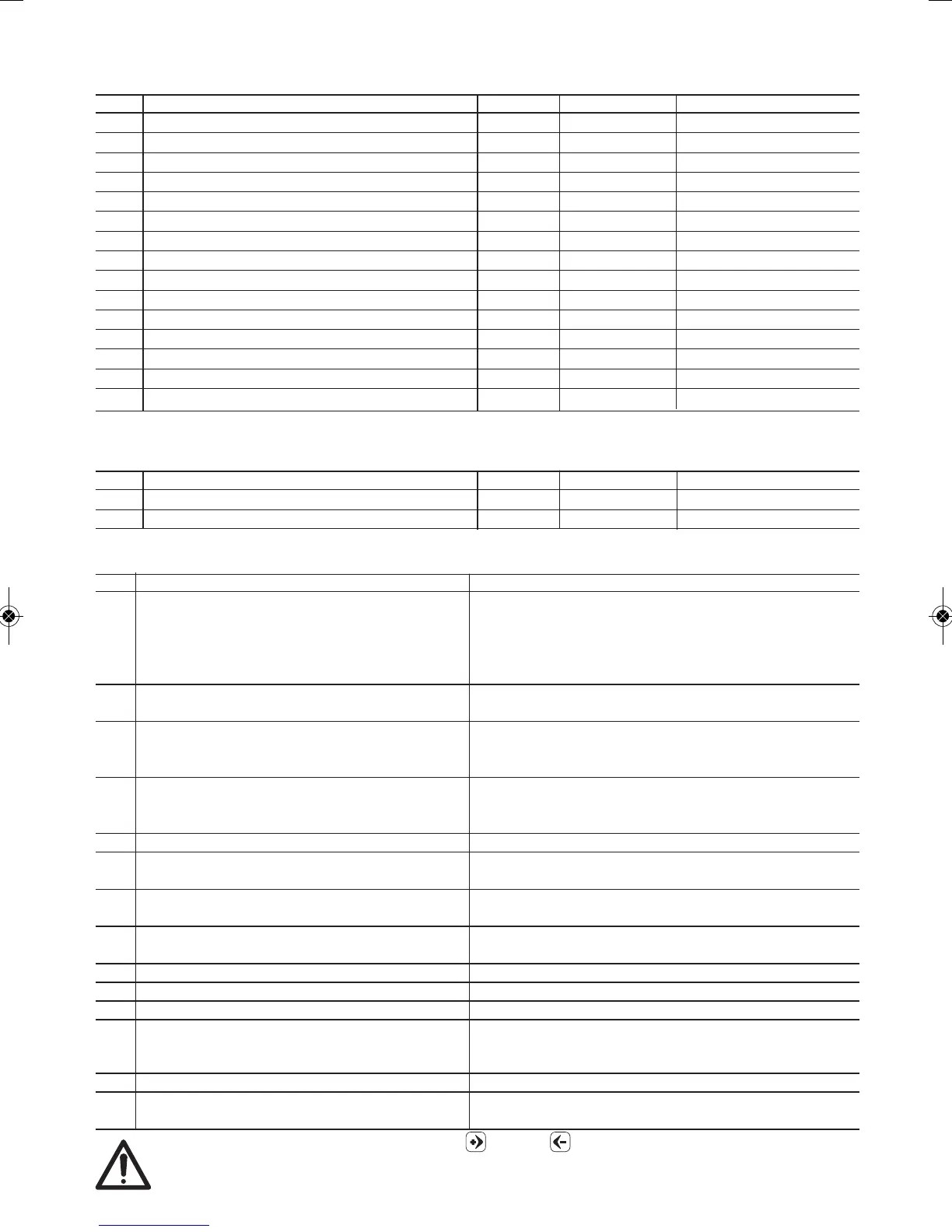
9.2.3. SA – Technical assistance settings
To enter password is required (see paragraph 10.1.)
N° Description Standard Modifications Note
SA01
SA02
SA03 Pressure PID (Proportional gain) 2,8
SA04 Pressure PID (Integral time constant) 5,5
SA05 Pressure PID (Derivative time constant) 5,0
SA06 Min. run frequency (Hz) 30
SA07 Max frequency (Hz) 60
SA08 Set point pressure step up (bar) 0,3
SA09 Pressure step up time (s) 3
SA10 Pressure step up ramp (bar/s) 0,3
SA11 Set point control ramp (bar/s) 0,4
SA12 Carrier frequency 7010
SA13 Singlephase starting frequency (Hz) 80
SA14 Singlephase starting voltage (V) 195
SA15 Nominal voltage (V) 220
9.2.4. MAn – Fixed speed mode activation
To enter password is required (see paragraph 10.1.)
N° Description Standard Modifications Note
MAn1 Fixed speed mode activation oFF
MAn2 Working frequency [MAn2 ≤ UP03] (Hz) 45
a
9.3. Alarms
N° Displayed alarm Causes
Er01 Blockage due to no water The device is in failure due to no water.
The system try to restart automatically.
- One attempt every 10 minutes for 6 times.
- One attempt every hour for 24 times.
- One attempt every 24hours for 30 times.
Er02 Pressure transducer fault Not connected cable, broken connection, pressure
transducer spoiled.
Er03 Blockage due to low supply voltage Supply voltage lower than 190V.
- The system automatically restart when the clamp
voltage is higher than 190V.
Er04 Blockage due to high rectified voltage Supply voltage higher than 250V.
- The system automatically restart when the clamp
voltage is lower than 250V.
Er05 Blockage for memory failure
Er06 Blockage due to overcurrent in the electro
pump motor
Er07 Blockage due to overcurrent in the
frequency converter
Er08 Blockage due to direct short circuit between
the phases of output terminals
Er09 Blockage due to overheating
Er10
Blockage due to overheating of the power module
Er11 Blockage due to low voltage 24 V
Er12 Stop for float switch intervention The system will restart with a delay defined by AP19
from the state variation of the float switch. The control
panel for remote alarm not report this alarm.
Er13 Internal hardware error Contact the technical assistance
Er14 Cascade mode communication error Check the RS 485 connection or that both pumps
are enabled.
In case of multiple fault, scroll with the buttons (plus) or (minus) to visualize the fault sequence.
In case of thermal block it is advised to check the causes that have created the problem before
restart the pump operation.
25


 To Next Page