23
8. Dry-running protection
The frequency converter is equipped with a dry-
running protection for the pumps. When the
pressure on the system remain for a time higher
than the dry-run time (AP05) lower than value of
the dry-run pressure (AP07) the protection system
stop the pump. It is possible the use of an external
float switch for the dry-running protection (see
paragraph 7.5.). In this case the pumps start with
a delay time (in seconds) defined by AP19 (Digital
input restart time), the time will be counted after
the change of the float switch state.
For entering the programming mode see
paragraph 10.
9. Parameters
On the frequency converter the following
informations are displayed:
- Parameters of pump status.
- Programming parameters.
- Alarms.
9.1. Parameters of pump status
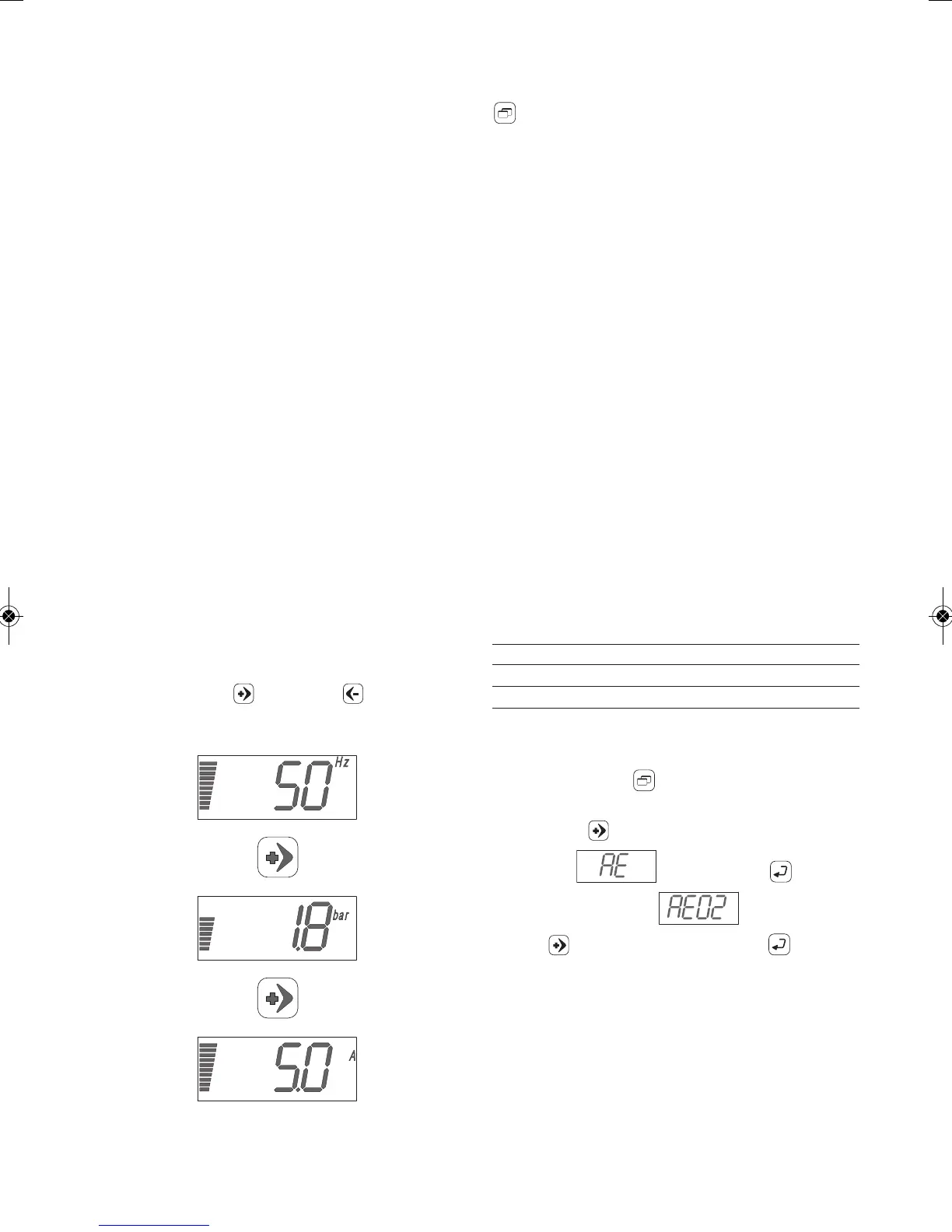
They allow to visualize:
- the modulation frequency of the pump (basic
display).
- the pressure of the system.
- the line absorbed current.
Starting form the basic display by pushing of the
directional arrow (plus) or (minus) the
other parameters are displayed.
Example:
9.2. Programming parameters
To display the programming parameters, select
(menu).
Will be displayed progressively:
UP - User settings: these are the basis settings
that user can change.
AP - Advanced settings: these settings are
available only to qualified personnel. To enter
password is required (see paragraph 10.1.).
SA - Technical assistance settings: these are
the advanced parameters, only technical
assistance personnel are allowed to access
this menu. Password is required (see
paragraph 10.1.).
MAn - Fixed speed mode activation: this allows
activation of the fixed speed mode and the
working frequency. Only qualified
personnel are allowed to access this menu.
Password is required (see paragraph
10.1.).
AE - Advanced parameters: this allows for the
display of secondary parameters which can
be useful for system diagnostics.
AE01 Software release
AE02 Supply voltage (V)
AE03 Last 5 faults
Supply voltage visualization example.
By pushing the button (menu) the UP
parameter appears. Select the AE parameter by
pushing the (plus) up to arrive at the correct
parameter , confirm with (enter).
Select the parameter by pushing the
button (plus) and confirm with (enter).
Supply voltage is displayed.


 To Next Page