14 ImPulse IP Audio Routing & Mixing System Start Up Guide
Cisco and Artel Switch and Network Configuration for AoIP / AES67 Networks
Below are shown some useful links for AoIP / AES67 network configuration, if using a Cisco SG350 switch for AoIP (which are only
recommended for very small systems) then please refer to the Cisco Auto Configuration guides or Cisco Manual Configuration guides.
There are 3 basic requirements for AES67 based switch operation: - 1. Enabling IGMP Snooping & Querier V2 ,
2. Setting up the DSCP Trust mode and 3. Setting higher DSCP to Queue priorities for PTP clocks EF(46) & Audio AF41 (34) data.
For larger PTP based audio networking using Artel Quarra switches, please refer to the Artel links below:
Artel Quarra PTP switch range
https://www.artel.com/media-transport-products/?swoof=1&product_cat=quarra
Artel Quarra Configuration Guide for AES67
https://www.artel.com/wp-content/uploads/2019/01/Quarra-Configuration-Guide-for-AES67-TC-and-BC-v20-6-24.pdf
* In order to simplify configuration, a text based example configuration file can be uploaded for both the Cisco and Artel Quarra
Switches for use with AoIP/AES67 Network devices. These can be found on the Calrec FTP site at http://ftp.calrec.com as
described earlier and access the information in the Type R area of the site using Account: TypeR & Password: tYoarEdQ
The configuration files both allow the switch to operate in the 192.168.30/24 subnet for the Primary AoIP port address range
and the 192.168.31/24 subnet for the Secondary AoIP port address range, but can be adapted as required.
Artel Switch Management Settings for AoIP / AES67 Networks
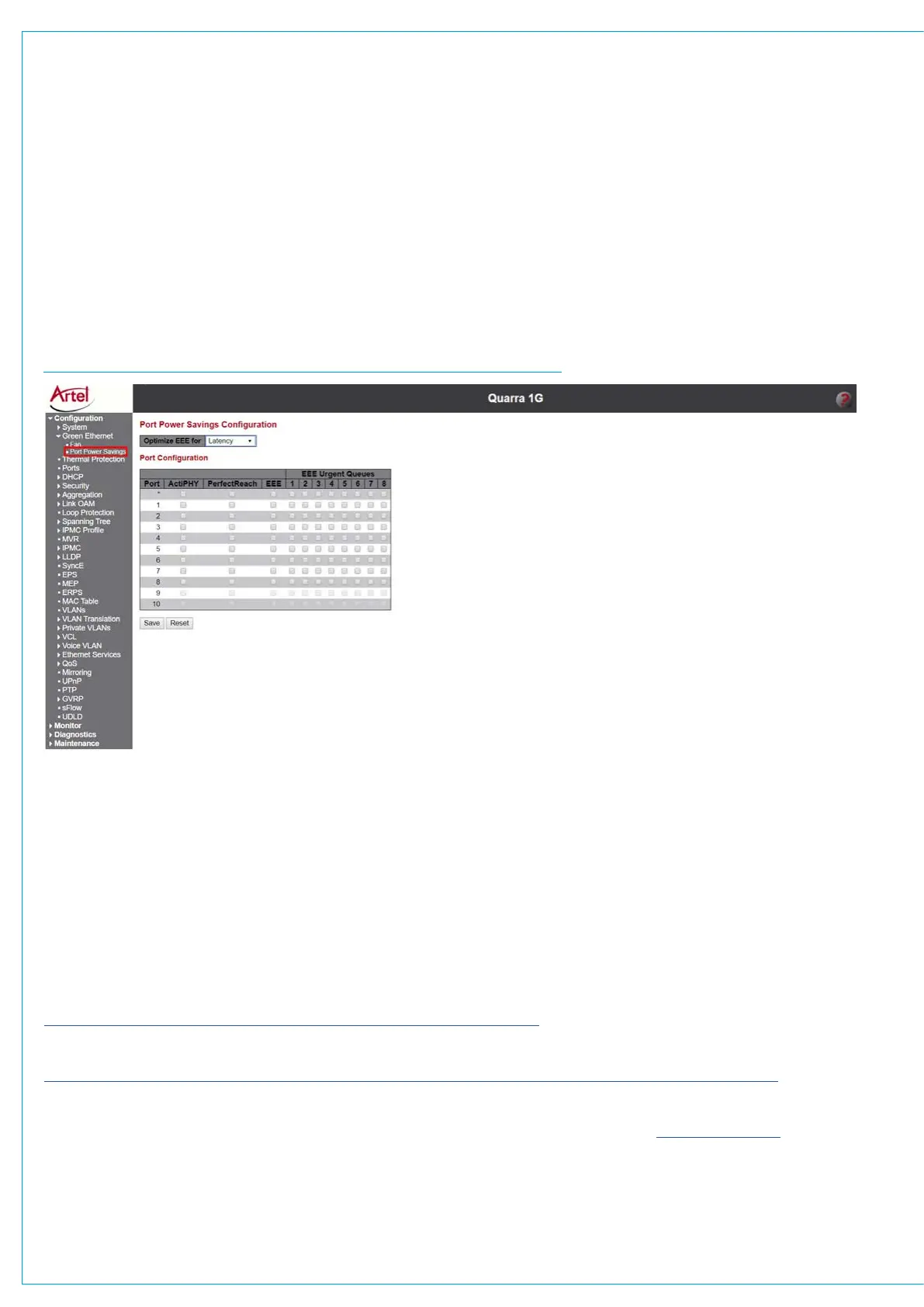
The Artel switch is used for AoIP/AES67 Interfacing and needs to have its Port Power Savings Configuration Properties disabled, this
is carried out in the Configuration>Green Ethernet>Port Power Savings page of the switch.
The Artel switch’s default IP address is 192.168.100.100 typing this into the address bar of the browser accesses the Log in screen.
The default Username is “admin” and there is no default Password, clicking on the ‘Sign in’ button gives access to the switch’s
configuration pages. A new Artel switch has its power saving feature disabled by default, but it’s worth checking to ensure this is the
case, if it isn’t then proceed as shown below:-
ARTEL QUARRA SWITCH GREEN ETHERNET PROPERTIES PAGE
Deselect all the tick boxes as shown above on the Port Power Savings page of the switch and click on ‘Save’ to apply the changes.
T
hen go to Maintenance > Configuration > Save start-up-config and click Save Configuration. This will save the currently running
settings that you have just configured as the switch’s startup configuration, so that it loads whenever it is turned on or rebooted.


 To Next Page