Need help?
Do you have a question about the CAMAG ATS 4 and is the answer not in the manual?
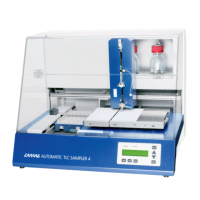
Overview of the CAMAG Automatic TLC Sampler 4 (ATS4) for Thin-layer chromatography.
Essential safety warnings and precautions for operating the ATS4, covering electrical and handling risks.
List of all components and accessories included with the CAMAG ATS4 instrument.
Catalog of optional and replacement parts and consumables for the CAMAG ATS4.
Step-by-step guide for safely unpacking the CAMAG ATS4 and removing transport locks.
Optimal placement and environmental conditions for installing the ATS4, including space and temperature.
Procedure for installing rinsing bottles in the ATS4.
Instructions for connecting the gas or compressed air supply to the CAMAG ATS4.
Guidance on selecting and installing the correct dosage syringe and needle for the ATS4.
Procedure for connecting the CAMAG ATS4 instrument to the main power supply.
Steps to connect the ATS4 to a PC and install necessary software for data transfer.
Accessing and navigating the user dialog for instrument settings on the ATS4.
Configuring ATS4 settings for display language and LCD contrast via the user dialog.
Initial system checks and tasks performed by the ATS4 upon startup.
Verify the appropriateness of the installed syringe and needle for the analysis method.
Instructions for correctly positioning and loading the waste plate into the ATS4.
Step-by-step guide on how to place TLC plates or foils onto the ATS4 stage.
Explanation of the control lamps and operating keys on the ATS4 instrument panel.
Using the ATS4 in offline mode to save and run methods without a PC connection.
Procedure for stopping an ongoing application on the ATS4 instrument.
Instructions for cleaning the syringe and spray nozzle of the ATS4 using the rinsing function.
How to reset the pre-dosage position on the ATS4, typically after loading a new waste plate.
Procedure to clean the rinsing unit of the ATS4 instrument.
Manual operation of the rinsing unit's valves and pump on the ATS4.
Inputting syringe volume and needle type into the ATS4 via the DIALOG key.
How to stop and re-initialize the ATS4 instrument, aborting current activities.
Instructions for mounting the optional baffle bridge with septum foil onto the ATS4.
Best practices for handling the HAMILTON syringe to ensure longevity and proper function.
Procedure to adjust the spray gas pressure on the ATS4 for optimal spray quality.
Instructions for cleaning the spray nozzle of the ATS4 to maintain spray quality.
Checking the state and function of the septum puncher on the ATS4 for needle protection.
Step-by-step guide for replacing a bent or damaged septum puncher on the ATS4.
Procedure for safely replacing fuses in the ATS4 instrument.
Common issues and solutions for the ATS4 instrument, such as syringe bubbles or poor spray quality.
Recommendations for professional service and annual maintenance of the ATS4.
Table of error codes displayed by the ATS4 and their corresponding causes and actions.
 General
| Type | Automated TLC Sampler |
|---|---|
| Positioning Accuracy | ± 0.1 mm |
| Software | visionCATS |
| Application | Thin Layer Chromatography (TLC) and High Performance Thin Layer Chromatography (HPTLC) |
| Sample application modes | Band, spot, rectangle |
| Number of samples | Up to 66 |
| Applicable plate sizes | 20 x 10 cm and 20 x 20 cm |
| Band Length | 1 to 50 mm |
| Spot Diameter | 0.5 mm to 5 mm |
| Power Supply | 100-240 V, 50/60 Hz |

 To Next Page