
 Need help?
Do you have a question about the CAMDEN CV-550SPK V3 and is the answer not in the manual?
Instructions to enter programming mode using the star key and master code.
Procedure to exit programming mode, resulting in a solid Red LED.
Steps to change the 6-digit admin password, essential before configuration.
Procedure to restore default settings, affecting only the master code.
Command to erase all stored user card and PIN data.
Configuration options for stand-alone mode: Card only, Card+PIN, or Card or PIN.
Methods for adding or deleting user credentials by card reading or ID number.
Setting the door unlock time from 1 to 999 seconds.
Configures data lines for connection to an access controller.
Sets the facility code, which must match the access controller.
Sets the Wiegand output data format for DO and D1.
Configures the bit length for Wiegand output data.
Sets the format for PIN output, including buffering.
Configures the burst output mode for Wiegand data.
Sets alarm for doors not closed within a specified time after unlocking.
Configures alarm triggered by forced door opening without valid entry.
Guide for connecting DC power (10-28V) using red for positive and black for ground.
Guide for connecting AC power (10-28V) using red (AC1) and light green (AC2).
Diagram for connecting the keypad to a door operator, alarm annunciator, and switches.
Diagram for connecting the keypad to a fail secure door strike and accessories.
Diagram for connecting the keypad to a maglock system with annunciator and switches.
Diagram for connecting to an external card reader and door strike, configured for single door.
Diagram showing Wiegand connection to an access controller.
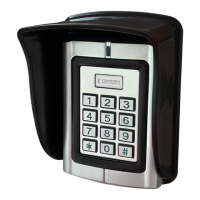
Instructions for mounting the keypad flush to a wall with its shield.
Instructions for flush mounting the keypad into an electrical box with its shield.
FCC ID and statement regarding compliance with Class B digital device limits.
Guidelines for users to correct potential radio or television interference.
 General
| Power Supply | 24VDC |
|---|---|
| Input Voltage | 24VDC |
| Power Consumption | 5W |
| Storage Temperature | -20°C to +70°C |
| Humidity | 0-95% non-condensing |
| Protection Class | IP20 |

 To Next Page