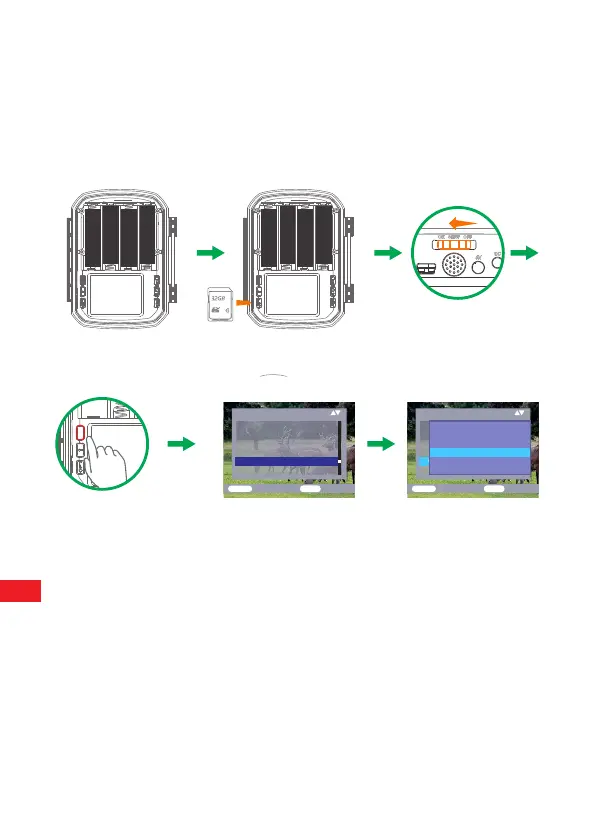
5.Switch on the camera. 3 switches: power off (OFF) ,setup menu
/SETUP mode (SETUP) and live mode (ON).
6.New memory card is recommended to be formatted when using (as
below described).
7.Please note that the camera will power off when power is very low.
Settings
Time&date
Photo stamp
Password protection
Beep sound
Format memory card
Serial NO
ME NU
Back
OK
Select
Settings
Time&date
Photo stamp
Password protection
Beep sound
Format memory card
Serial NO
ME NU
Back
OK
Select
Notification:All data
will be deleted
Yes
No
Operation (See Figures Below)
Open the locking brackets - insert batteries -insert memory card—switch
to SETUP—enter system menu by pressing MENU button-choose to
format memory card—choose to reset to factory.
AA LR 6
AA LR 6
AA LR 6
AA LR 6
AA LR 6
AA LR 6
AA LR 6
AA LR 6
EN
6


 To Next Page