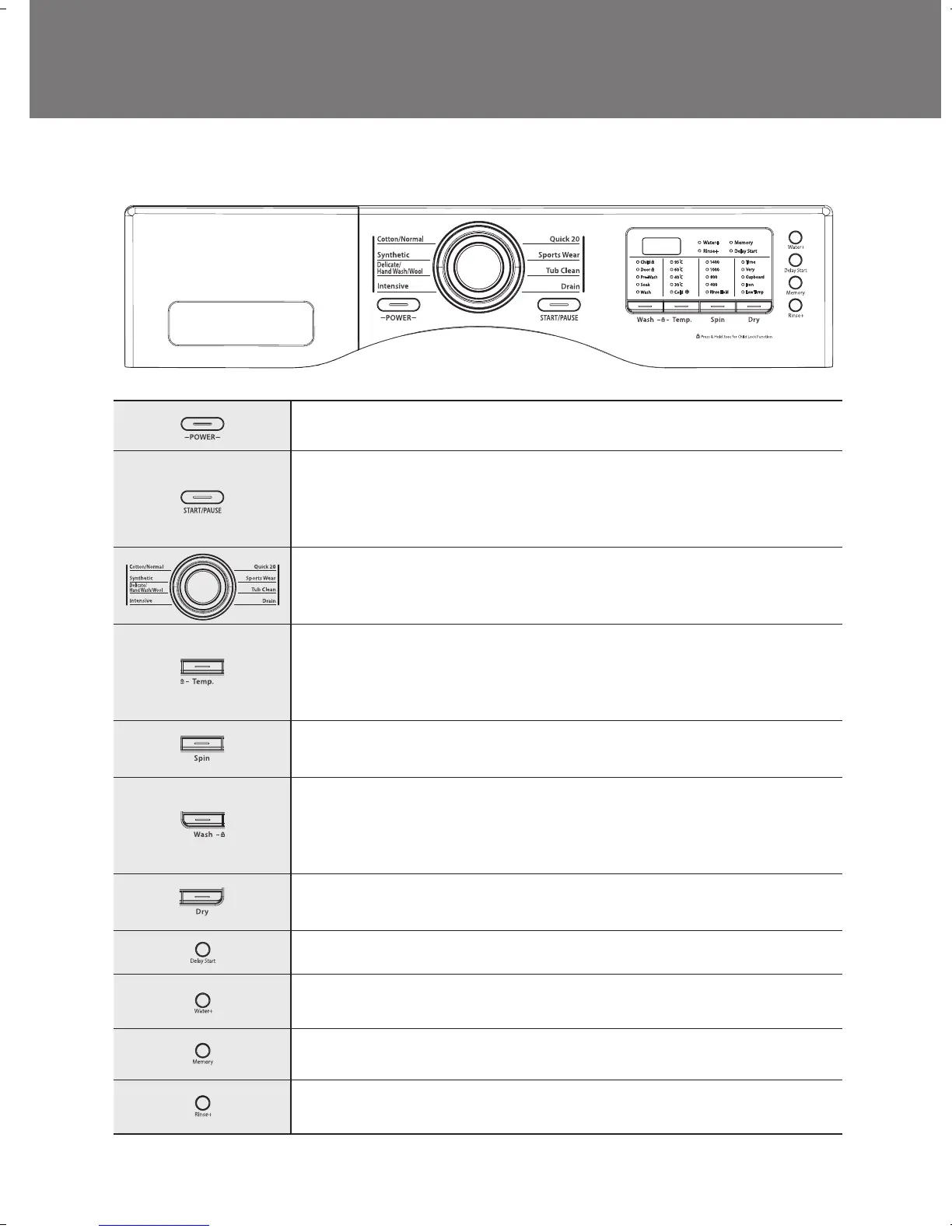
The functions of the control panel
■ WD11KD's
Press this switch to turn the power on or off.
Operation and temporary stop is repeated as it is pressed.
When you want to change program in operating;
press the “Start/Pause” button → Select the program that you want to change →
press the “Start/Pause” button again.
You can select the course you want, and each lamp is turned on when that course
is selected.
For the more detailed information, please refer to the page 14~21.
It can be used to adjust temperature of water according to types of the load to be
washed.
As the button is pressed, temperature of water is selected by
Cold → 30°C → 40°C → 60°C → 95°C
By pressing the spin button, the spin speed can be chosen.
If press "spin button" spin RPM change.
You can select the course you want, and each lamp is turned on when that course
is selected.
As the button is pressed, the wash course is selected by
Wash → Soak → Pre-Wash
You can select the course you want, and each lamp is turned on when that course
is selected.
It can be used to pre-engage time for wash.
• Steam - During washing time Steam is sprayed in Drum. Laundry is more clean.
• Water + - If you want to use more water, press this button.
Use to memory program you want.
• Is used to add a rinse, which may assist in removing traces of detergent residue.
• By selecting Rinse+ function, the rinse time and the rinse water are increased.



 To Next Page