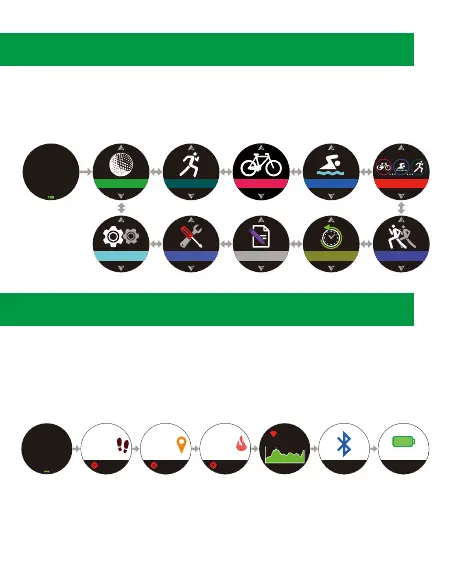
3. Watch Menus
1. Press ④ to enter main menu.
2. Press ③/⑤ to scroll up/down the menu.
3. Choose a selected function and press ④ to enter.
4. Fitness Calculators/Bluetooth
Under the Time Mode, press ③/⑤ to browse the step walked,
distance, calories burned, heart rate, and turn on/off Bluetooth or
energy saving. Press ④ under each mode, you can set daily targets
and set the achievement alarm.
•The Fitness calculator will be reset at 00:00am daily.
•To reset manually, please enter [Tools] → [Pedometer].
•When energy Saving is on, the Pedometer will be switch off.
TOOLS
RUNNING
SWIMMING
TRIATHLON
HISTORYRECORDS
CYCLINGGOLF
TRAININGSETTINGS
WED
31
DEC
23
42
31
DEC
WED
Off
Energy Saving
Off
55555
55555
STEPS
TO DAY
50.03
50.03
Km
TO DAY
5555
5555
Kcal
TO DAY
WED
31
DEC
23
42
31
DEC
WED
135
185
63
4.



 To Next Page