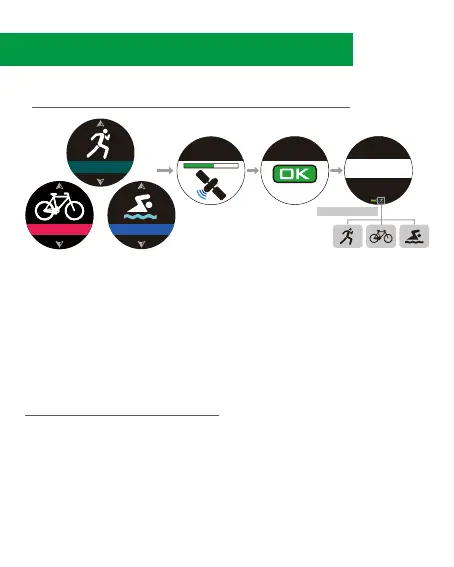
7. Sport Mode
1. Press ④ to enter main menu, select [RUNNING/CYCLING/
SWIMMING], and press ④ to enter.
2. Satellites will be located automatically.
3. After locating is completed, press ④ to start.
4. Press ③/⑤ to browse sport’s figures. To Lap manually, press ②.
5. To finish the sport mode, press ④. Then press ③/⑤ to select
[Resume /Save /Discard], and press ④ to confirm.
Enter [TRIATHLON] mode (Follow the same procedure as 7-1). Press
② to switch sport mode, the sport icon will flash (to record the mode
switch preparation time). To start the next sport, press ② again to
confirm. There will be 5 Laps under Triathlon history record. Lap 1/3/5
shows swimming/cycling/running records. Lap 2/4 shows the records
during mode switch.
7-1 Running/Cycling/Swimming.
7-2 Triathlon Mode
Calories
0
Stride Rate
0
Avg. Pace
--
’
--
”
Push
to Go
Locating GPS
RUNNING
SWIMMING
CYCLING
Current Mode
Or Or
7.



 To Next Page