CHAPTER 7 PICK-UP / FEEDING SYSTEM
7-102
COPYRIGHT
©
2002 CANON INC. CANON CLC1100/1130/1150/1160/1180 REV.2 FEB. 2002 PRINTED IN JAPAN (IMPRIME AU JAPON)
H. Duplexing Delivery
Assembly
(CLC1150/1180 only)
1. Removing the Duplexing Delivery
Assembly
1) Remove the left upper cover and the left
lower cover.
2) Remove the delivery cover.
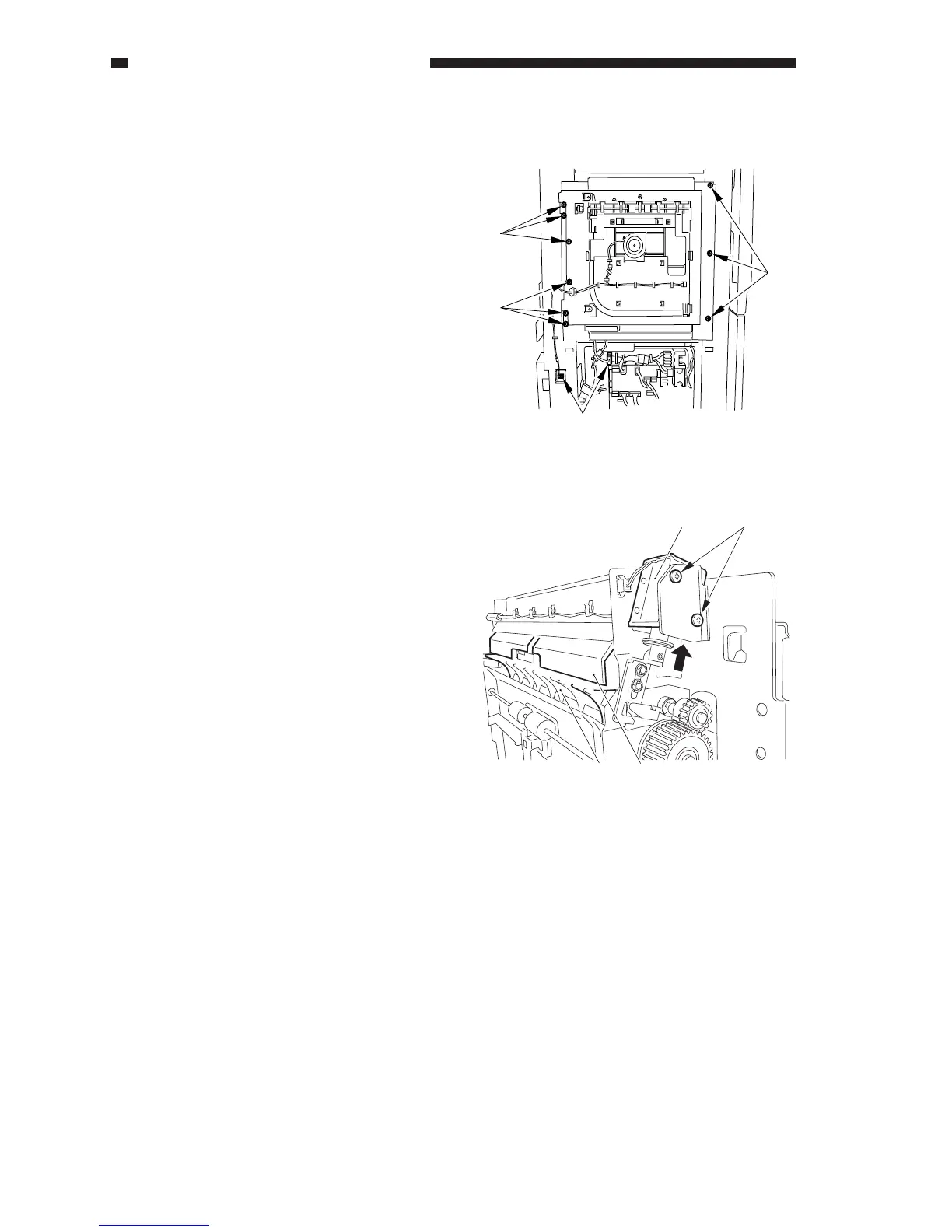
3) Remove the nine screws [1], and
disconnect the two connectors [2].
4) Slide out the delivery unit slowly to detach.
Figure 7-876
2. Position of the Delivery Assembly
Paper Deflecting Plate Drive
Solenoid (SL10)
1) Remove the delivery assembly.
2) Place the delivery assembly on its end on
a level surface.
3) Loosen the adjusting screw [4] to make
adjustments while keeping the paper
deflecting plate [2] butted against the
delivery upper guide [3] when the
solenoid [1] is on while viewing from the
rear of the delivery assembly.
[1]
[1]
[1]
[2]
[1] [4]
[2] [3]
Figure 7-877



 To Next Page