COPYRIGHT
©
2002 CANON INC. CANON CLC1100/1130/1150/1160/1180 REV.1 FEB. 2002 PRINTED IN JAPAN (IMPRIME AU JAPON)
10-29
CHAPTER 10 PAPER DECK
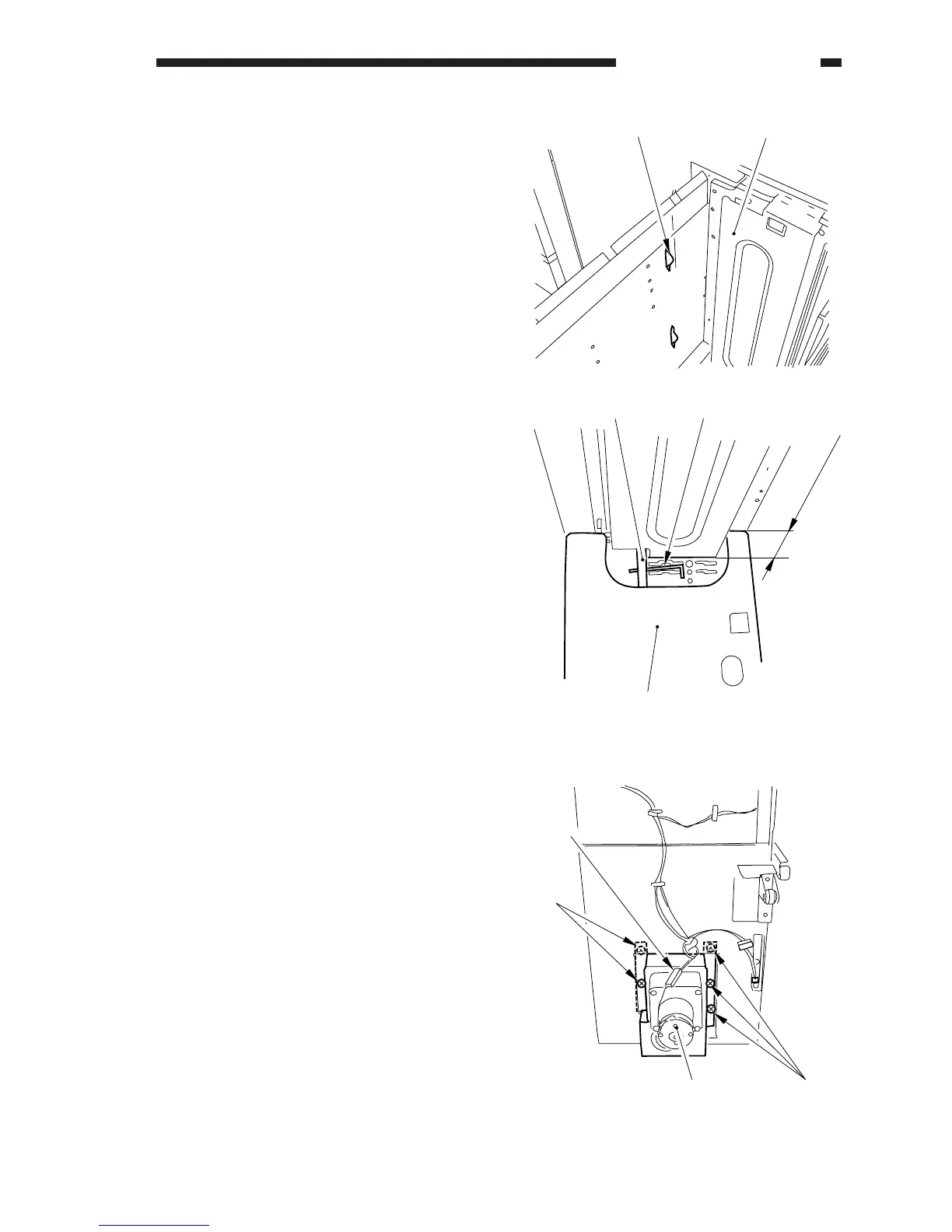
3. Removing the Deck Lifter Motor
(M101)
1) Open the compartment of the deck, and
remove all paper.
2) Turn on the copier. If the lifter of the
deck is in up position, press the sensor
lever [1] of the paper supply position
inside the compartment to stop the lifter
about 7 cm from the bottom of the
compartment base plate. Then, insert a
hex wrench into the hole of the lifter
drive shaft [3] to hold it in place (against
turning).
Figure 10-326
3) Remove the compartment from the deck.
(p. 10-25)
4) Disconnect the connector [5], and remove
the five screws [6]; then, remove the deck
lifter motor unit [7].
Figure 10-327



 To Next Page