EasyManua.ls Logo

Canon 80D - Page 3

Canon 80D
15 pages
Print Icon
To Next Page IconTo Next Page
To Previous Page IconTo Previous Page
Loading...
Return to contents page
Live View
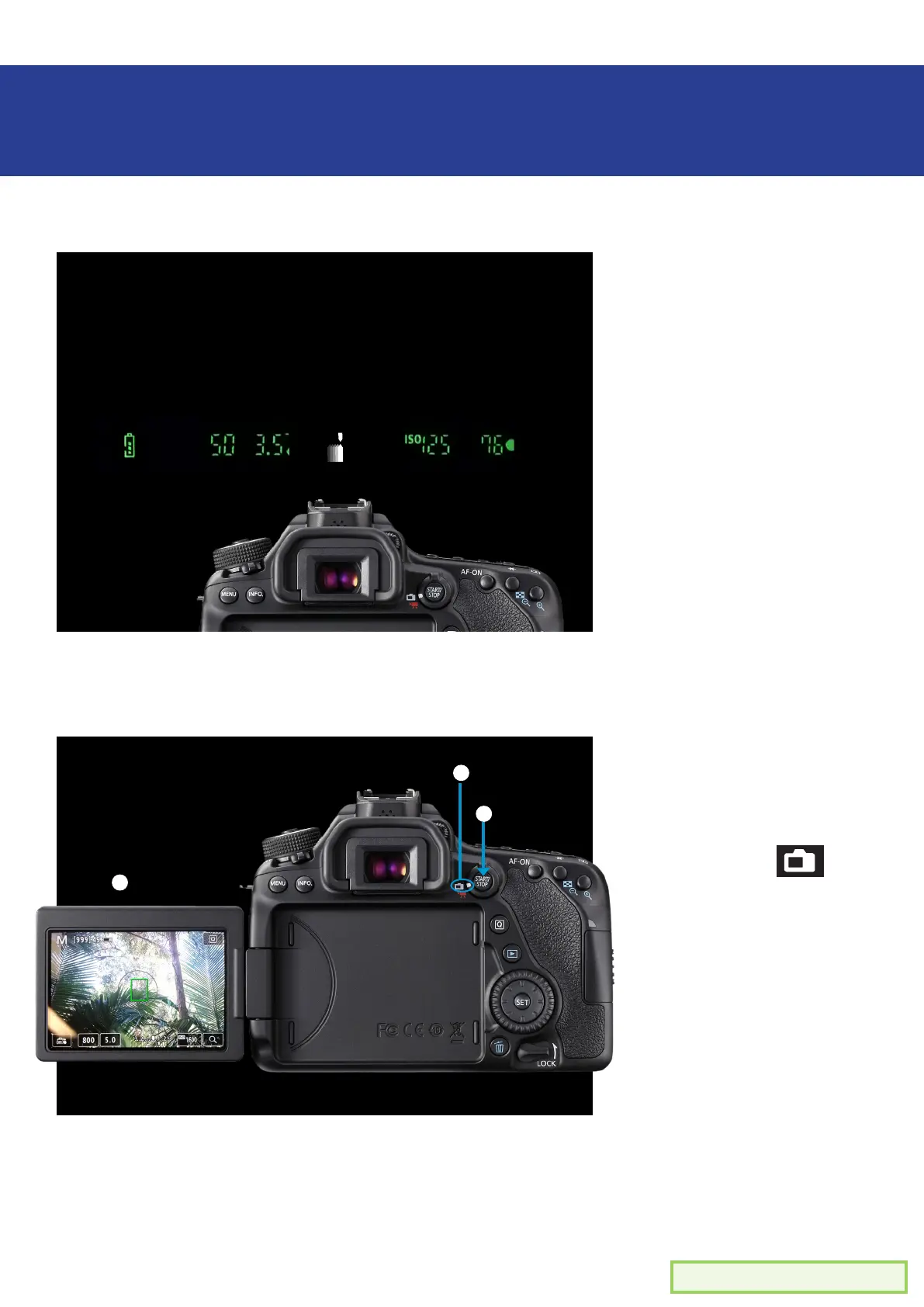
Make sure the dial is
pointing to the white
camera icon
Press the ‘START/
STOP’ button
You’ll notice the LCD
screen will now display
a live image of your
scene
You can now change
your settings and use
the preview image and
the LCD light meter
as a guide for a good
exposure
Light meter
This moves!
3 3
+
-
-
-
-
-
-
-
-
-
-
-
-
-
2 21 1
Previewing exposure
- Two methods -
Method #1
Method #2
Light Meter
Look through the view
nder
Pay attention to the
light indicator as it
moves
Aim for the middle for a
good exposure
Can’t see your light
meter? Check to make
sure your camera is
NOT in ‘Live View’
mode. (see below)
1 Camera
switch
3 LCD screen
shows scene
2 Live
View

Related product manuals