EasyManua.ls Logo

Canon 80D - Focus Trap

Canon 80D
15 pages
Print Icon
To Next Page IconTo Next Page
To Previous Page IconTo Previous Page
Loading...
Return to contents page
click!
I
I
Hold button........move camera......take photo
half press
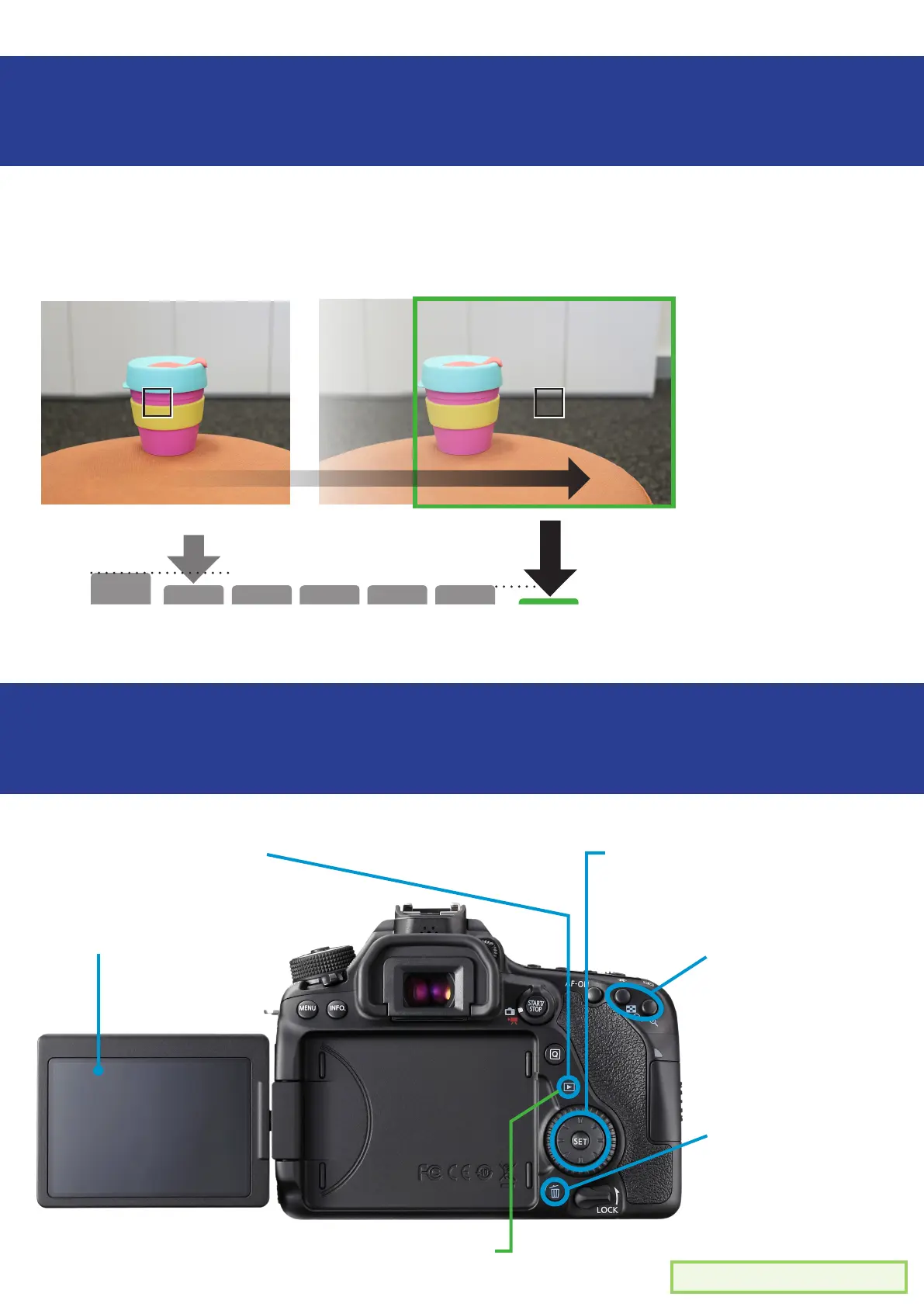
Focus Trap
Review a photo/video
Taking a photo, with the subject in focus, but NOT
centered
Press the shutter
button halfway
to focus on your
subject
Keep the shutter
button half
pressed while
you move your
camera
Make your
subject o centre
When you are
ready, press the
shutter button
1 - Review ‘play’ button
2 - images/videos will
appear on the LCD
screen
3 - Use wheel/pad to cycle
through les. The ‘Set’ button
selects images/videos to
view
4 - To zoom in on an
image, press - or +
5 - Press the rubbish
bin button to delete
an image or video.
Press ‘SET’ to
conrm.
To exit review mode
Press the ‘play’ button again.

Related product manuals