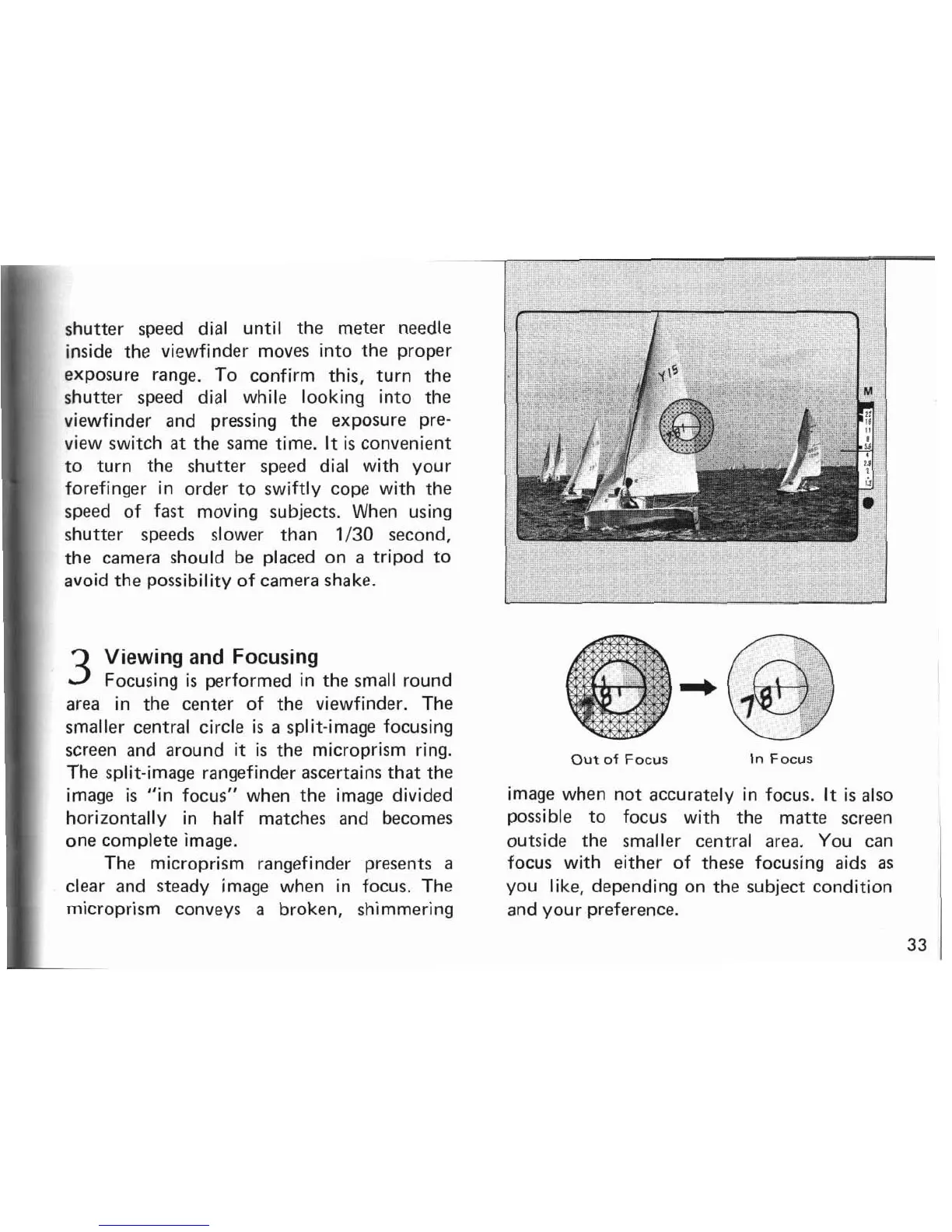
shutter speed dial until the meter needle
inside the viewfinder moves into the proper
exposure range. To confirm this, turn the
shutter speed dial while looking into the
viewfinder and pressing the exposure pre-
view switch
at
the same time. It
is
convenient
to turn the shutter speed dial with your
forefinger in order to swiftly cope with the
speed of fast moving subjects. When using
shutter speeds slower than
1/30
second.
the camera should be placed on a tripod to
avoid the possibility of camera shake.
Viewing and Focusing
3
Focus~ng
..
1s performed in the small round
area in the center of the viewfinder. The
smaller central circle
is
a split-image focusing
screen and around
it
is
the microprism ring.
The split-image rangefinder ascertains that the
image
is
"in focus" when the image divided
horizontally in half matches and becomes
one complete image.
The microprism rangefinder presents a
clear and steady image when in focus. The
microprism conveys a broken, shimmering
Out
of
Focus
In
Focus
image when not accurately in focus.
It
is
also
possible to focus with the matte screen
outside the smaller central area. You can
focus with either of these focusing aids
as
you like, depending on the subject condition
and your preference.
33


 To Next Page