
 Need help?
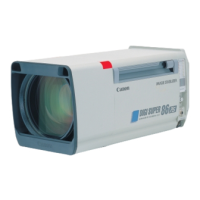
Do you have a question about the Canon digi super 86 XS and is the answer not in the manual?
Details FCC Class A limits, potential interference, and requirements for shielded cables.
Confirms the apparatus meets Canadian Interference-Causing Equipment Regulations.
Confirms conformity with EC Directives and lists applicable standards and environment types for 12V DC input.
Confirms conformity with EC Directives, listing standards and specific notes for 230V AC input.
Thanks the user and explains the manual's purpose and importance.
Highlights the lens's high zoom, focal length range, HDTV compatibility, and image stabilizer.
Explains the meaning of WARNING, CAUTION, and NOTE symbols used in the manual.
Details critical safety warnings regarding liquids, sunlight, and eye protection.
Lists cautions for handling, mounting, cables, and protection from impacts, weather, dust.
Instructs immediate action for smoke, unusual smells, noises, or foreign objects inside the lens.
Outlines lens cleaning methods, periodic inspection, and proper storage procedures.
Lists standard parts and separately available accessories for the lens system.
Provides guidelines for storing the lens, including temperature, humidity, and avoiding shocks.
Step-by-step instructions with diagrams for physically attaching the lens to the camera body.
Details mounting flexible modules and control units for the flexible system.
Explains connecting flexible zoom and focus control units to tripod and lens.
Shows how to connect DIGI servo zoom and focus demands, including alternate analog setup.
Provides instructions and diagrams for mounting servo modules onto the lens.
Describes methods to mount the servo zoom demand onto a tripod panning rod.
Explains how to connect the demand cable to the lens and servo zoom demand.
Details how to mount the servo focus demand onto a tripod panning rod.
Explains the connection of the demand cable to the lens and servo focus demand.
Illustrates mounting servo zoom demand and flexible focus control unit.
Guides on locating and setting the IS-POWER switch for image stabilizer activation.
Describes connecting the IS controller cable and positioning the IS switch unit.
Provides instructions for mounting the switch box and connecting its cable.
Details mounting the supporter onto the cam head, checking camera adjusting unit.
Explains mounting the camera onto the supporter, including adapter and connector.
Provides reference data and diagrams for mounting the SUP-NC2L (B3) supporter with various cameras.
Presents reference data and diagrams for mounting the SUP-NC2L (B4) supporter with different cameras.
Details steps for mounting the lens unit onto the supporter, including alignment and locking.
Explains verifying correct mounting position and alignment of the lens unit on the supporter.
Describes positioning the camera adjusting unit on the supporter for proper camera mounting.
Provides instructions for mounting 2/3" portable cameras onto the lens unit using bayonet mounts.
Details locking the camera adjusting unit and adjusting height for balance and smooth rotation.
Guides on checking camera mount bayonet ring rotation and adjusting height if needed.
Explains attaching power modules or battery adapters and connecting power input.
Step-by-step guide to adjust the lens flange back using a Siemens star chart or similar object.
Describes how to adjust the iris gain using the trimmer on the circuit board if hunting occurs.
Explains iris control modes (auto/remote) based on camera and switch signals.
Details the process of initializing DIGI zoom and focus demands for proper connection and position data.
Provides instructions on how to open and securely close the lens cover.
Explains how to zoom, change zoom speed, and adjust torque using the flexible zoom control unit.
Describes how to focus using the flexible focus control unit grip and adjust its torque.
Details zooming, changing zoom speed, and rotation direction with the servo zoom demand.
Explains how to select zoom speed curves (OFF, A, B modes) on the servo zoom demand.
Describes the function of the F-drop prevention switch to limit zooming and prevent darkening.
Guides on setting zoom track ON/OFF and adjusting zoom control range limits.
Explains how to save and recall a specific zoom position using the preset switch.
Describes the use of return video switches and the talk-back function on the servo zoom demand.
Explains how to adjust the torque of the thumb ring on the servo zoom demand.
Details focusing operation, rotation direction, and torque adjustment for the FDJ-D01 servo focus demand.
Explains selecting focusing curves (Standard, Far, Near modes) on the servo focus demand.
Describes the end slip function to reduce impact at the ends of the focus range.
Details focusing operation, rotation direction, and torque adjustment for the FDJ-D11 servo focus demand.
Explains selecting focusing curves and the effect of changing settings during shooting.
Mentions the provision of a movable index ring for setting tint anywhere.
Guides on checking IS controller switches (SW MODE, IS MODE) for basic stabilizer operation.
Explains how to press the IS-switch to activate the stabilizer and release it to stop.
Advises on operating pan-tilt when the stabilizer is stopped to avoid unnatural composition.
Details settings for the SW MODE switch (Momentary, Alternate) and their effect on IS operation.
Explains using the IS MODE switch for panning or tilting operations.
Summarizes how IS operates based on combinations of IS MODE and SW MODE switches.
Describes the iris value indicator and how auto/remote iris control is performed via the CCU.
Explains setting the Extender A/M selector switch to auto or manual mode.
Guides on opening the lens cover and setting the extender switch to auto for servo operation.
Explains how to switch extender values (Nx, 1x) using the selector switch on the servo zoom demand.
Describes operating the extender using the selector knob on the switch box.
Explains operating the extender via a camera's switch function when supported.
Guides on opening lens cover and setting extender switch to manual for manual operation.
Explains switching extender values (Nx, 1x) using the selector knob on the lens itself.
Explains switching camera modes (CAM.AUTO, 4:3, 16:9) using the lens selector switch.
Lists extender values (1x, 2x, 2.4x) for different camera modes (16:9, standard, 4:3).
Describes the ON/OFF switch for the tally light and indicator on the lens.
Details the 12V DC external power input jack and compatible battery types.
Explains the Power Low LED and its indications for power supply status.
Guides on adjusting tally light brightness using a selector switch on the circuit board.
Explains activating CAFS to suppress angle of view changes during focusing.
Describes the optional heater function for warming the lens interior and its operation.
Lists technical specs like focal length, aperture, and image format for Normal and 16:9 modes.
Details technical specs for focal length, aperture, and image format in Switchable (4:3) mode.
Provides general specs like dimensions, voltage, power consumption, and operating temperature.
 General
| Brand | Canon |
|---|---|
| Model | digi super 86 XS |
| Category | Camera Lens |
| Language | English |



 To Next Page