3
ENGLISH
6
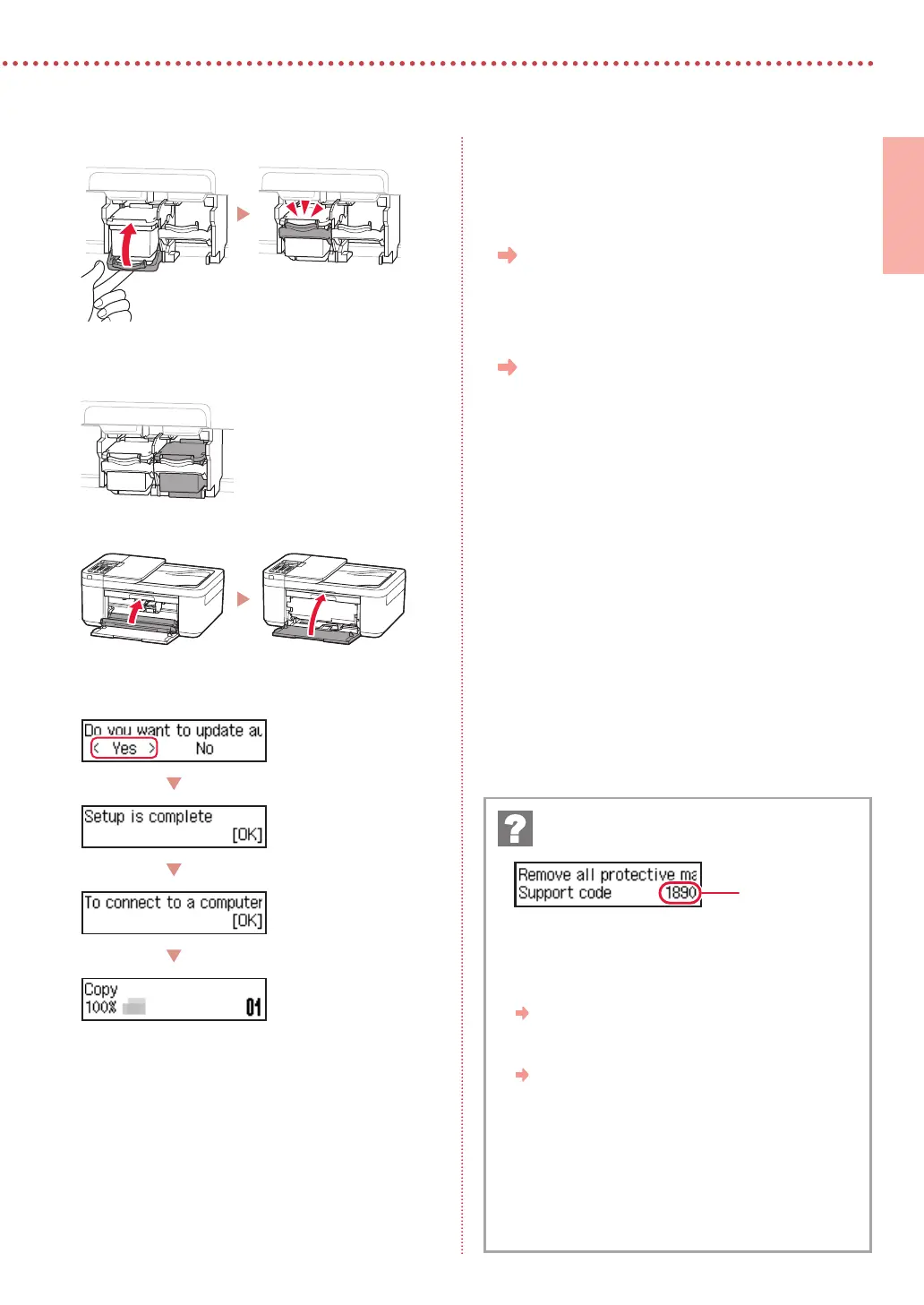
Raise the ink cartridge lock lever.
7
Repeat steps 3 to 6 and install the Black ink
cartridge on the right-hand side.
8
Close the paper output tray and the front cover.
9
Follow the on-screen instructions, and then
press the OK button.
Select the connection method that best matches how you
will use the printer.
•
To use the printer without connecting to any other
devices
Setup is now complete.
To set up a fax, see "Using Fax Function" on page
5.
•
To use the printer connecting to a computer or
smartphone
Proceed to the next page.
Check the support code, and then follow the
instructions if the displayed code is written below.
•
1890
Protective material remaining.
"2. Removing the Orange Tape" on page 1
•
168A
Ink cartridges are not installed correctly.
"4. Installing the Ink Cartridges" on page 2
For all other cases, refer to the Online Manual.
If an error message (support code) appears on
the screen
Support code






 To Next Page