EasyManua.ls Logo

Canon EOS 30 - Page 55

Canon EOS 30
108 pages
Print Icon
To Next Page IconTo Next Page
To Previous Page IconTo Previous Page
Loading...
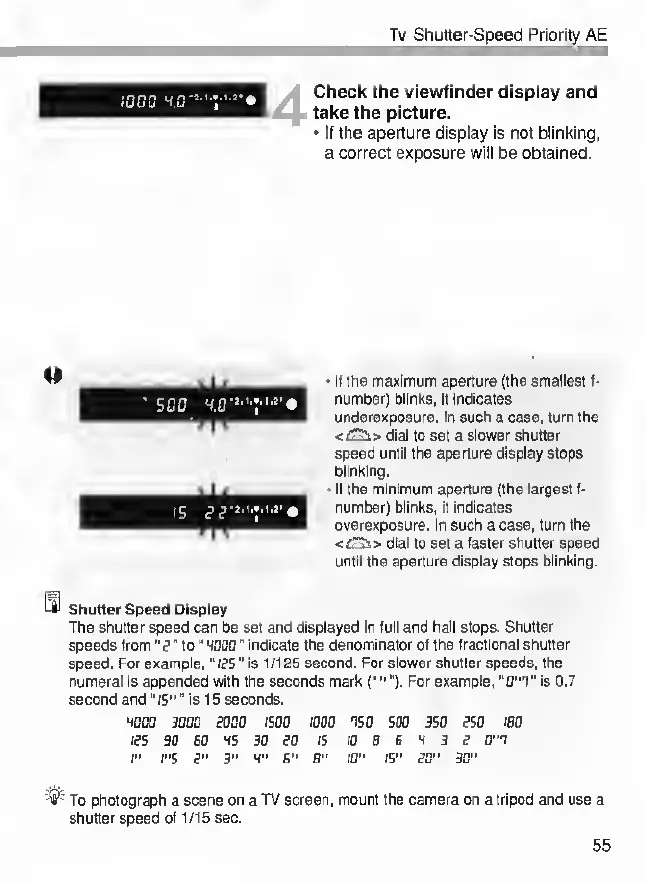
Tv
Shutter-Speed
Priority
AE
Check
the
viewfinder
display
and
take
the
picture.
•
If
the
aperture
display
is
not
blinking,
a
correct
exposure
will
be
obtained.
•
If
the
maximum
aperture
(the
smallest
f-
number)
blinks,
it
indicates
underexposure.
In
such
a
case,
turn
the
</T?t>
dial
to
set
a
slower
shutter
speed
until
the
aperture
display
stops
blinking.
•
If
the
minimum
aperture
(the
largest
f-
number)
blinks,
it
indicates
overexposure.
In
such
a
case,
turn
the
<jCs>
dial
to
set
a
faster
shutter
speed
until
the
aperture
display
stops
blinking.
LSI
Shutter
Speed
Display
The
shutter
speed
can
be
set
and
displayed
in
full
and
half
stops.
Shutter
speeds
from
”F
’’
to
“
WOOD"
indicate
the
denominator
of
the
fractional
shutter
speed.
For
example,"
fFS
”
is
1
/125
second.
For
slower
shutter
speeds,
the
numeral
is
appended
with
the
seconds
mark
(.).
For
example,
“0"T"
is
0.7
second
and
“15""
is
15
seconds.
iooo
3000
food
jsoo
iooo
os
o
s
do
3S0
fsc
/so
les
90
SO
WS
30
SO
IS
10
B
6
4
3
F
0"0
I"
rs
F"
3"
W"
6"
B"
10"
IS"
SO"
30"
-
<
i
>
~
To
photograph
a
scene
on
a
TV
screen,
mount
the
camera
on
a
tripod
and
use
a
shutter
speed
of
1/15
sec.
55