EasyManua.ls Logo

Canon EOS 30 - Auto Exposure Bracketing (AEB)

Canon EOS 30
108 pages
Print Icon
To Next Page IconTo Next Page
To Previous Page IconTo Previous Page
Loading...
^Auto
Exposure
Bracketing
(AEB)
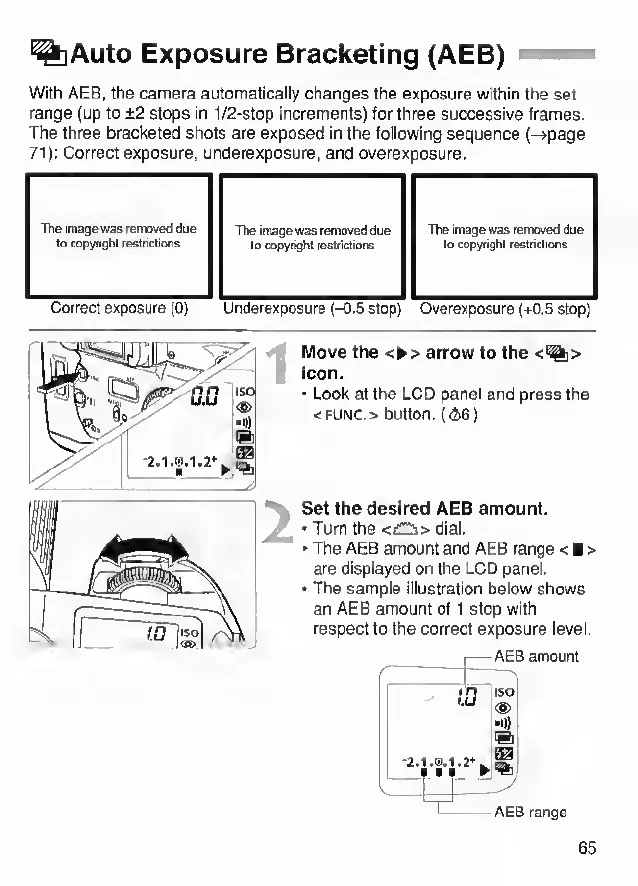
With
AEB,
the
camera
automatically
changes
the
exposure
within
the
set
range
(up
to
±2
stops
in
1/2-stop
increments)
for
three
successive
frames.
The
three
bracketed
shots
are
exposed
in
the
following
sequence
(-+page
71):
Correct
exposure,
underexposure,
and
overexposure.
The
image
was
removed
due
to
copyright
restrictions
The
image
was
removed
due
to
copyright
restrictions
The
image
was
removed
due
to
copyright
restrictions
Correct
exposure
(0)
Underexposure
(-0.5
stop)
Overexposure
(+0.5
stop)
Move
the
<
►
>
arrow
to
the
<%>
icon.
•
Look
at
the
LCD
panel
and
press
the
<func>
button.
(<S6)
Set
the
desired
AEB
amount.
•
Turn
the
<£2i>
dial.
►
The
AEB
amount
and
AEB
range
<
■
>
are
displayed
on
the
LCD
panel.
•
The
sample
illustration
below
shows
an
AEB
amount
of
1
stop
with
respect
to
the
correct
exposure
level.
65