EasyManua.ls Logo

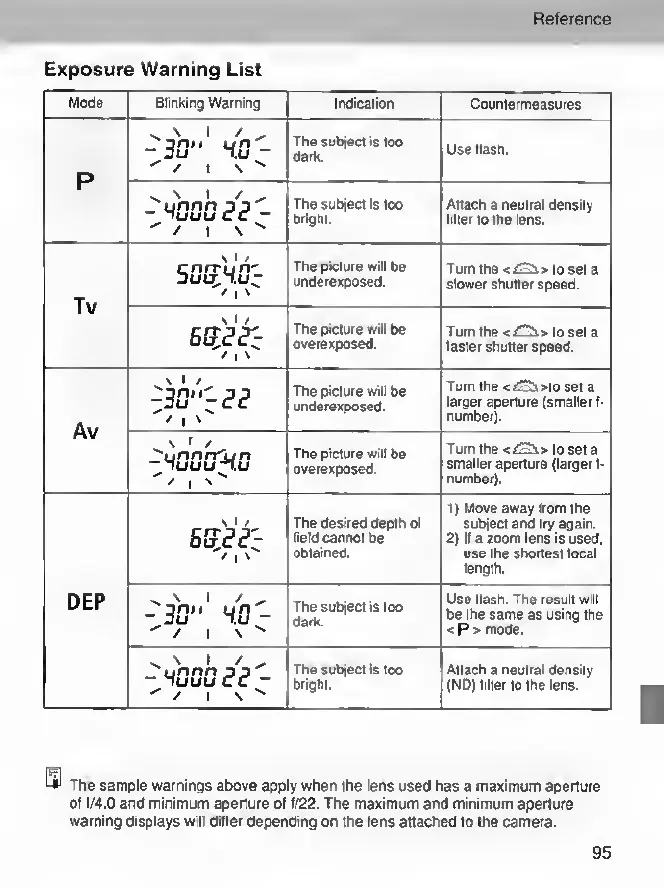
Canon EOS 30 - Exposure Warning List

Canon EOS 30
108 pages
Print Icon
To Next Page IconTo Next Page
To Previous Page IconTo Previous Page
Loading...
Reference
Exposure
Warning
List
Mode
Blinking
Warning
VGuu
(?<?
SOft'UTr
Turn
the
<t£5i>
to
set
a
smaller
aperture
(larger
I-
number).
The
picture
will
be
overexposed.
■
unnrrjjn
luuunu
1)
Move
away
from
the
subject
and
try
again.
2)
If
a
zoom
lens
is
used,
use
the
shortest
focal
length.
The
desired
depth
of
field
cannot
be
obtained.
Use
flash.
The
result
will
be
the
same
as
using
the
<
P
>
mode.
The
subject
is
loo
dark.
The
subject
is
too
bright.
Attach
a
neutral
density
(ND)
filter
to
the
lens.
Indication
Countermeasures
The
subject
is
too
dark.
Use
flash.
The
subject
is
too
bright.
Attach
a
neulral
density
filter
to
the
lens.
The
picture
will
be
underexposed.
Turn
the
<i£2i>
to
set
a
slower
shutter
speed.
The
picture
will
be
overexposed.
Turn
the
<£2±>
to
set
a
faster
shutter
speed.
The
picture
will
be
underexposed.
Turn
the
<£2s>to
set
a
larger
aperture
(smaller
f-
number).
The
sample
warnings
above
apply
when
the
lens
used
has
a
maximum
aperture
of
f/4.0
and
minimum
aperture
of
f/22.
The
maximum
and
minimum
aperture
warning
displays
will
differ
depending
on
the
lens
attached
to
the
camera.
95