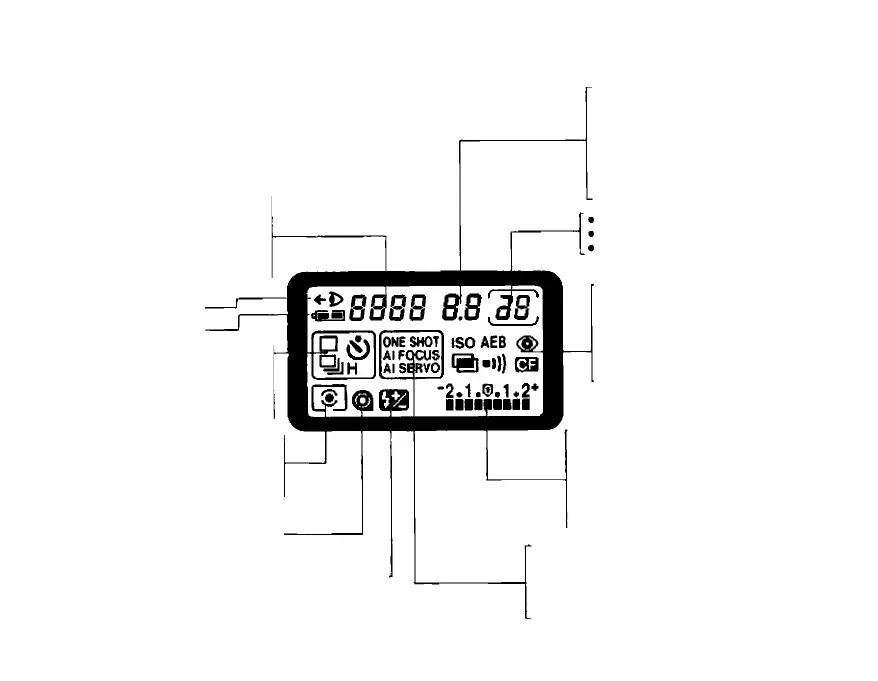
Display Panel
This camera uses a large liquid crystal display
panel to display shooting information. The diag
ram below shows all the information displayed
simultaneously for explanation only. The LCD
panel never actually appears like this.
• Shutter speed
• ISO film speed value
• dEP (Depth-of-field AE) indicator
• Custom Function No.
• CAL (Calibration) indicator
• Film rewind indicator
• Eye Controlled Focus
mode indicator-
• Battery check indicator
Film winding mode indicator
• Single exposure
• Continuous exposure
• High-speed continuous exposure
• Self-timer operation
Metering mode indicator
• Evaluative metering
• Spot metering
• Center-weighted average metering
Film condition indicator
Film-load check
Film rewind completion
Flash exposure compensation mode indicator
A minute amount of battery power is used for the display
even when the command dial is set to L
Aperture value
AEB bracketing amount
dEP point number
Custom function setting
Red-eye reduction function setting
Beeper mode setting
Calibration number
Film rewind indicator
Frame counter
No of preset multiple exposures
No of completed multiple exposures
ISO indicator
Auto exposure bracketing mode
indicator
Red-eye reduction mode indicator
Multiple exposure mode indicator
Beeper mode indicator
Custom function mode indicator
Exposure display
• Exposure compensation amount
• Metered manual exposure indicator
• AEB bracketing amount
• Flash exposure compensation amount
• Red-eye reduction lamp operation
• Film rewind indicator
Focus mode indicator
• One-shot AF
• Al Focus AF
• Al Servo AF
• Manual focus (all AF indicators extinguished)



 To Next Page