70
1
2
3
4
Introduction
Contents at
a Glance
Downloading
Images
Camera
Settings
Remote
Shooting
Reference
Preferences
Index
Registering Background Music to a Camera Memory Card
You can register WAV-format music files, saved to your computer, to the
camera’s memory card as background music. Registered background
music can be played together with a Video Snapshot Album or
slideshow played on the camera.
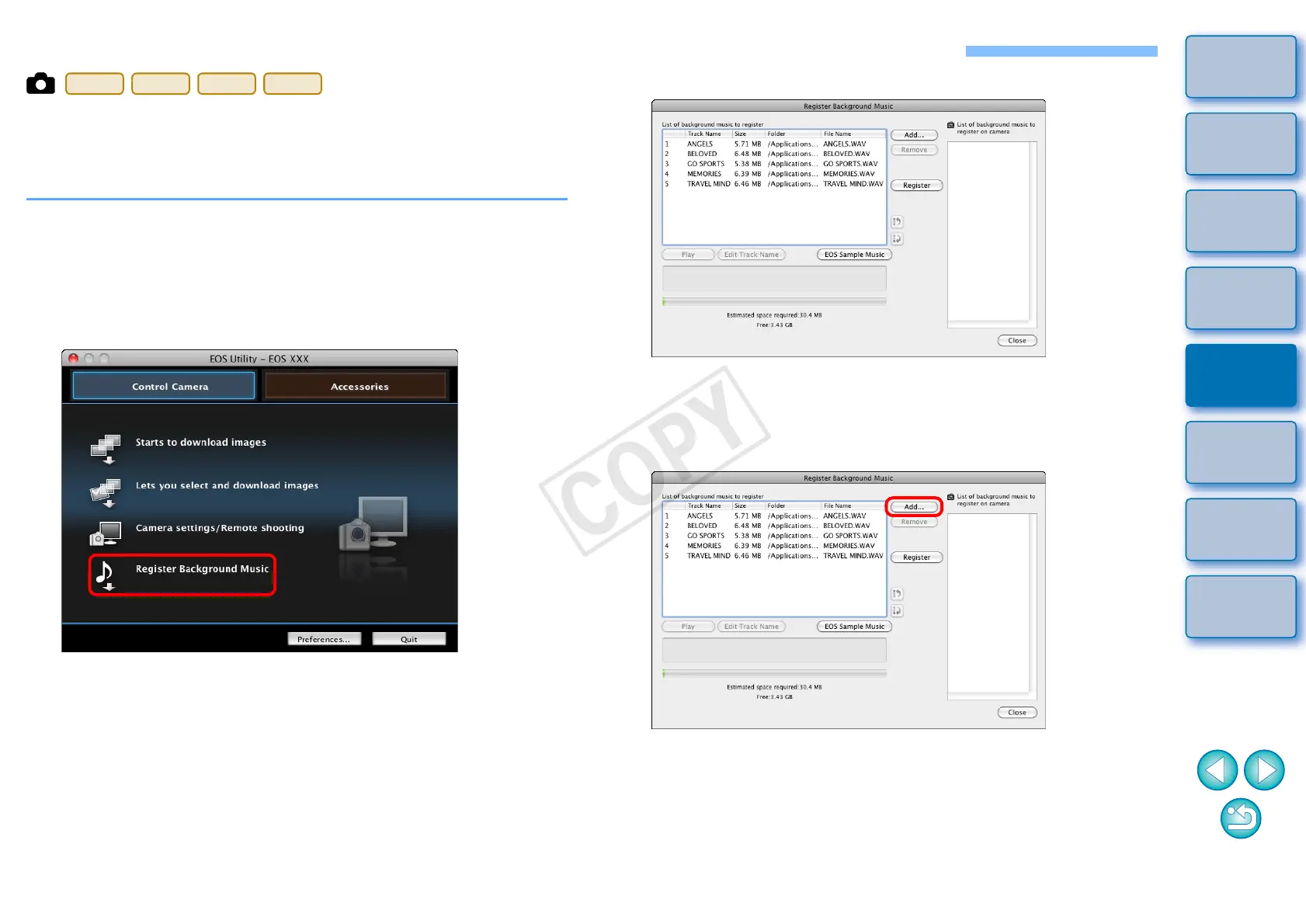
1
Connect your camera and computer, and then start
EU (p.5).
O If your camera and computer are not connected, [Register
Background Music] is not displayed.
2
Click [Register Background Music].
¿ The [Register Background Music] window appears.
O When the [EOS Sample Music] folder is installed to your
computer, five tracks appear in [List of background music to
register] the first time as EOS Sample Music.
O When the camera is in movie shooting mode, registering
background music is not possible.
3
Edit [List of background music to register].
Adding New Music Files
O Click the [Add] button, select a music file in the [Open] dialog box
that appears, and then click the [Open] button.
¿ A music file is added to [List of background music to register].
O You can also directly drag and drop a music file saved anywhere
in your computer to add it to [List of background music to
register].
O Music can be added only one track at a time.
O A total of 20 tracks can be added, each up to 29 minutes 59
seconds long.










 To Next Page