7171
1
2
3
4
Introduction
Contents at
a Glance
Downloading
Images
Camera
Settings
Remote
Shooting
Reference
Preferences
Index
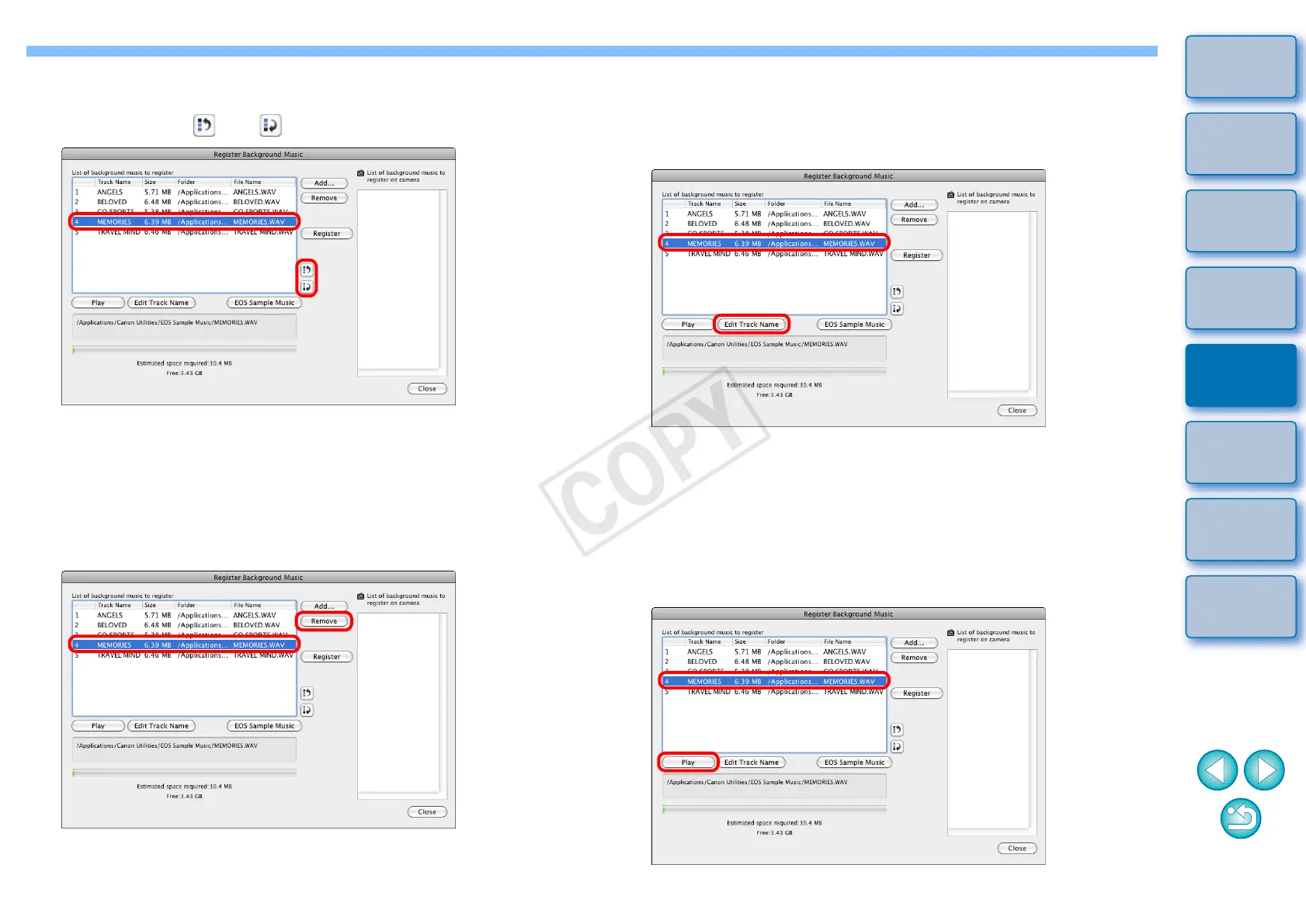
Changing the Playback Order of Music Files
O Select a music file in [List of background music to register], and
then click the [ ] or [ ] button.
¿ The order of the music files changes.
O You can also directly drag and drop music files within the [List of
background music to register] to change the order.
Deleting Music Files
O Select a music file in [List of background music to register], and
then click the [Remove] button.
¿ The music file is deleted from [List of background music to
register].
Editing Track Names of Music Files
O Select a music file in [List of background music to register], click
the [Edit track Name] button and enter a track name up to 25
characters (single-byte). Then, click the [OK] button.
¿ The track name for the music file changes.
O You can also display the [Edit Track Name] dialog box by
double-clicking a music file in the [List of background music to
register].
Playing Music Files
O Select a music file in [List of background music to register], and
then click the [Play] button.
¿ The music file plays.










 To Next Page