Using the Quick Control Screen
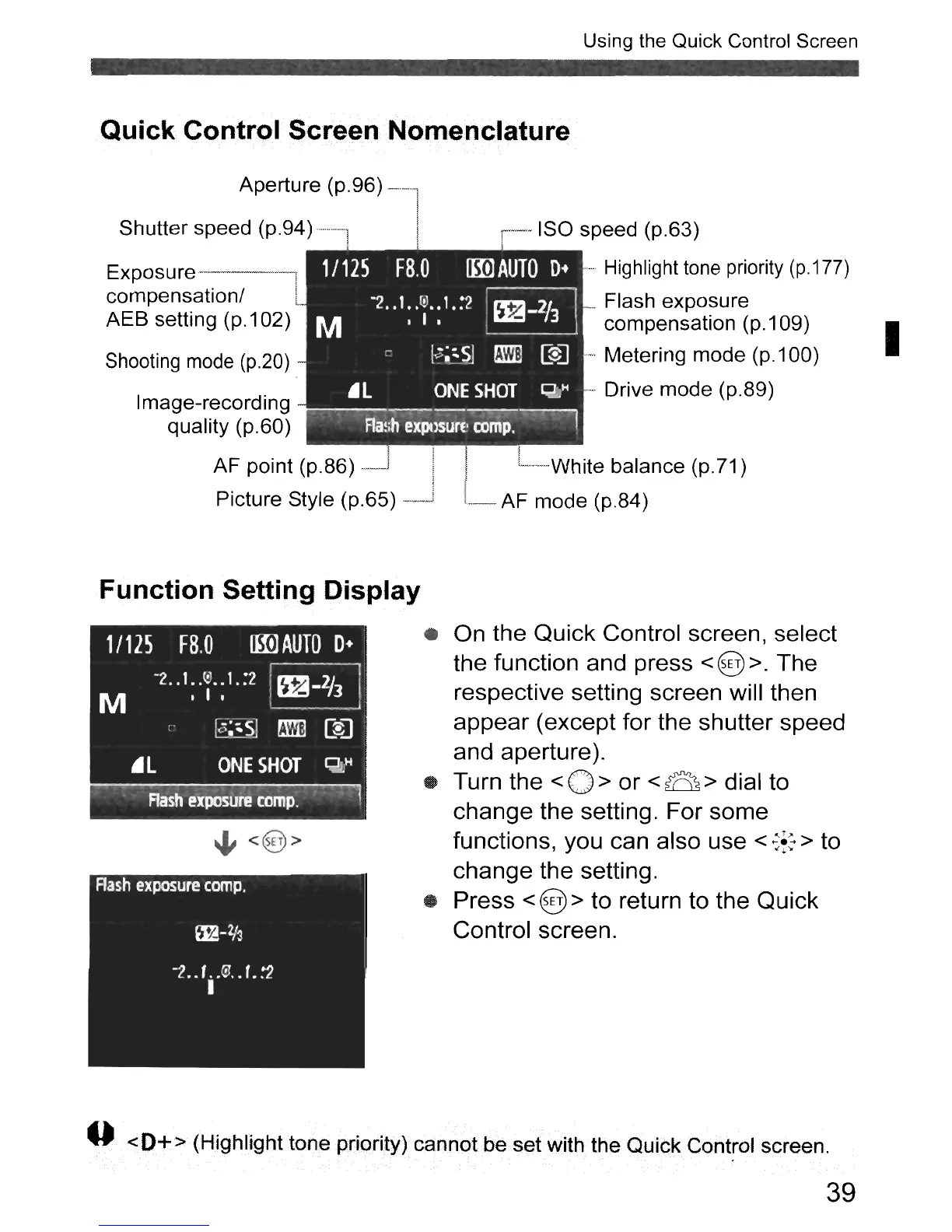
Quick Control Screen Nomenclature
1/125
F8.0
lmJAUTO
D+
-2
..
1.
.rv
..
1.:2
~
M
.1.
~
r
19;~~5J
~
[$J
.L
ONE
SHOT
Q2,H
Aa~;il
eXPllsun'cornp.
~
Aperture (p.96)
~-~.
Shutter speed (p.94
)···········1
Exposu
re
---------,
compensation/
AEB setting
(p.1
02)
Shooting
mode
(p.20)
Image-recording
quality (p.60)
AF point (p.86)
-~
Picture Style (p.65)
--ISO
speed (p.63)
.,.
Highlight
tone
priority (p.177)
_Flash exposure
compensation
(p.1
09)
. Metering mode
(p.1
00)
Drive mode (p.89)
.
L······White
balance (p. 71)
L
AF
mode (p.84)
I
Function Setting Display
• On the Quick Control screen, select
the function and press
< @ >. The
respective setting screen will then
appear (except for the shutter speed
and aperture).
• Turn the
<0>
or
<B>
dial to
change the setting. For some
functions, you can also use
<
~f:
> to
change the setting.
• Press
< @ > to return to the Quick
Control screen.
--
<0+> (Highlight tone priority)cannot be set with the Quick Control screen.
39












 To Next Page