Av: Aperture-Priority AE
.....
•
'..
•••
_'_ "
,.
l.
••
-
..'
In
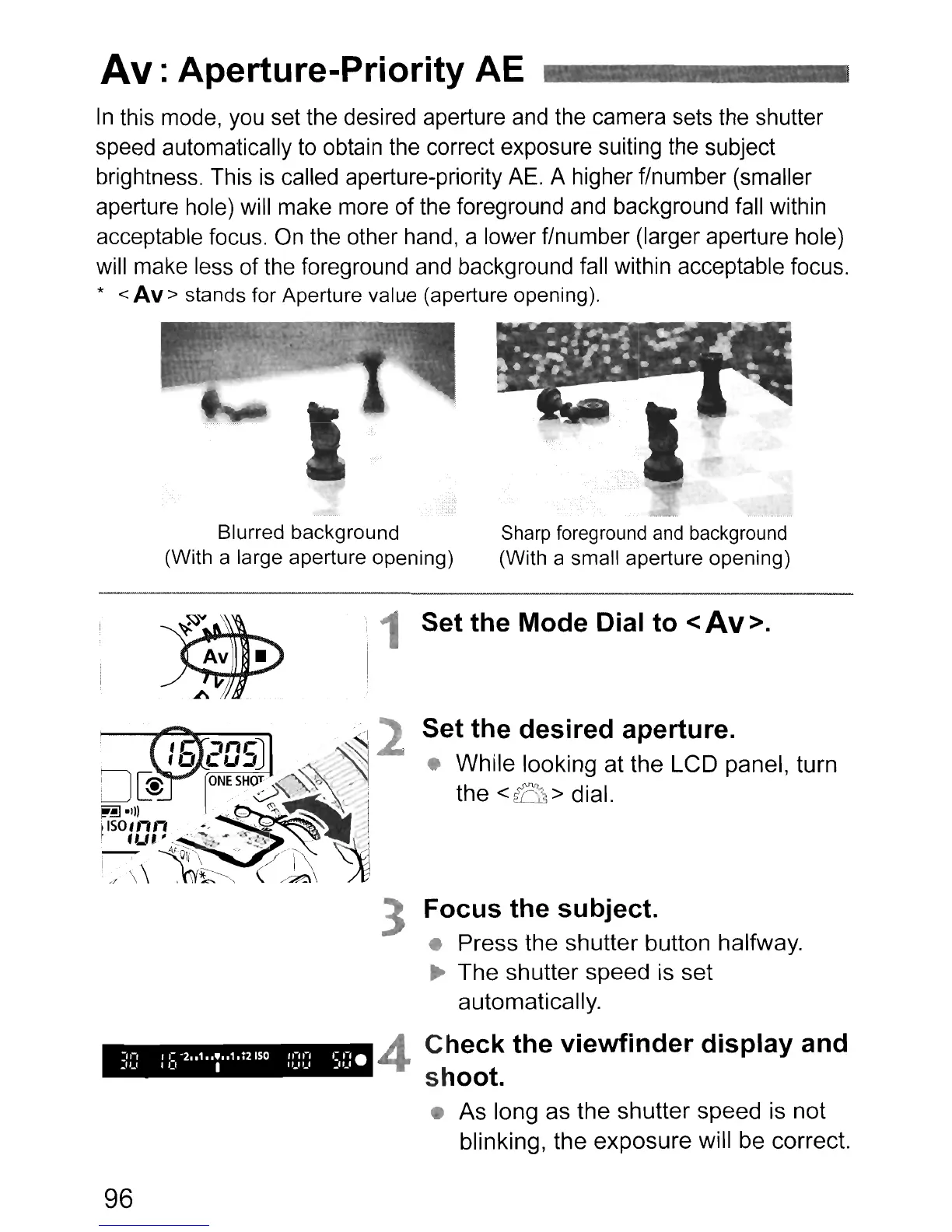
this mode, you set the desired aperture and the camera sets the shutter
speed automatically to obtain the correct exposure suiting the subject
brightness. This
is
called aperture-priority
AE.
A higher f/number (smaller
aperture hole) will make more of the foreground
and
background fall within
acceptable focus.
On
the other hand, a lower f/number (larger aperture hole)
will make less of the foreground and background fall within acceptable focus.
* <
Av
> stands for Aperture value (aperture opening).
Blurred background
(With a large aperture opening)
Sharp foreground and background
(With a small aperture opening)
1 Set the Mode Dial to <Av>.
Set the desired aperture.
While looking at the LCD panel, turn
the
<B>
dial.
4
96
3 Focus the subject.
• Press the shutter button halfway.
~
The
shutter speed is set
automatically.
Check the viewfinder display and
shoot.
•
As
long as the shutter speed is not
blinking, the
exposure
will be correct.












 To Next Page