M:
Manual Exposure
In
this mode, you set both the shutter speed and aperture as desired.
To
determine the exposure, refer to the exposure level indicator
in
the
viewfinder or use a commercially-available handheld exposure meter.
This method
is
called manual exposure.
* < M> stands for Manual.
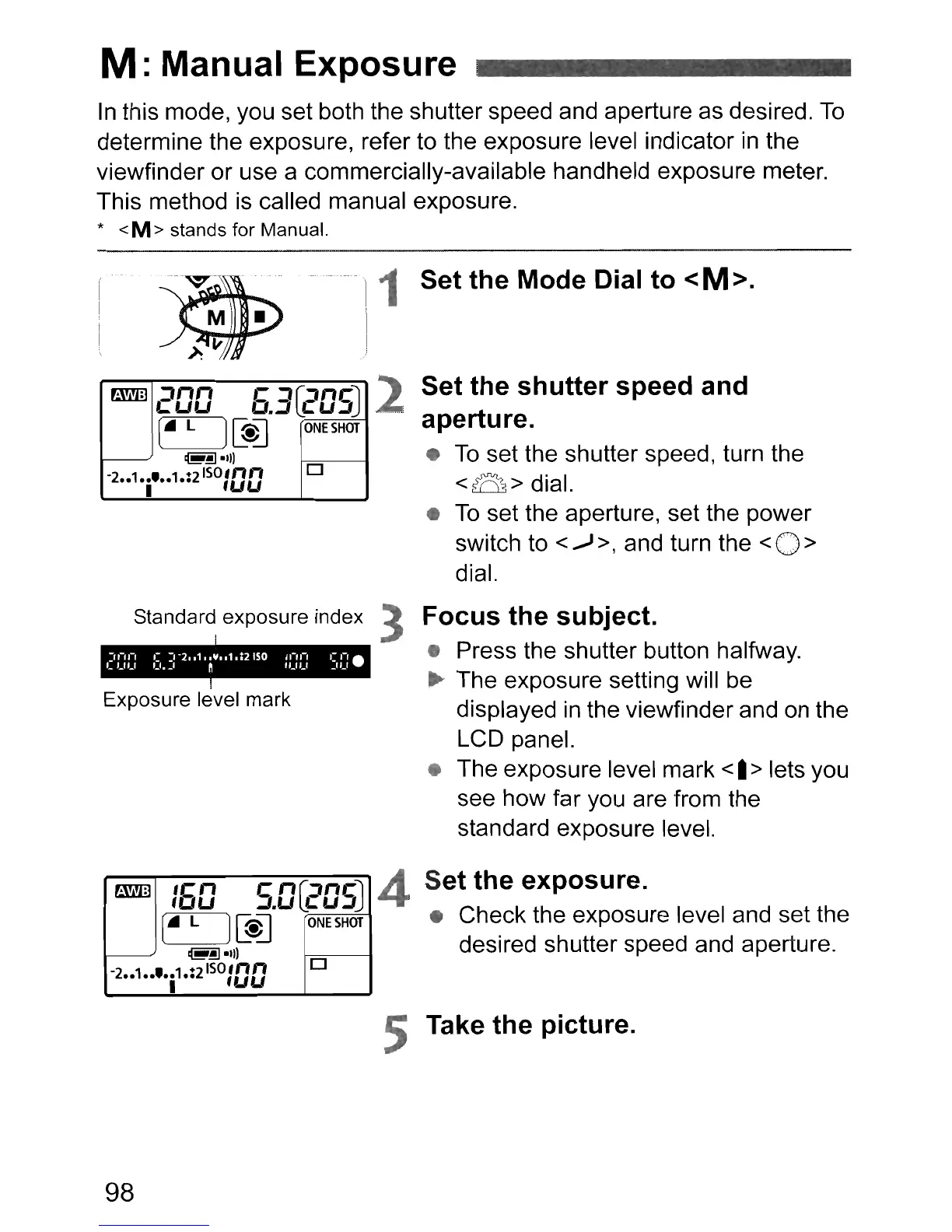
Exposure level mark
Set
the
shutter
speed
and
aperture.
•
To
set the shutter speed, turn the
<B>
dial.
•
To
set the aperture, set the power
switch to
<....J
>, and turn the <0 >
dial.
Focus
the
subject.
• Press the shutter button halfway.
~
The exposure setting will be
displayed
in
the viewfinder and
on
the
LCD panel.
• The exposure level mark
<.
> lets you
see how far you are from the
standard exposure level.
2
1 Set
the
Mode
Dial
to
<M>.
Standard exposure index 3
~
200
6.3
[2D5J
(.
L
)[s]
ONE
SHOT
@~.'"
-2
••
1
••
'
••
1.:2
Iso
,nn
0
I
'UU
~
:60
c
nG:tncJ
~.u
4:U~
(.
L
][@]
ONE
SHOT
@~.11l
-2
••1••
'.i
1.:2
ISO
:DD
0
4
Set
the
exposure.
• Check the exposure level and set the
desired shutter speed and aperture.
5 Take
the
picture.
98












 To Next Page