o Fully Automatic Shooting
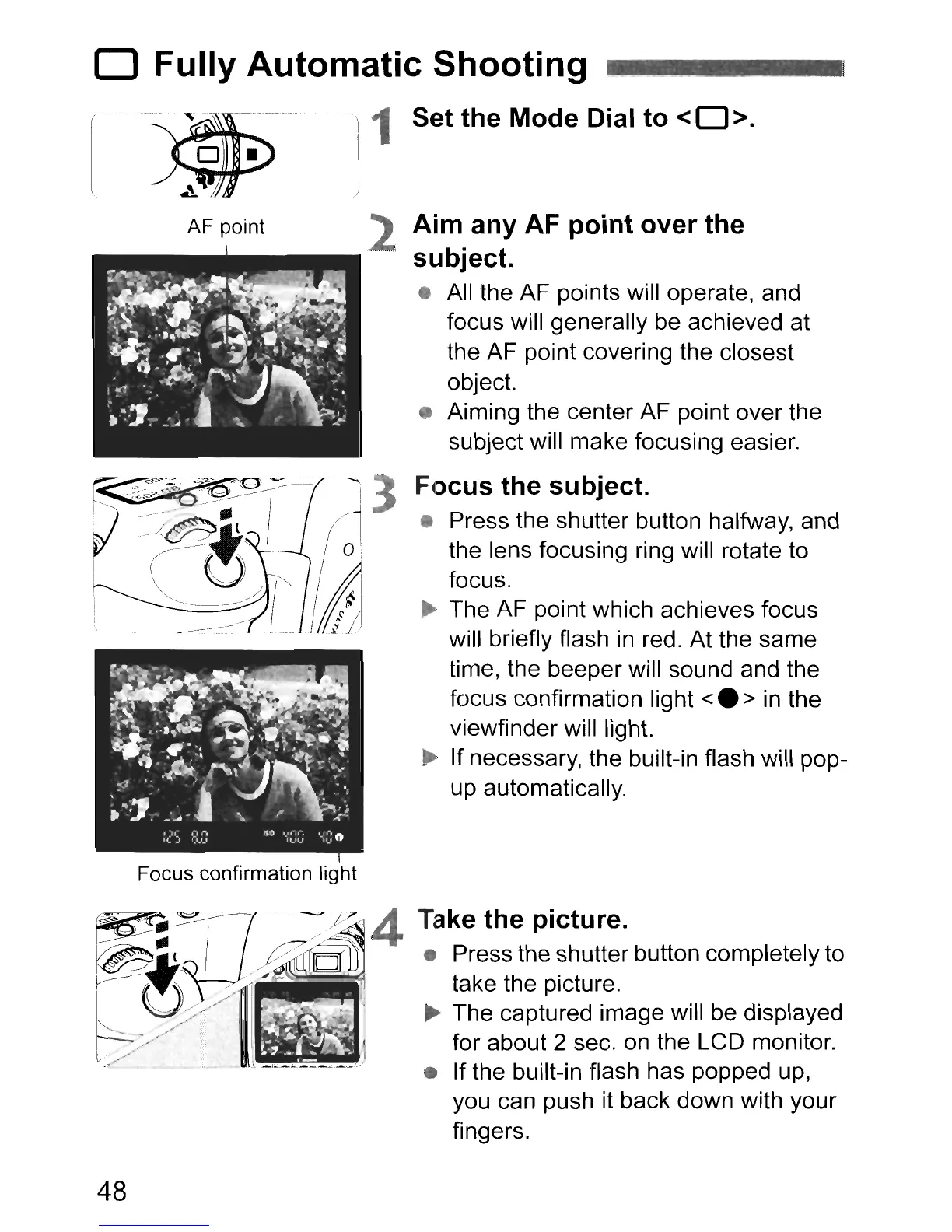
AF point
Focus confirmation light
48
1 Set the Mode Dial to
<0>.
2 Aim any AF point over the
subject.
• All the AF points will operate, and
focus will generally be achieved at
the AF point coveri
ng
the closest
object.
• Aiming the center AF point over the
subject will make focusing easier.
Focus the subject.
• Press the shutter button halfway, and
the lens focusing ring will rotate to
focus.
~
The AF point which achieves focus
will briefly flash
in
red. At the same
time, the beeper will sound and the
focus confirmation light
<.
>
in
the
viewfinder will light.
..
If necessary, the built-in flash will pop-
up automatically.
Take the picture.
• Press the shutter button completely to
take the picture.
..
The captured image will be displayed
for about 2 sec.
on
the LCD monitor.
• If the built-in flash has popped up,
you can push it back down with your
fingers.












 To Next Page