AF:
Selecting
the
AF Mode*
Select the AF mode suiting the shooting conditions or subject.
In
the
Basic Zone modes, the optimum AF mode
is
set automatically.
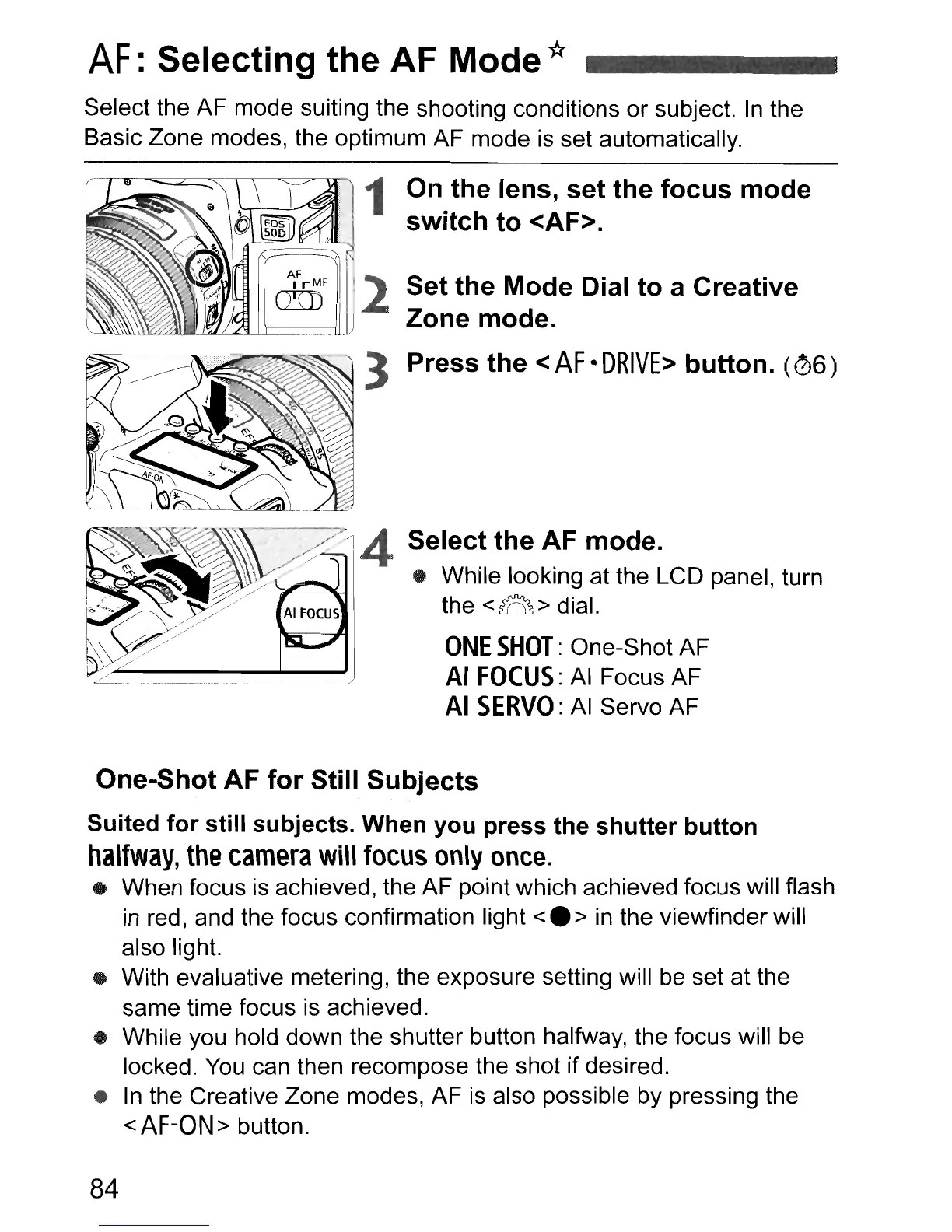
1 On
the
lens,
set
the
focus
mode
switch
to
<AF>.
Set
the
Mode Dial
to
a Creative
Zone mode.
Press
the
<
AF
•
DRIVE>
button.
(06)
One-Shot AF
for
Still
Subjects
Suited
for
still
subjects. When
you
press
the
shutter
button
halfway,
the
camera
will
focus
only
once.
• When focus
is
achieved, the AF point which achieved focus will flash
in
red
I and the focus confirmation light
<.
>
in
the viewfinder will
also light.
• With evaluative metering, the exposure setting will be set at the
same time focus
is
achieved.
• While you hold down the shutter button halfway, the focus will be
locked.
You
can then recompose the shot if desired.
•
In
the Creative Zone modes, AF is also possible by pressing the
<AF-ON>
button.
84












 To Next Page