EasyManua.ls Logo

Canon F-10 - 1. Ordinary Calculations; 1-1. Addition and Subtraction; 1-2. Multiplication; 1-3. Division

Canon F-10
16 pages
Print Icon
To Next Page IconTo Next Page
To Previous Page IconTo Previous Page
Loading...
Il. CALCULATION
1.
Ordinary Calculations
,.,
.
Addition
and
Subtraction
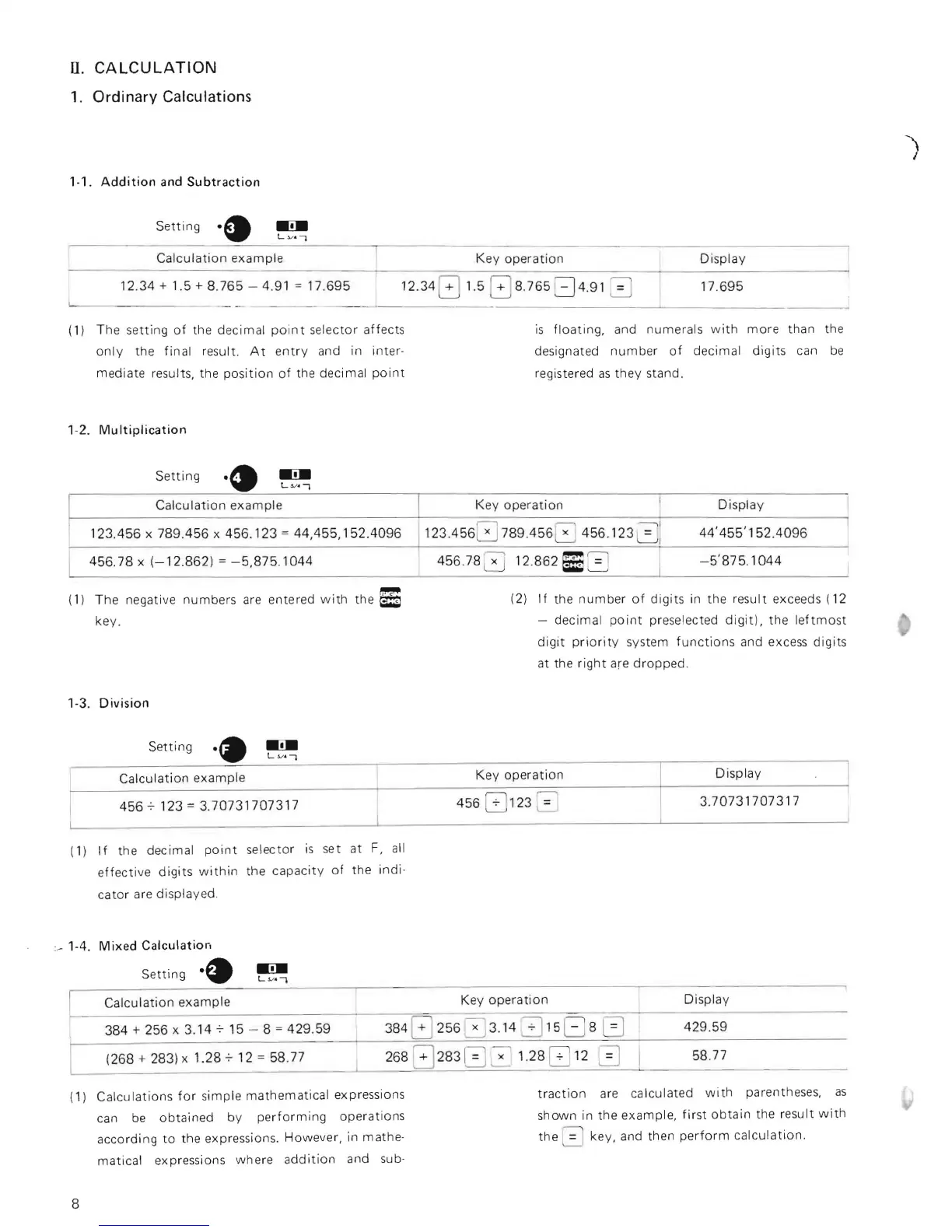
Setting
·EI
(1)
Calculation
examp
le
12.34
+ 1
.5
+ 8.
765
-
4.9
1 =
17.695
1
2.34
G
_
___
- - -
_0
-
__
-
The setting
of
the decimal
poin
t
se
l
ector
affects
onl y the final result.
At
entry
and in inter-
mediate results, the
position
of
the decimal
point
Key
operation
Display
1.5
8
8
.
765
::=J4
.91 0
17.
695
is
floating,
and numerals
with
more
than
designated
numb
er
of
decimal
digits
can
registered
as
they
stand.
the
be
' -2.
Multiplication
Setting
~
L.v
.,
Calculation
e
xamp
le
Key operati on
Display
12
3.456
x
789.456
x
456.123
=
44,455,152.4096
123.4
5
6
0
789.456
~
456.123
a l
44'
455'
152.4096
456.78
x
(-
12.862) =
-5,8
75.1044
456.
78
a 12.
862
D 3 I
-
5'875.1044
Ke
y
operation
Di
sp
la
y
Calculation example
~------------------
----
---------=~~~---==-
~=-
-==--------
------------
384 + 256 x 3.
14715
- 8 =
429.59
384 G
256
0 3. 14 3
1
5 G 8
0
429.59
~
(1)
Th
e negative numbers are entered
wi
th the
~
(2)
If
the
number
of
digits
in the result exceeds
(12
key
.
- decimal
point
preselected
digit),
the
leftmost
digit
prior
ity
system
functions
and excess digits
at the r
ight
are dropped.
'-3.
Division
Setting
Display
Key oper
ation
Calcu
lation
example
3.
70731707317
4567123
=
3.70731707317
456
G 123 2
(1)
If
the decimal
point
selector is
se
t at
F,
all
effective
digits
within
the
capacity
of
the indio
cator
are displayed.
:_ ' -4.
Mixed
Calculation
Settin
g
._
58.77
(268
+ 283) x 10
28712
= 58.77
(1) Calculations
for
s
imple
mathematical exp
re
ssions
can
be
obtained
by
perfo
rming operations
according
to
the expressions. However, in mathe-
matical expr
ess
ions where
addition
and sub-
traction
are
ca
lculated
wi
th parentheses,
as
shown in the example,
fir
st
obtain
the result
with
the 0 key, and then
perform
calculation.
8
I

Related product manuals