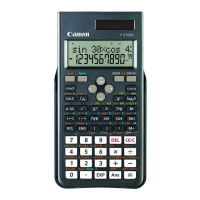
Need help?
Do you have a question about the Canon F-960SG and is the answer not in the manual?
Explains the meaning of various symbols displayed on the calculator screen.
Covers first-time setup, powering on/off, and auto power off features.
Guide to adjust screen contrast and select calculation modes.
Details on setting input/output formats, angle units, and display formats.
Procedures for checking current settings and resetting the calculator.
Information on input limits, cursor movement, and correcting input errors.
Explains LineIO vs. MthIO modes and how to insert/overwrite text.
Details on internal calculation precision, allowable ranges, and function limits.
Explains common error messages (Math, Stack, Syntax) and how to resolve them.
Explains calculation priority, precedence, and how the calculator handles intermediate steps.
Covers basic arithmetic, using memory variables, and answer memory.
How to perform fraction, percentage, and degree-minute-second calculations.
Performing calculations involving roots, powers, logarithms, and pi.
Converting angle units and performing trigonometric and hyperbolic functions.
Using functions for permutations, combinations, and generating random numbers.
Performing calculations in Decimal, Hexadecimal, Binary, and Octal systems.
Applying logical operations (Xnor, Ansor, Neg) and base transformations.
Selecting statistical types and entering sample data for analysis.
Accessing statistical calculation menus and interpreting results.
Practical examples of performing statistical calculations like regression.
Methods for solving systems of linear equations with two or three unknowns.
Solving quadratic and cubic polynomial equations.
Step-by-step guide for replacing the calculator's battery.
Important advice on usage, care, and safety precautions for the calculator.
Details on power supply, dimensions, weight, and operating temperature.
 Power
Power| power supply | Solar and Lithium battery (CR2032 x 1) |
|---|---|
| power consumption | DC 3.0V / 0.3mW |
| battery life | Approximately 3 years |
 Operating Environment
| usable temperature | 0° ~ 40°C |
|---|
 Weight and Dimensions
| dimension with cover | 171 (L) × 86 (W) × 18.75 (H) mm |
|---|---|
| dimension without cover | 168 (L) × 80 (W) × 14.5 (H) mm |
| weight with cover | 131 g |
| weight without cover | 94.5 g |

 To Next Page