2-2
Changing Modes
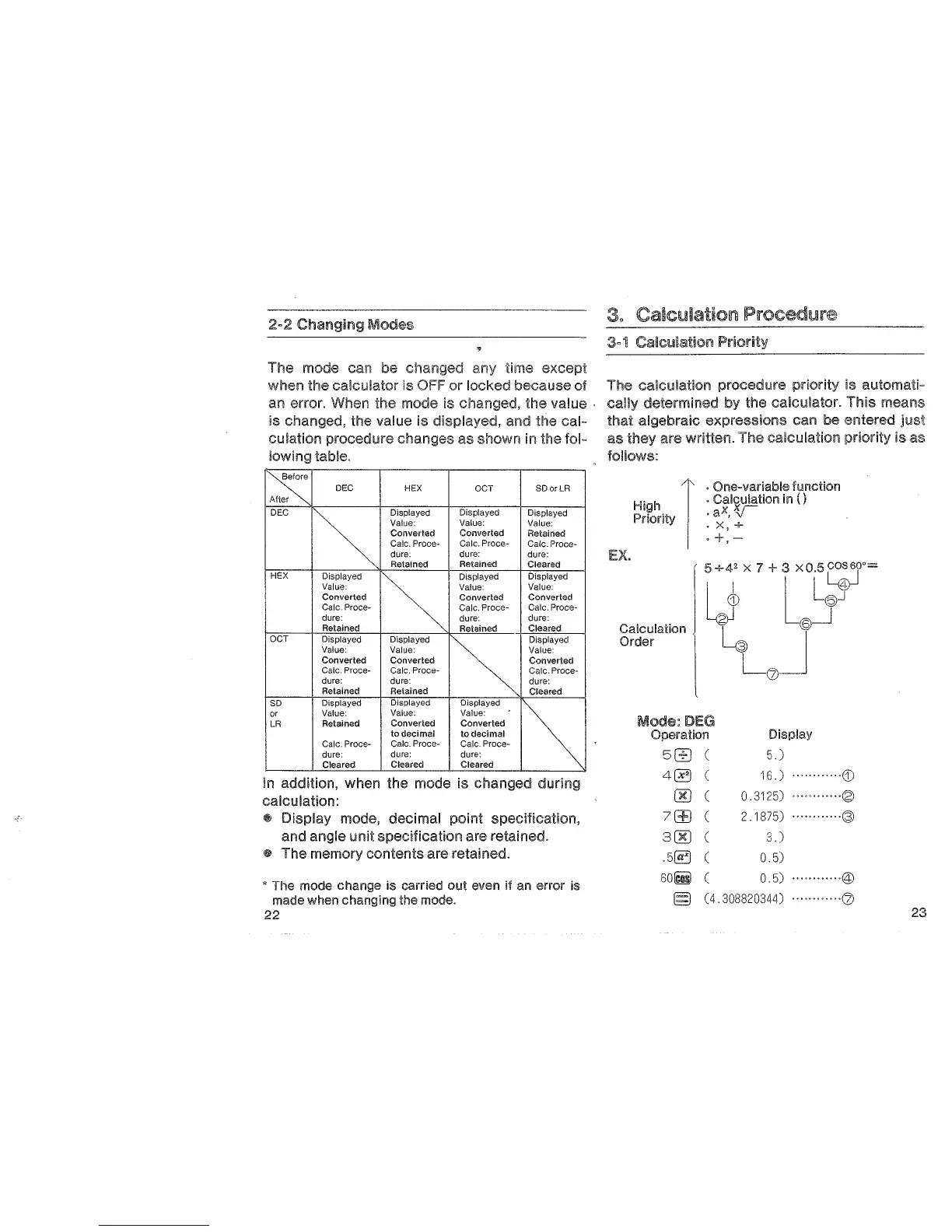
The mode can be changed any time except
when
the calculator is
OFF
or
locked because of
an
error. When the mode is changed, the value
is
changed, the value is displayed, and the cal-
culation
procedure changes as shown in the fol-
lowing table.
I~
DEC
HEX
OCT
SDorLR
r
DEC
~.
Displayed
Displayed
Displayed
Value:
Value:
Value:
Converted
Converted
Retained
Calc. Proce- Calc.
Proce-
Calc.
Proce-
dure: dure:
dure:
Retained Retained
Cleared
HEX
Displayed
~
Displayed Displayed
Value:
Value: Value:
Converted
Converted
Converted
Calc. Proce-
Calc. Proce-
Calc. Proce-
dure:
dure:
dure:
Retained
Retained
Cleared
OCT
Displayed Displayed
G
Displayed
Value:
Value: Value:
Converted Converted Converted
Calc. Proce- Calc. Proce-
Calc. Proce-
dure:
dure:
dure:
Retained Retained
Cleared
so
Displayed
Displayed Displayed
~
or
Value: Value:
Value:
LR
Retained
Converted
Converted
to decimal
to decimal
Calc. Proce- Calc. Proce- Calc. Proce-
dure:
dure: dure:
Cleared Cleared Cleared
in addition, when the mode is changed during
calculation:
~
Display mode, decimal point specification,
and angle unit specification are retained.
@ The memory contents are retained.
• The mode change is carried
out
even if an error is
made when changing the mode.
22
3, Calculation Procedure
The calculation procedure priority is automati-
cally determined by the calculator. This
means
that
algebraic expressions can be entered
just
as they are written. The calculation priority is as
follows:
EX.
High I
Priority I
. One-variable function
. Calculation in
()
.ax,v
oX,+
·+,~
G)
gj
Calculation
Order
5U+42
x 7 +
3LXOL.sr;r=
®_j
~
J
Mode:
DEG
Operation
5G]
4~
00
7(±)
300
LQJ
Display
5.)
16.)
············G)
0.3125)
············~
2.1875)
············@
3.)
.5~
0.5)
60iii)
0.5)
············@
§ ( 4. 308820344)
...........
·Ql
23


 To Next Page