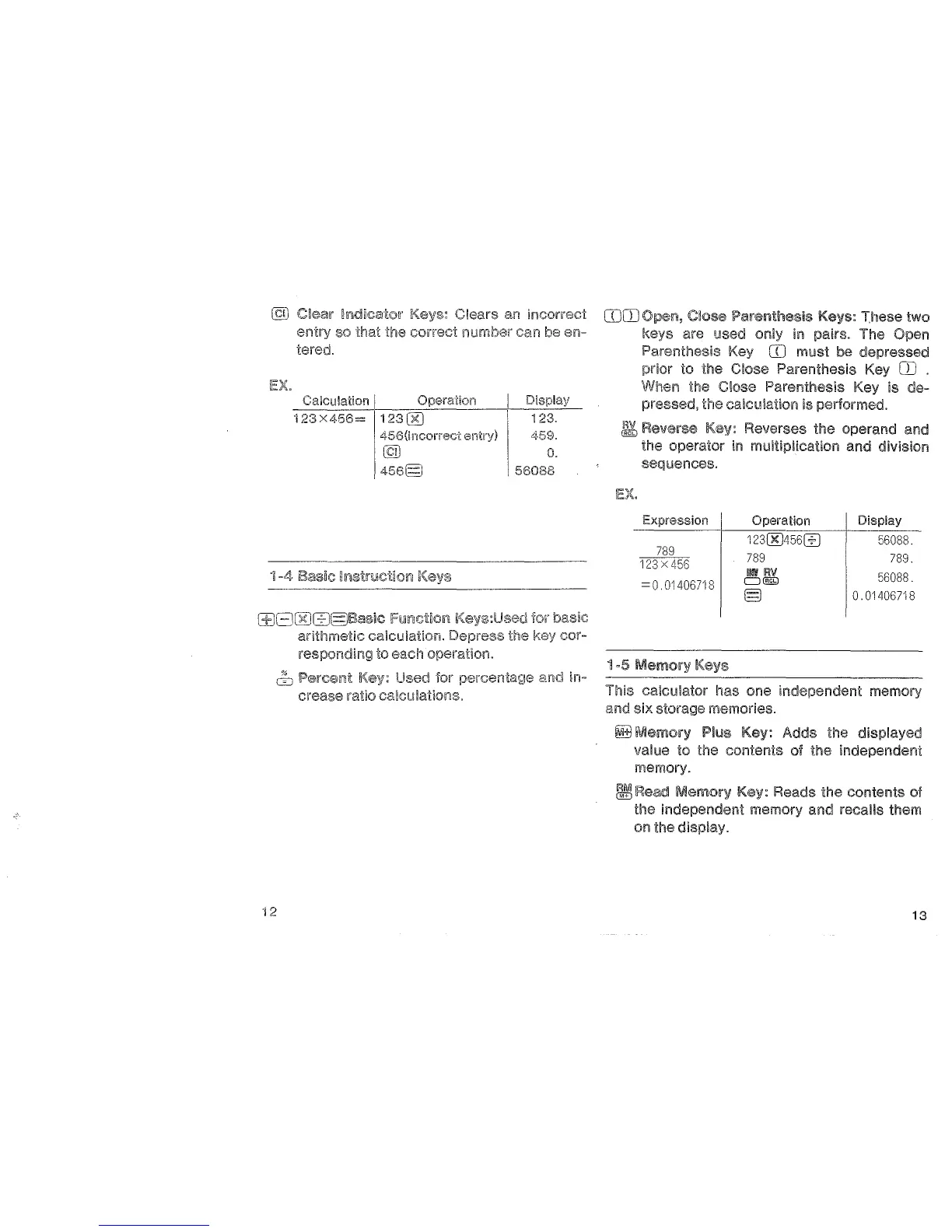
Clears
an
incorrect
entry
so that the correct
number
can be
en-
tered.
Calculation I Operation
123X456=
123[KJ
456(incorreci
entry)
l9l
456§
l±JGCKIG:J§Basic
FUJ!fictioi11
arithmetic calculation.
to each operation.
I Display
123.
I
459.
0.
\56088
& Percerilt Used
lor
""''e'"'"'"·l,::,
and in-
crease ratio calculations.
COOJ
Close Parenthesis Keys: These two
are used
in
pairs. The
Parenthesis
CO
must be depressed
prior
to the Close Parenthesis Key
OJ
.
When the Close Parenthesis Key is de-
pressed, the calculation is performed.
~
Reverse Reverses the operand and
the operator
in
multiplication and division
sequences.
Expression
Operation
Display
12300456ffi
56088.
789
789
789.
123
X
456
11!11
AV
56088.
=
0.
01406718
0@9
§
0.01406718
1-5
Memory
This calculator has one independent memory
and six storage memories.
~Memory
Pius Key: Adds the displayed
value
to the contents of the independent
memory.
1!JIR:ea~d
Memory
Key: Reads the contents of
the independent memory
and recalls them
on the
display.
13


 To Next Page