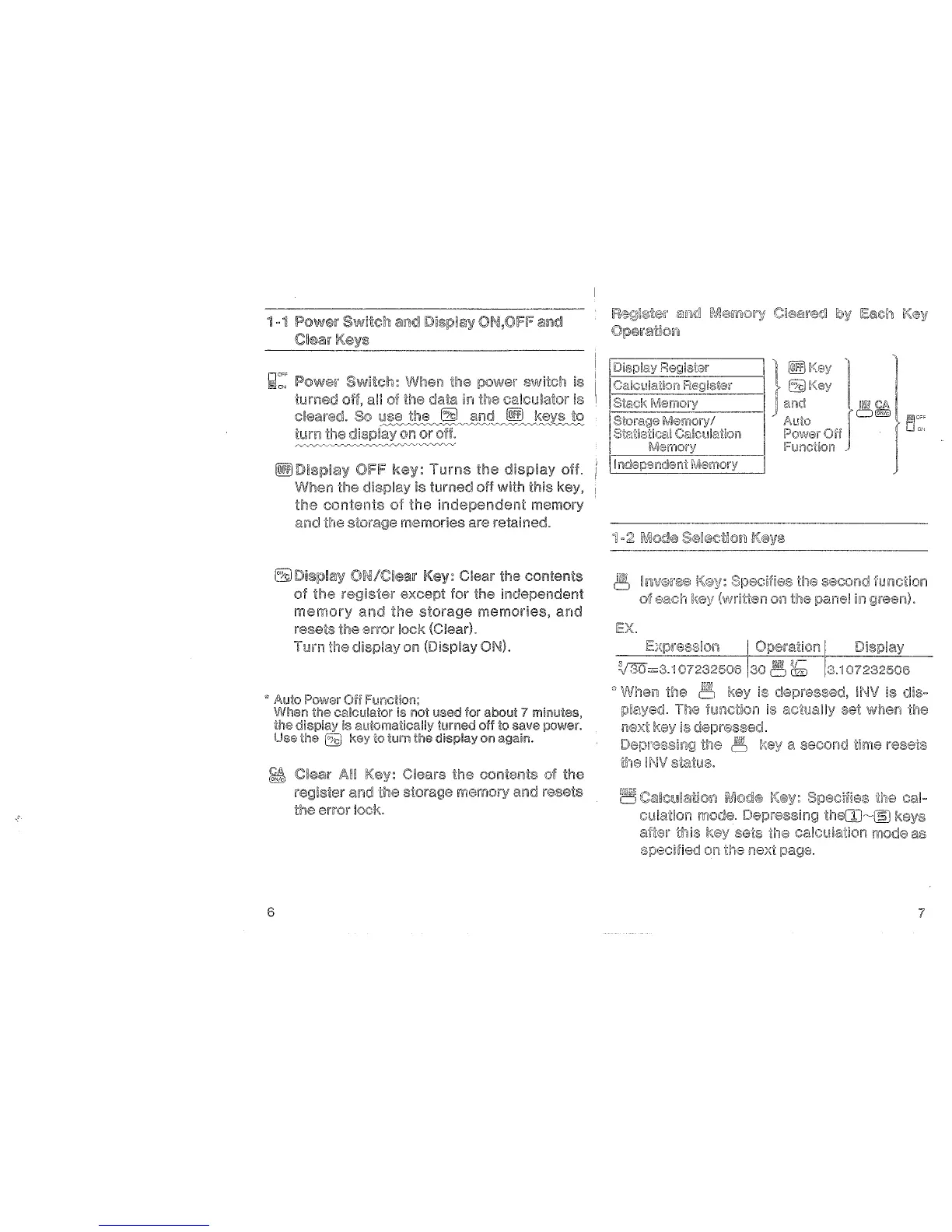
1 • 1
IPow\!llr
Swit(:a1
and
C~ear
Key!:!
~::
IPow~w
Swill:ch: When the power swach is
tumed
an
of the data in the caJcu!a!or is
c!eared. So
=~;:~."~"'/~~~~-~~-~-~s-~~
6
tum the
~
When the
the
contents
o·l
the
memory
and the storage memories are retained.
~
Oi"'!/Cirear Clear the contents
of
the
except for the inrlc:>n'"'"n"''m
memory
and
the
storage memories, and
rese~s
the error lock
on
7 minutes,
Clears the contents of the
rP.«]IC'J:lfRr and the
the error jock.
memory and resets
lEX.
~ruv®n~€01
oi!eact1
a second time resets
~
C5J~C~Jiarocio~~
U-le
cal-
cu~ation
mode.
the(JJ~~
after this sets the calcula1ion mode as
on
t11e
next
page.
7


 To Next Page