2. Hexadecimal/Octal
Calculations
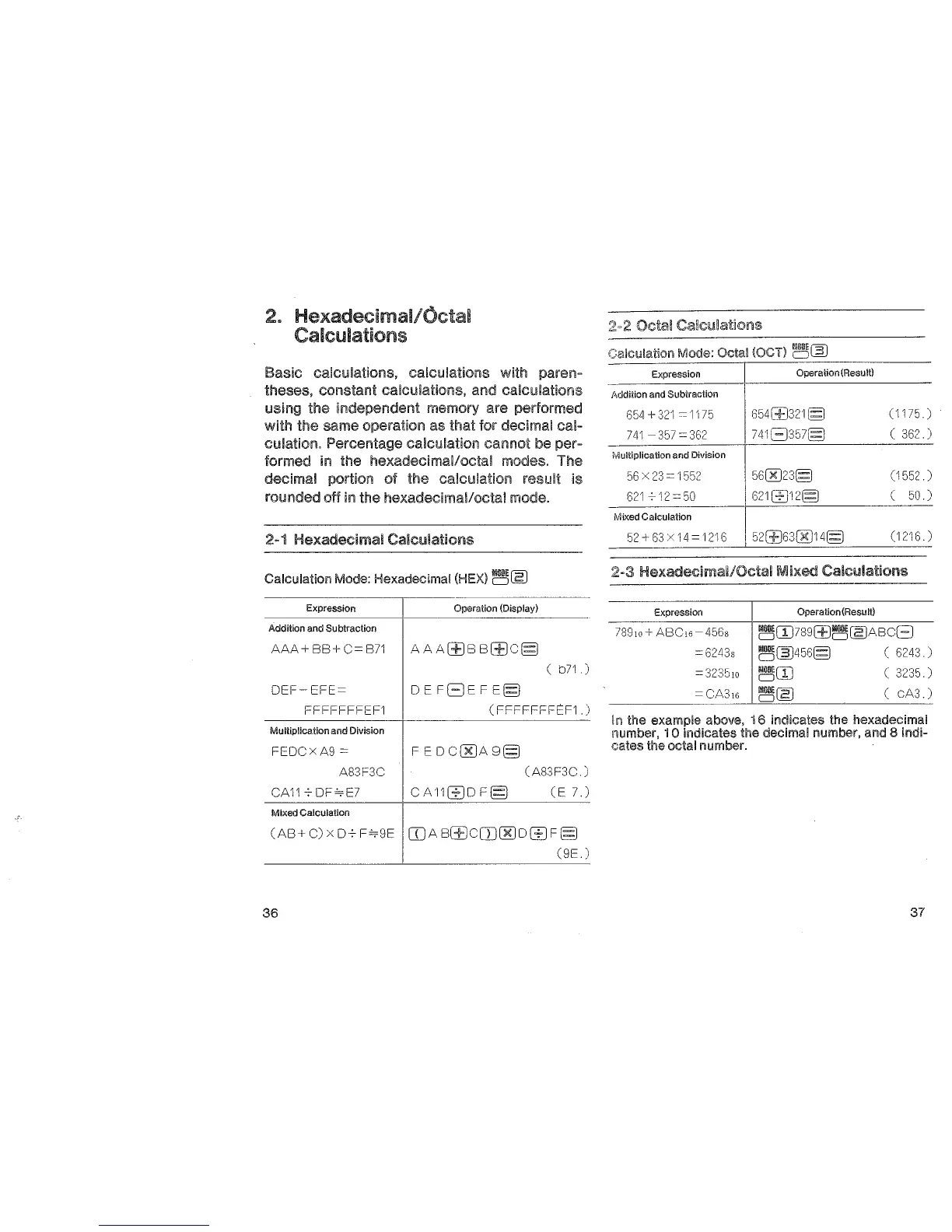
Basic calculations, calculations with paren-
theses, constant calculations, and calculations
using the independent memory are performed
with the same operation as that for decimal cal-
culation. Percentage calculation
cannot
be
per-
formed in
the hexadecimal/octal modes. The
decimal portion of the calculation result is
rounded off
in
the hexadecima!loctal mode.
2-1 Hexadecimal Calculations
Calculation Mode: Hexadecimal
(HEX)~~
Expression
Addition and Subtraction
AAA+
BB+
C=
871
DEF-EFE=
FFFFFFFEF1
Mulliplicaiion and Division
FEOCXA9=
A83F3C
CA117DF""'E7
Mixed Calculation
Operation (Display)
A
AA(±JB
B(±JC§
(
b71
DEFE)EFE§
(
FFFFFFFtcF1.)
FEDC00A9§
(A83F3C )
CA11G]D
F§
(E
7.)
(AB+C)x07F""'9E
II)AB(±JC[D00DG]F§
(9E
)
36
Calculation Mode: Octal !OCT)
~~
Expression I Operation(Result)
Addition and Subtraction
654
+
321
=
1175
654(±)321 §
(1175 )
741-357=362
741E)357§
(
362
)
Multiplication and Division
56
X
23
=
1552
560023§
(1552)
621712=50
621812§
(
50
)
Mixed Calculation
52+
63
X
14
=
1216
52(±)630014§
(1216 )
2-3
Hexadecimai/Octai
Mixed
Calculations
Expression
Operation(Result)
789Jo
+ ABC16-
456s
~(IJ789(±J~~P.BCE)
=
6243s
~~456§ ( 6243.)
=
323510
~rn
c
3235
)
=CA3,6
~~
(
cA3.)
In the example above, 16 Indicates the hexadecimal
number, 1 0 indicates the decimal number, and 8 indi-
cates
the octal number.
37


 To Next Page