EasyManua.ls Logo

Canon FTb - Page 30

Canon FTb
49 pages
Print Icon
To Next Page IconTo Next Page
To Previous Page IconTo Previous Page
Loading...
i
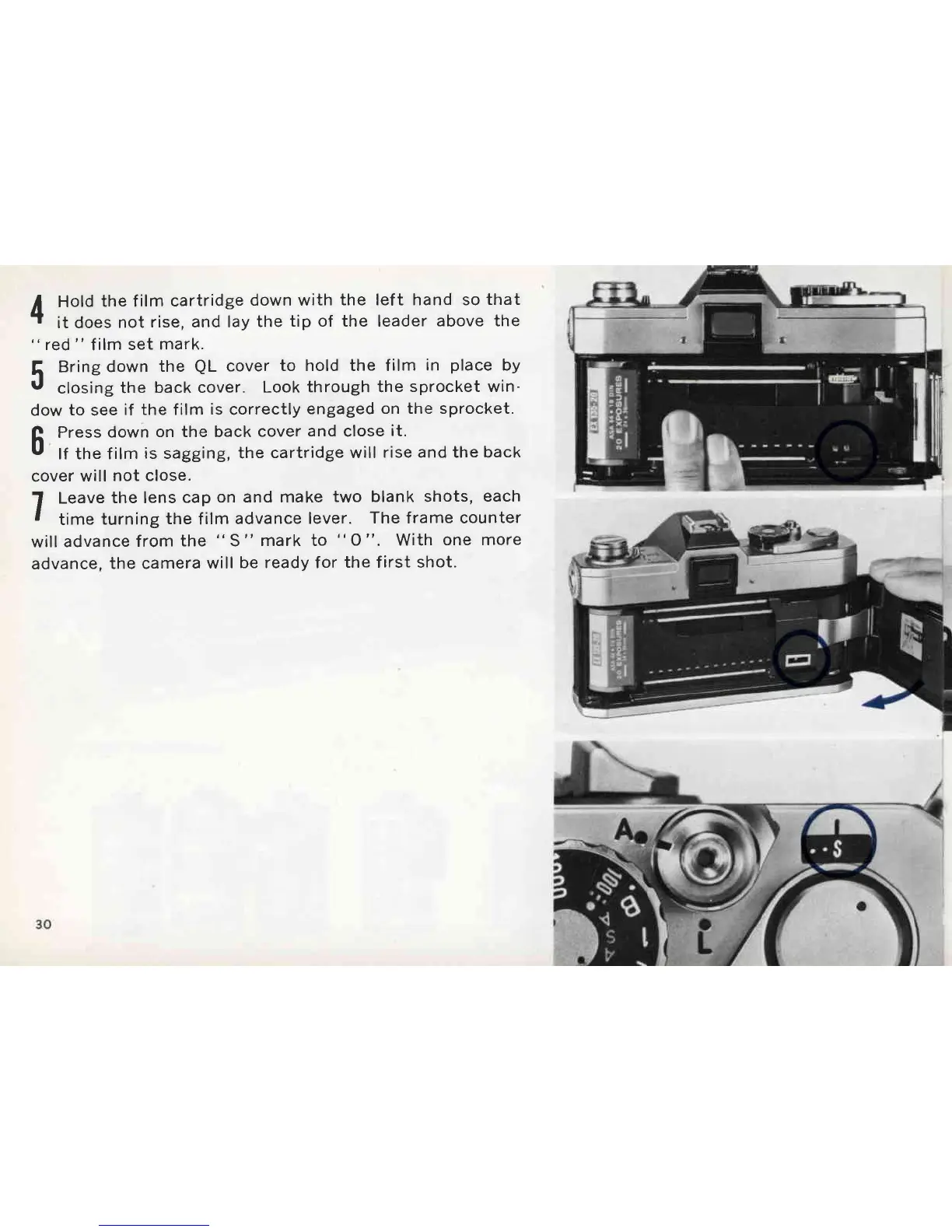
Hold
the f
ilm cartridge
down with
the left hand so
that
"1
it does
not
rise, and lay
the
tip of the leader
above the
"
red
"
f
ilm set
mark.
5
Bring
down
the
QL
cover
to hold the film
in
place
by
r,
closing
the
back cover.
Look
through the
sprocket win-
dow
to
see
if the film
is
correctly
engaged
on the sprocket.
A
Press
down
on the back
cover
and close
it.
u
lf the f
ilm
is
sagging,
the
cartridge will
rise and the back
cover
will
not close.
1
Leave
the lens
cap
on and make
two blank shots,
each
I
time
turning
the
film
advance
lever.
The frame counter
will
advance
from
the
"
S
"
mark to
"
O
".
With
one more
advance,
the camera
will
be ready for
the first shot.

Other manuals for Canon FTb

Related product manuals