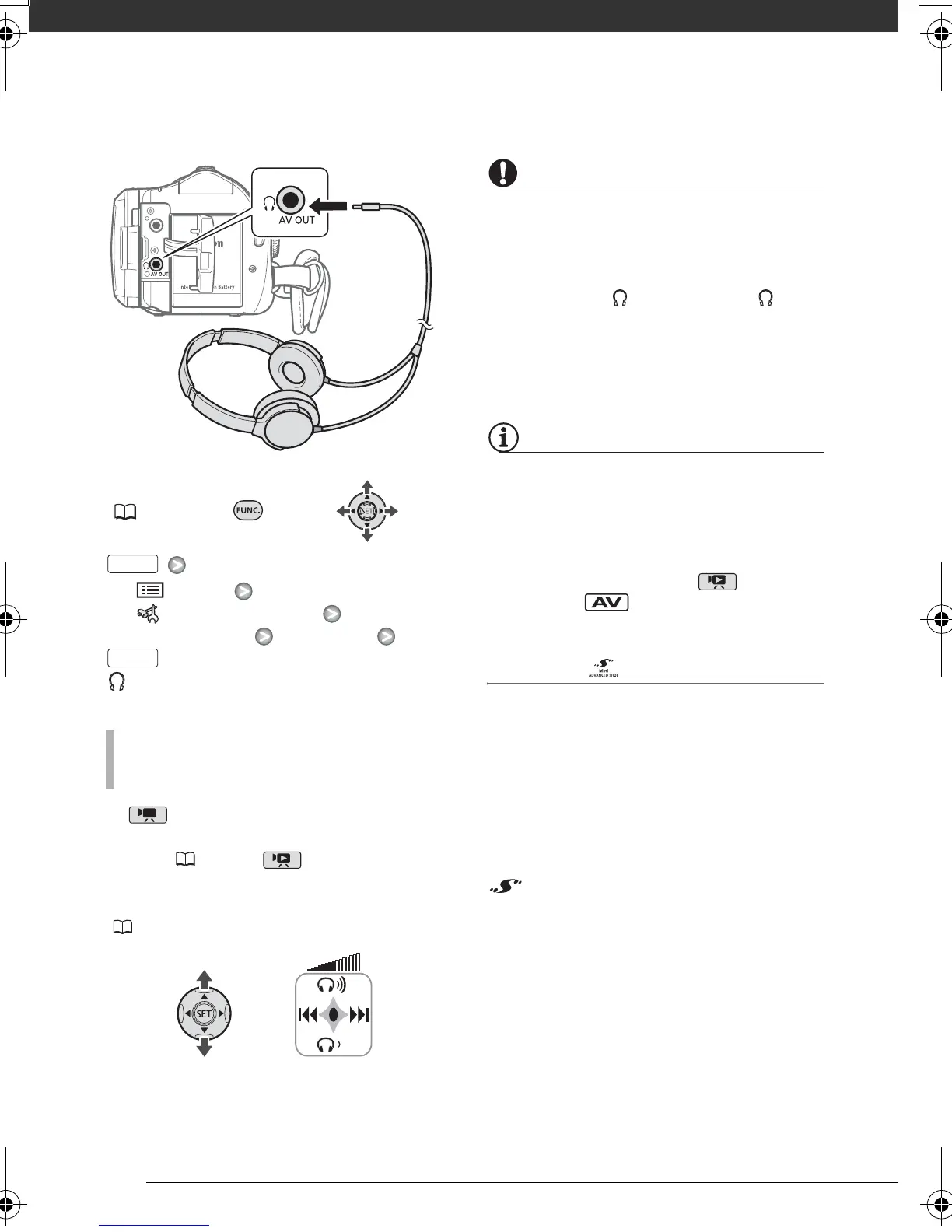
Video
50
FUNC.
( 24)
[ MENU]
[ SYSTEM SETUP]
[AV/PHONES] [PHONES]
appears.
In mode, adjust the volume of the
headphones with the [PHONES VOL.]
setting ( 91). In mode, adjust
the headphones volume the same way
you adjust the speaker’s volume
( 35).
IMPORTANT
• When using headphones, make sure
to lower the volume to an appropriate
level.
• Do not connect the headphones to
the AV OUT/ terminal if the icon
does not appear on the screen. If you
connect the headphones while the
terminal is set to AV output, only
noise will be output.
NOTES
• Use commercially available headphones
with a ∅ 3.5 mm minijack and a cable
no longer than 3 m.
• When you turn off the camcorder or
change the operating mode, the
[AV/PHONES] setting in mode will
return to [ AV].
Using the DM-100 Directional Stereo
Microphone
Retract the mini advanced shoe cover
and attach the optional DM-100
Directional Stereo Microphone to the
mini advanced shoe. For details, refer
to the instruction manual of the
microphone.
When a compatible accessory is
attached to the mini advanced shoe,
will appear on the screen.
TO ADJUST THE VOLUME OF THE
HEADPHONES
FUNC.
FUNC.
D128_PAL_E.book Page 50 Thursday, March 6, 2008 7:53 PM










 To Next Page