External Connections
74
Connection Diagrams
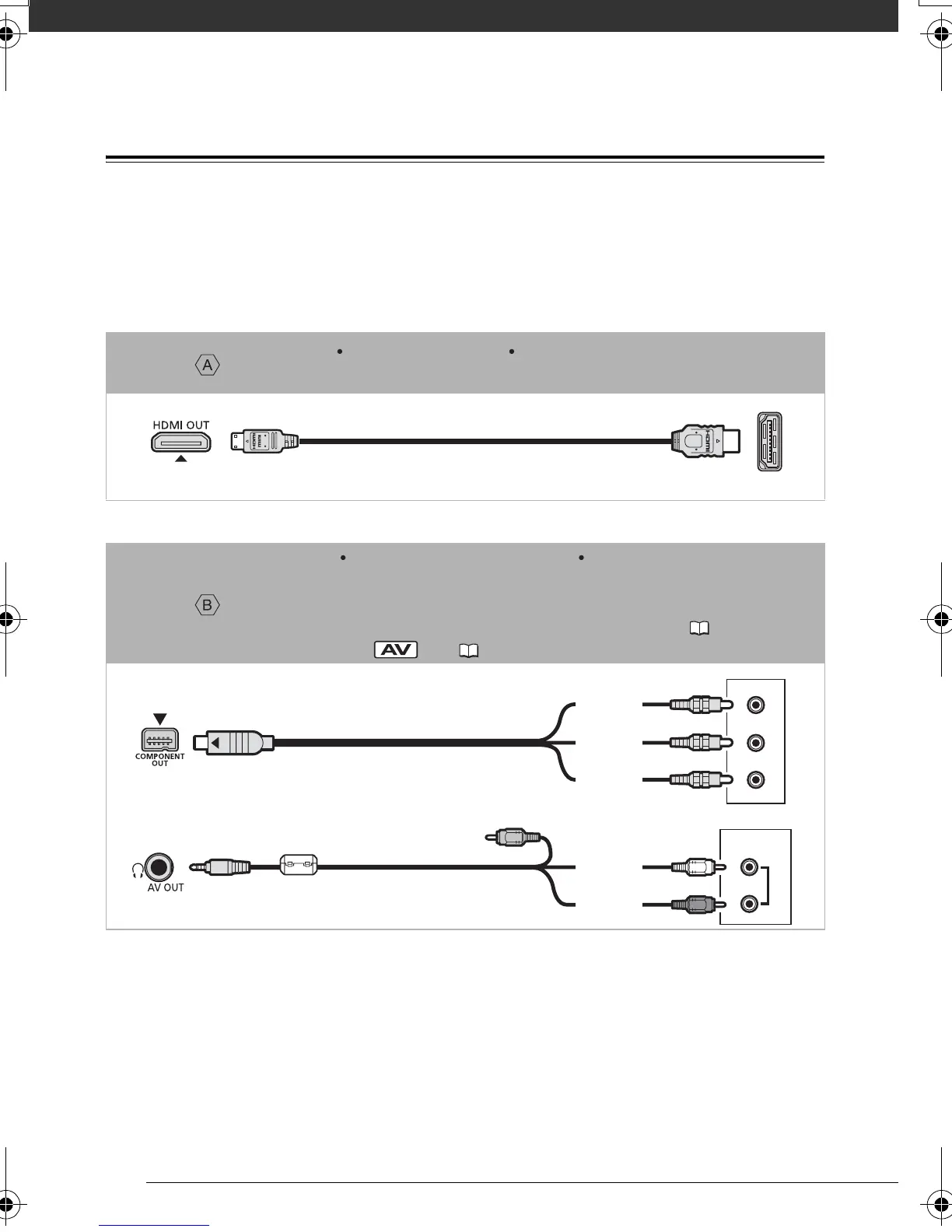
Connections that can be used to connect the camcorder to a TV are listed in falling
order of picture quality. Connections that require cables or accessories not supplied
with the camcorder are marked with an asterisk; prepare the necessary equipment in
advance.
Connection *
Type: Digital Quality: High definition Output only
Connect to a high-definition TV (HDTV) with an HDMI input terminal.
Connection
Type: Analog Quality: Depends on the settings Output only
Connect to a high-definition TV (HDTV) or a standard TV with component video input
terminals. Change the following settings on the camcorder:
- [COMP.OUT] according to the TV set (standard or high definition) ( 92)
- [AV/PHONES] to [ AV] ( 91)
HTC-100 HDMI Cable
(optional)
AUDIO
R
L
Pr/Cr
Pb/Cb
Y
Red
Green
Blue
CTC-100/S Component Cable
(supplied)
White
Red
STV-250N Stereo Video Cable
(supplied)
D128_PAL_E.book Page 74 Thursday, March 6, 2008 7:53 PM










 To Next Page