75
Connection
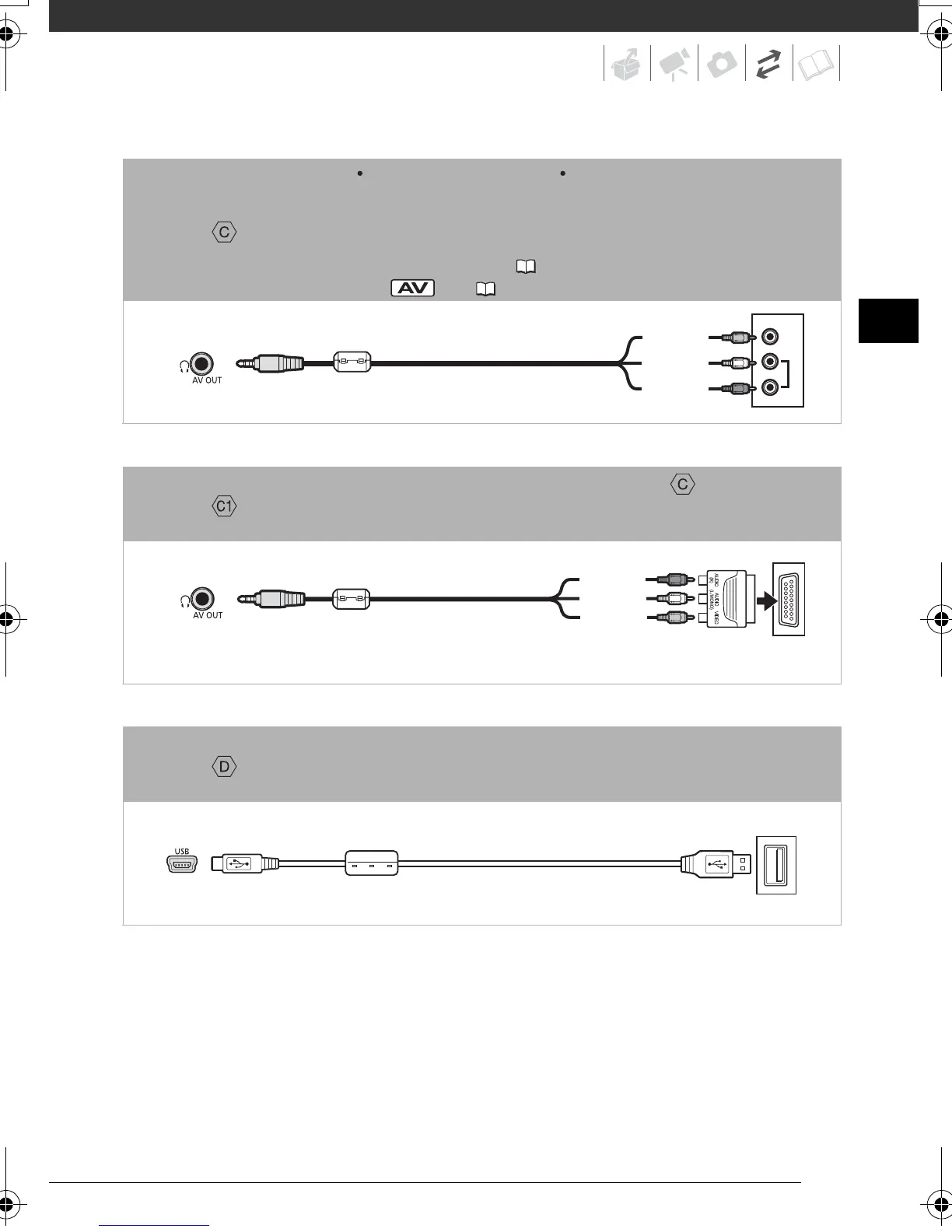
Type: Analog Quality: Standard definition Output only
Connect to a standard TV or a VCR with audio/video input terminals. Change the
following settings on the camcorder:
- [TV TYPE] according to the TV set (widescreen or 4:3), if the TV cannot automatically
detect and change the aspect ratio ( 92)
- [AV/PHONES] to [ AV] ( 91)
Connection *
In all respects, exactly the same connection as connection above.
Connect to a standard TV or VCR with SCART input terminal. Requires a SCART adapter
(commercially available).
Connection
Type: Digital data connection
Connect to a computer to transfer and back up your recordings, to the optional DW-
100 DVD Burner to create DVD discs from them, or to a printer to print out photos.
VIDEO
AUDIO
R
L
STV-250N Stereo Video Cable
(supplied)
Yellow
White
Red
STV-250N Stereo Video Cable
(supplied)
Yellow
White
Red
SCART adapter
(commercially available)
USB Cable
(supplied)
D128_PAL_E.book Page 75 Thursday, March 6, 2008 7:53 PM










 To Next Page