57
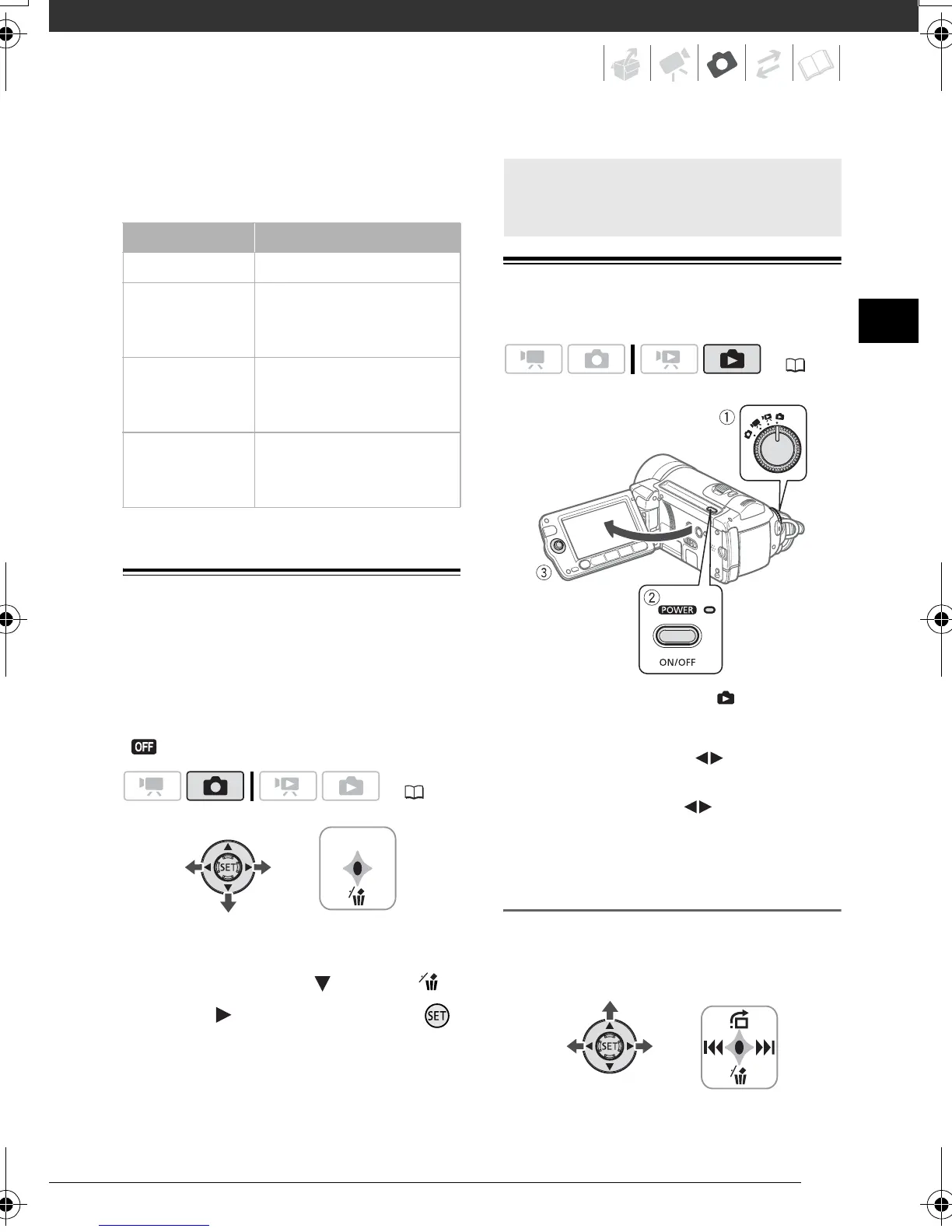
• When printing still images, use the
following guidelines as a reference for
selecting the print size.
Erasing a Photo Right After Recording It
You can erase the still image recorded
last while reviewing it within the time set
for the [REVIEW] option or immediately
after recording it, if [REVIEW] is set to
[OFF].
While reviewing the image immediately
after recording:
1 Push the joystick ( ) toward .
2 Select ( ) [ERASE] and press .
Viewing Photos
1 Set the mode dial to .
2 Turn on the camcorder.
3 Push the joystick ( ) to move
between images.
Push the joystick ( ) and hold it
down to run quickly through the still
images.
Image Jump Function
When you have recorded a large
number of still images, you can jump 10
or 100 still images at a time.
Image size Recommended use
L 2048x1536 To print photos up to A4 size.
M 1440x1080 To print photos up to L size
(9 x 13 cm) or postcard size
(10 x 14.8 cm).
S 640x480 To send images as e-mail
attachments or to post on
the Web.
LW 1920x1080,
SW 848x480
To print photos with a 16:9
aspect ratio. Wide-sized
photo paper is required.
( 22)
Basic Playback
( 22)
D128_PAL_E.book Page 57 Thursday, March 6, 2008 7:53 PM











 To Next Page