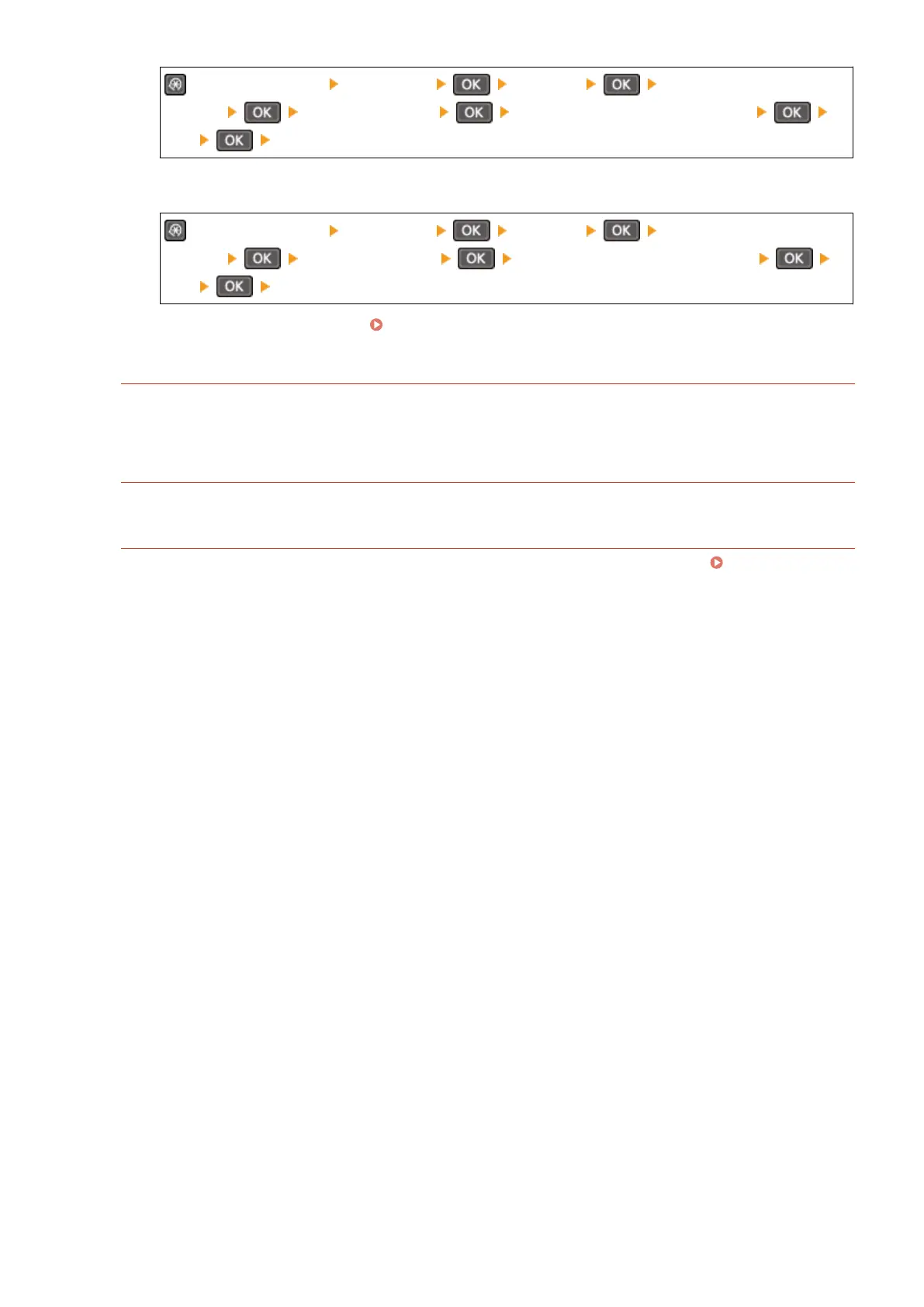
on the control panel [Preferences] [Network] [Firewall
Settings] [IPv6 Address Filter] [Outbound Filter] or [Inbound Filter]
[Off] Restart the machine.
To Disable MAC Address Filter
on the control panel [Preferences] [Network] [Firewall
Settings] [MAC Address Filter] [Outbound Filter] or [Inbound Filter]
[Off] Restart the machine.
2
Congure the r
ewall correctly.
Setting the Firewall(P. 354)
Reinstalling the Printer Driver
Uninstall the installed driver, and then reinstall it.
For details about uninstalling and installing drivers, see the driver manual at the online manual site.
https://oip.manual.canon/
Ar
e You Using Resident Software?
If you are using resident software, such as security software, disable it and then try printing.
Can Y
ou Print from Another Computer in the Network?
If you cannot print from another computer, contact your dealer or service representative. If the Problem
Persists(P
. 651)
Troubleshooting
604




 To Next Page