26
Appendix
Performing Color Correction
It is recommended to perform color correction to obtain optimum copy or printout results.
4
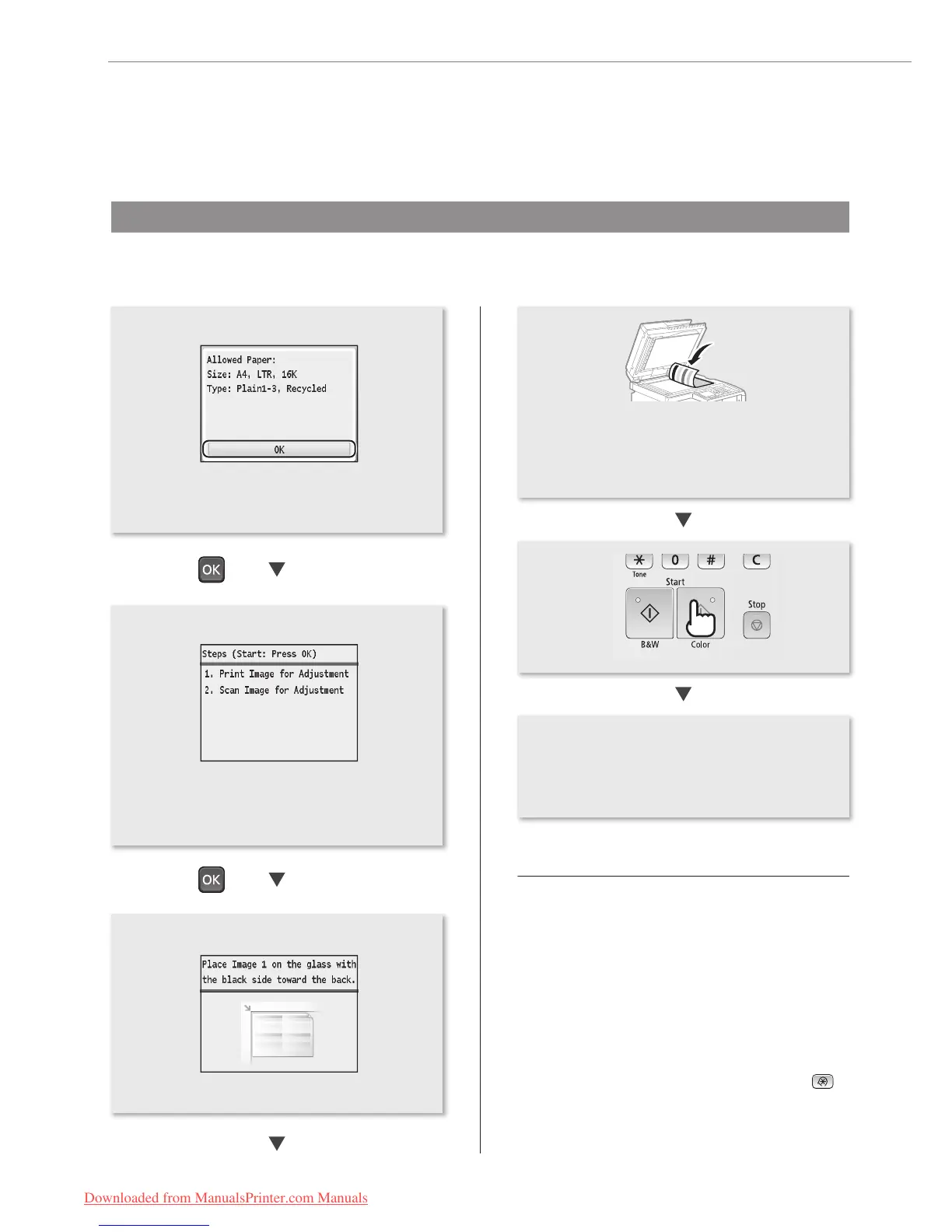
• Conrm the procedure for color correction,
and then press [OK].
• An adjustment image is printed.
• Open the feeder, place the adjustment image
on the platen glass with the print side face
down, and then close the feeder.
• Place the paper so that the black stripe is at
the back side of the machine.
If <Correction failed.> appears:
• Is the paper loaded correctly?
→ Load plain or recycled paper of A4/Letter size in the
paper drawer.
• Is the adjustment image placed on the platen glass
correctly?
→ Place the adjustment image with the print side face
down and the black stripe toward the back of the
machine.
• Has a paper jam occurred?
→ Remove the jammed paper.
If you want to perform color correction again, press
,
and then select the following settings in the following
order.
<Adjustment/Maintenance> → <Auto Adjust Gradation >
→ <Adjust Copy Image>
• When <Finished> is displayed, remove the
adjustment image placed on the platen glass
in Step 4.
• Make sure that paper is loaded, and then
press [OK].
Downloaded from ManualsPrinter.com Manuals






 To Next Page