27
Appendix
4
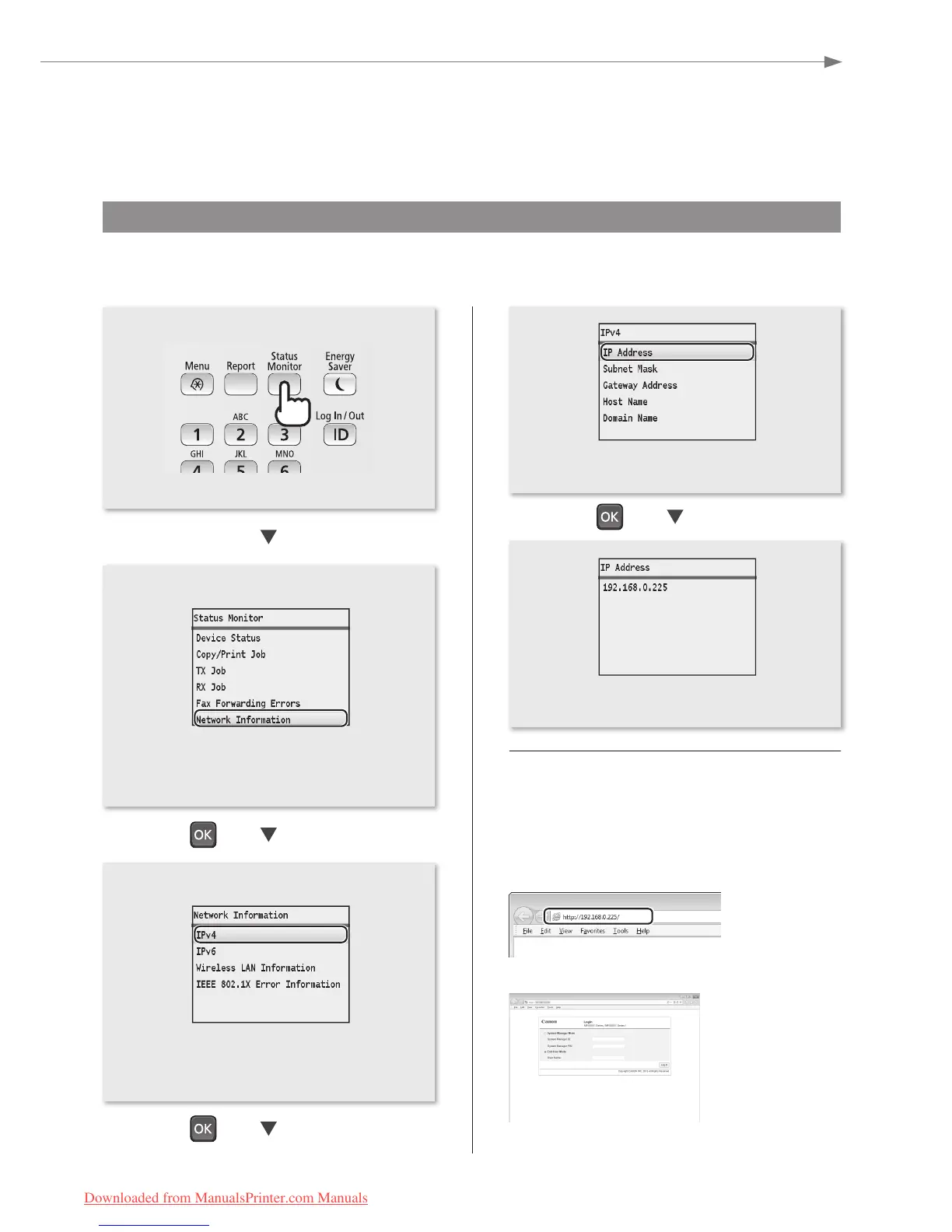
Checking the IP Address
You can check the IP address of the machine. Use it when you need to enter the IP address during the conguration
or registration.
• Press [▲] or [▼] to highlight <Network
Information>, and then press [OK].
• The IP address is displayed. Press [Status
Monitor] to close the screen.
• Press [▲] or [▼] to highlight <IP Address>,
and then press [OK].
Check if the Machine Is Connected to
the Network Correctly
Start a Web browser of the computer that is
connected to the network, enter [http://IP address of
the machine], and then press [ENTER]. (Example:
http://192.168.0.225/)
The screen below (Remote UI) should be displayed.
*
* If the remote UI screen is not displayed, see the e-Manual.
• Press [▲] or [▼] to highlight <IPv4>, and
then press [OK].
Downloaded from ManualsPrinter.com Manuals






 To Next Page