25
If Paper is Soiled
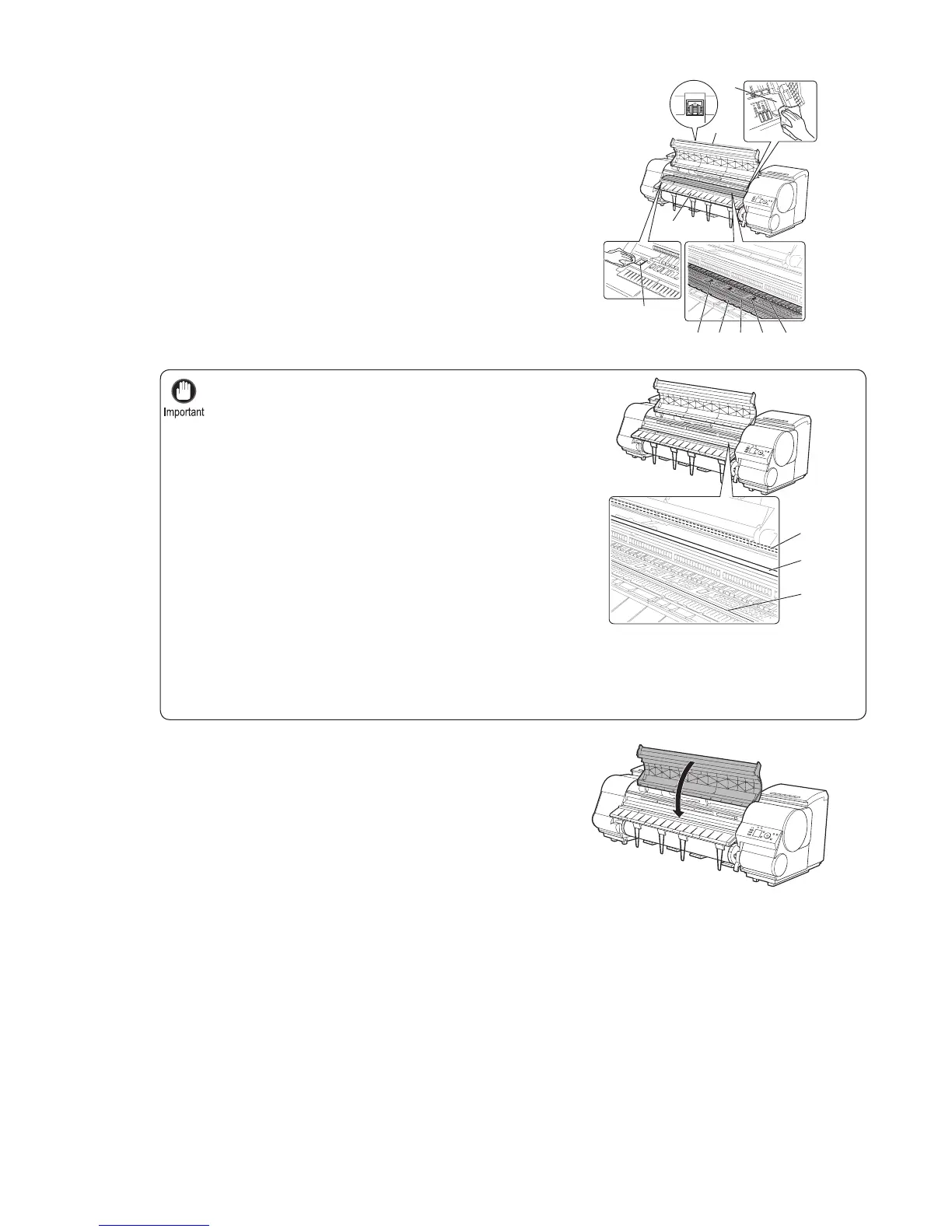
Do not touch the Linear Scale (a), Carriage Shaft (b),
or Fixed Blade (c).
•
Do not use a dry cloth to wipe inside the Top Cover . This may create a static charge, which may attract
dust and affect the printing quality.
•
Never use fl ammable solvents such as alcohol, benzene, or thinner. If these substances come into
contact with electrical components inside the printer, there is a risk of fi re or electrical shock.
•
Do not touch the clear sheet on the side of the Top Cover Roller . This may damage the roller.•
3
4
Using a damp cloth that you have wrung out completely,
wipe inside the Top Cover to clean it. Wipe away any ink
residue and paper dust (debris from cutting) on the Top
Cover Roller (a), all over the Platen (b), on the Paper
Retainer (c), the Borderless Printing Ink Grooves (d),
the Ejection Guide (e), the cutter guide (f), around the
vacuum holes at left (g), around the Borderless Printing
Ink Grooves at right (h), on the blue Switch (i), and so
on.
Close the Top Cover .
a
c
bf d
i
e
g
h
a
b
c











 To Next Page